Join us at FabCon Atlanta from March 16 - 20, 2026, for the ultimate Fabric, Power BI, AI and SQL community-led event. Save $200 with code FABCOMM.
Register now!The Power BI Data Visualization World Championships is back! Get ahead of the game and start preparing now! Learn more
Hi in need of some assistance, not sure of what i need to make my cards work.
I have three visual cards:
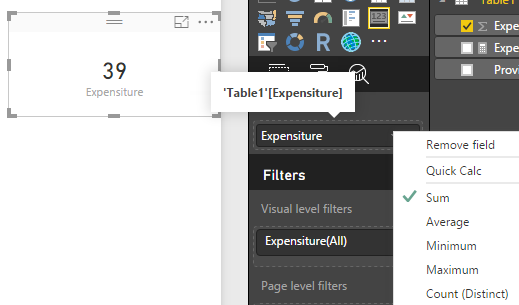
card 1 - Displaying Total spend $24 million (column expenditure)
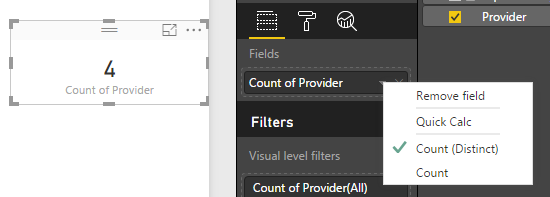
card 2 - Displaying number of suppliers 445
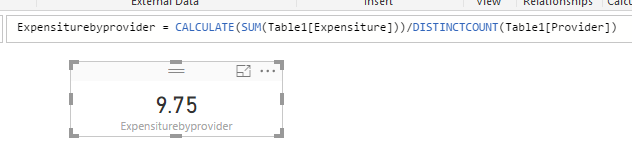
card 3 - I need this card to average card 1 by card 2 to display end result of approx $54,000
These are linked to a slicer that changes them by the year.
Thanks!!
Solved! Go to Solution.
1. card 1 - Displaying Total spend $24 million (column expenditure)
2. card 2 - Displaying number of suppliers 445
3. card 3 - I need this card to average card 1 by card 2 to display end result of approx $54,000
Create a measure:
1. card 1 - Displaying Total spend $24 million (column expenditure)
2. card 2 - Displaying number of suppliers 445
3. card 3 - I need this card to average card 1 by card 2 to display end result of approx $54,000
Create a measure:
The Power BI Data Visualization World Championships is back! Get ahead of the game and start preparing now!
| User | Count |
|---|---|
| 46 | |
| 42 | |
| 34 | |
| 31 | |
| 21 |
| User | Count |
|---|---|
| 143 | |
| 125 | |
| 100 | |
| 81 | |
| 63 |