Join us at FabCon Atlanta from March 16 - 20, 2026, for the ultimate Fabric, Power BI, AI and SQL community-led event. Save $200 with code FABCOMM.
Register now!Get Fabric certified for FREE! Don't miss your chance! Learn more
Hi in need of some assistance, not sure of what i need to make my cards work.
I have three visual cards:
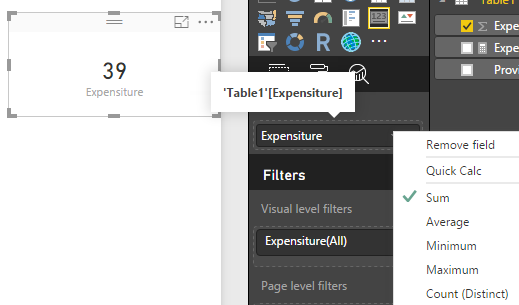
card 1 - Displaying Total spend $24 million (column expenditure)
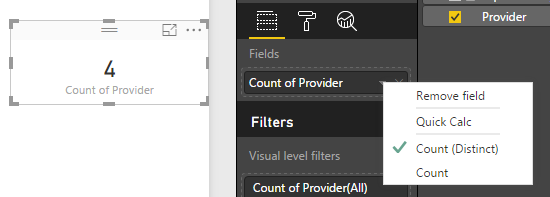
card 2 - Displaying number of suppliers 445
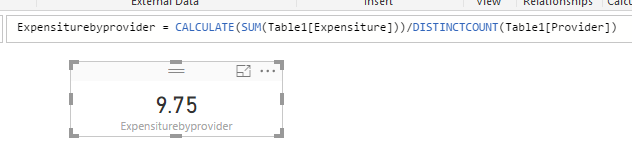
card 3 - I need this card to average card 1 by card 2 to display end result of approx $54,000
These are linked to a slicer that changes them by the year.
Thanks!!
Solved! Go to Solution.
1. card 1 - Displaying Total spend $24 million (column expenditure)
2. card 2 - Displaying number of suppliers 445
3. card 3 - I need this card to average card 1 by card 2 to display end result of approx $54,000
Create a measure:
1. card 1 - Displaying Total spend $24 million (column expenditure)
2. card 2 - Displaying number of suppliers 445
3. card 3 - I need this card to average card 1 by card 2 to display end result of approx $54,000
Create a measure:
Share feedback directly with Fabric product managers, participate in targeted research studies and influence the Fabric roadmap.
Check out the January 2026 Power BI update to learn about new features.
| User | Count |
|---|---|
| 69 | |
| 59 | |
| 47 | |
| 20 | |
| 15 |
| User | Count |
|---|---|
| 106 | |
| 102 | |
| 38 | |
| 27 | |
| 27 |