Join us at FabCon Atlanta from March 16 - 20, 2026, for the ultimate Fabric, Power BI, AI and SQL community-led event. Save $200 with code FABCOMM.
Register now!Vote for your favorite vizzies from the Power BI Dataviz World Championship submissions. Vote now!
Hi Community,
I'm a beginner in Power BI. Need help in 2 measure calculations.
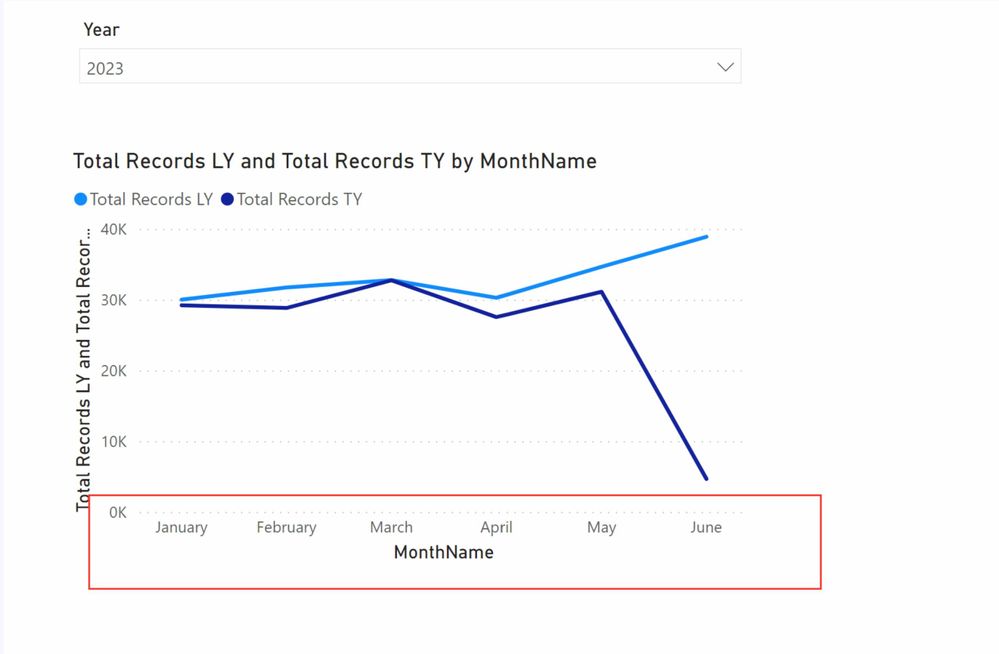
I'm just showing LY and TY comparison. This works fine independently.
But when we put a Year slicer, this doesnot work as expected.
Below, are my measure calculations:
Solved! Go to Solution.
@Dhairya I tried this but it was not working for me.
Meanwhile I have modified the measure to get the required output
add a Year Slicer, make it single select (from date dimension)
add a chart with Month (from date dimension) on x and 2 measure (Total Records , Total Records LY)
Total Records = COUNTROWS('Fact')
Total Records LY = CALCULATE([Total Records], SAMEPERIODLASTYEAR ( 'Date'[Date] ) )
Have you created a seperate date table named Calendar?
If yes then the above year is for dataytype of that Calendar'date' column,
In PREVIOUSYEAR function you have to pass field having 'date' datatype.
@Dhairya I tried this but it was not working for me.
Meanwhile I have modified the measure to get the required output
add a Year Slicer, make it single select (from date dimension)
add a chart with Month (from date dimension) on x and 2 measure (Total Records , Total Records LY)
Total Records = COUNTROWS('Fact')
Total Records LY = CALCULATE([Total Records], SAMEPERIODLASTYEAR ( 'Date'[Date] ) )
Vote for your favorite vizzies from the Power BI World Championship submissions!
If you love stickers, then you will definitely want to check out our Community Sticker Challenge!
Check out the January 2026 Power BI update to learn about new features.
| User | Count |
|---|---|
| 57 | |
| 52 | |
| 45 | |
| 17 | |
| 16 |
| User | Count |
|---|---|
| 108 | |
| 108 | |
| 39 | |
| 33 | |
| 26 |