We've captured the moments from FabCon & SQLCon that everyone is talking about, and we are bringing them to the community, live and on-demand. Starts on April 14th. Register now
Hi everyone,
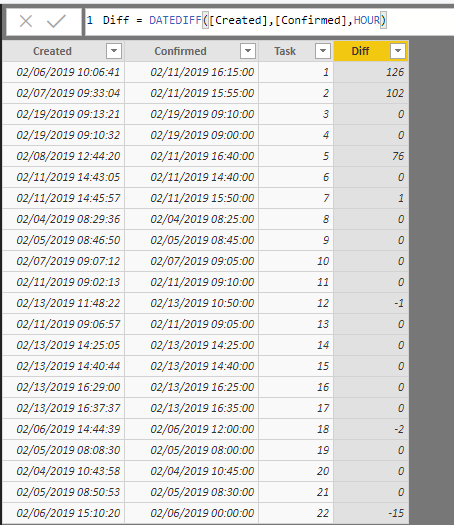
I am using a calculated Column "Hours" to calculate the hour differences between created and resource confirmed. The formula I am using is:
Hours to Assign = DATEDIFF((CRQ_TASKS[Received]), (CRQ_Tasks[ResourceConfirmed]), HOUR)
However the results aren't all accurate especially for higher values. See Task 3 for example, it shows 105 hours but if you look at the date created and date confirmed it shows that its on the same day. The hours should be negative, if anything, since date created is later than date confirmed (entry error by user). When I switch the formula to MINUTE, the same thing happens. Task 11 shows 2 hours but it is still a wrong calculation.
The hours variable shows the same values regardless of "dont summarize" or "average".
Any ideas on how to calculate hours in terms of 0.## or in hours and minutes accurately? Also why is this error occurring?
Thanks!
The sample data is as follows:
Created ResourceConfirmed Task Hours
| 2/6/2019 10:06:41 AM | 2/11/2019 4:15:00 PM | 1 | 144 | |
| 2/7/2019 9:33:04 AM | 2/11/2019 3:55:00 PM | 2 | 121 | |
| 2/19/2019 9:13:21 AM | 2/19/2019 9:10:00 AM | 3 | 105 | |
| 2/19/2019 9:10:32 AM | 2/19/2019 9:00:00 AM | 4 | 97 | |
| 2/8/2019 12:44:20 PM | 2/11/2019 4:40:00 PM | 5 | 79 | |
| 2/11/2019 2:43:05 PM | 2/11/2019 2:40:00 PM | 6 | 72 | |
| 2/11/2019 2:45:57 PM | 2/11/2019 3:50:00 PM | 7 | 72 | |
| 2/4/2019 8:29:36 AM | 2/4/2019 8:25:00 AM | 8 | 65 | |
| 2/5/2019 8:46:50 AM | 2/5/2019 8:45:00 AM | 9 | 32 | |
| 2/7/2019 9:07:12 AM | 2/7/2019 9:05:00 AM | 10 | 2 | |
| 2/11/2019 9:02:13 AM | 2/11/2019 9:10:00 AM | 11 | 2 | |
| 2/13/2019 11:48:22 AM | 2/13/2019 10:50:00 AM | 12 | 2 | |
| 2/11/2019 9:06:57 AM | 2/11/2019 9:05:00 AM | 13 | 2 | |
| 2/13/2019 2:25:05 PM | 2/13/2019 2:25:00 PM | 14 | 2 | |
| 2/13/2019 2:40:44 PM | 2/13/2019 2:40:00 PM | 15 | 2 | |
| 2/13/2019 4:29:00 PM | 2/13/2019 4:25:00 PM | 16 | 2 | |
| 2/13/2019 4:37:37 PM | 2/13/2019 4:35:00 PM | 17 | 2 | |
| 2/6/2019 2:44:39 PM | 2/6/2019 12:00:00 PM | 18 | 2 | |
| 2/5/2019 8:08:30 AM | 2/5/2019 8:00:00 AM | 19 | 1 | |
| 2/4/2019 10:43:58 AM | 2/4/2019 10:45:00 AM | 20 | 1 | |
| 2/5/2019 8:50:53 AM | 2/5/2019 8:30:00 AM | 21 | 1 | |
| 2/6/2019 3:10:20 PM | 2/6/2019 12:00:00 AM | 22 | 0 |
Created ResourceConfirmed Hours Task
| 2/6/2019 10:06:41 AM | 2/11/2019 4:15:00 PM | 144 | 1 |
| 2/7/2019 9:33:04 AM | 2/11/2019 3:55:00 PM | 121 | 2 |
| 2/19/2019 9:13:21 AM | 2/19/2019 9:10:00 AM | 105 | 3 |
| 2/19/2019 9:10:32 AM | 2/19/2019 9:00:00 AM | 97 | 4 |
| 2/8/2019 12:44:20 PM | 2/11/2019 4:40:00 PM | 79 | 5 |
| 2/11/2019 2:43:05 PM | 2/11/2019 2:40:00 PM | 72 | 6 |
| 2/11/2019 2:45:57 PM | 2/11/2019 3:50:00 PM | 72 | 7 |
| 2/4/2019 8:29:36 AM | 2/4/2019 8:25:00 AM | 65 | 8 |
| 2/5/2019 8:46:50 AM | 2/5/2019 8:45:00 AM | 32 | 9 |
| 2/8/2019 11:17:20 AM | 2/8/2019 11:15:00 AM | 21 | 10 |
2/11/2019 9:02:13 AM | 2/11/2019 9:10:00 AM | 2 | 11 |
Hi everyone,
I am using a calculated Column "Hours" to calculate the hour differences between created and resource confirmed. The formula I am using is:
Hours to Assign = DATEDIFF((CRQ_TASKS[Received]), (CRQ_Tasks[ResourceConfirmed]), HOUR)
However the results aren't all accurate especially for higher values. See Task 3 for example, it shows 105 hours but if you look at the date created and date confirmed it shows that its on the same day. The hours should be negative, if anything, since date created is later than date confirmed (entry error by user). When I switch the formula to MINUTE, the same thing happens. Task 11 shows 2 hours but it is still a wrong calculation.
The hours variable shows the same values regardless of "dont summarize" or "average".
Any ideas on how to calculate hours in terms of 0.## or in hours and minutes accurately? Also why is this error occurring?
Thanks!
Hi @Anonymous ,
In fact, datediff function works on my side. Can you please provide a sample pbix for test?
Regards,
Xiaoxin Sheng
Hello,
I tried your formula with the sample data you provided and can't reproduce the same result. For hours i get 0 for Task3 and for minutes i get -3.
Maybe you can give more details or share your pbix (hide sensitive data if it is the case) to test.
Regards,
ElenaN
If you have recently started exploring Fabric, we'd love to hear how it's going. Your feedback can help with product improvements.
A new Power BI DataViz World Championship is coming this June! Don't miss out on submitting your entry.
| User | Count |
|---|---|
| 56 | |
| 40 | |
| 36 | |
| 18 | |
| 18 |
| User | Count |
|---|---|
| 70 | |
| 67 | |
| 38 | |
| 34 | |
| 23 |