Join us in Barcelona for FabCon and SQLCon, September 28 - October 1, 2026.
This is best Fabric, Power BI, SQL and AI community event. How do we know? The last event sold out! Save €200 with code FABCMTY200.
Register now- Power BI forums
- Get Help with Power BI
- Desktop
- Service
- Report Server
- Power Query
- Mobile Apps
- Developer
- DAX Commands and Tips
- Custom Visuals Development Discussion
- Health and Life Sciences
- Power BI Spanish forums
- Translated Spanish Desktop
- Training and Consulting
- Instructor Led Training
- Dashboard in a Day for Women, by Women
- Galleries
- Data Stories Gallery
- Themes Gallery
- Contests Gallery
- QuickViz Gallery
- Quick Measures Gallery
- Visual Calculations Gallery
- Fabric Apps Gallery
- Notebook Gallery
- Translytical Task Flow Gallery
- TMDL Gallery
- R Script Showcase
- Webinars and Video Gallery
- Ideas
- Custom Visuals Ideas (read-only)
- Issues
- Issues
- Events
- Upcoming Events
The Fabric community is upgrading! Read all of the details including the timeline and what you can expect. Learn more
- Power BI forums
- Forums
- Get Help with Power BI
- Desktop
- Re: Need Help With Card Visual
- Subscribe to RSS Feed
- Mark Topic as New
- Mark Topic as Read
- Float this Topic for Current User
- Bookmark
- Subscribe
- Printer Friendly Page


- Mark as New
- Bookmark
- Subscribe
- Mute
- Subscribe to RSS Feed
- Permalink
- Report Inappropriate Content
Need Help With Card Visual
based on the account number which the account number can be on multiple rows. So I need the measure to add the total
per account number. I currently have a MaxDate Measure which keeps the most recent account number in the visual table, but this date needs to be accounted for in the Card visual as well. Right now the Total Commissions is giving me the total in the commissions column in the data table, not the total from the visual tables in the screenshot, which is what I need. So the Total Commissions should show $5,713.

Solved! Go to Solution.


- Mark as New
- Bookmark
- Subscribe
- Mute
- Subscribe to RSS Feed
- Permalink
- Report Inappropriate Content
Hi @lbrown
Your formula need to modify, please see the bold character which is different from yours
Commission Measure =
VAR maxdate =
    CALCULATE (
        MAX ( 'Retained &Winback Call Logs'[Create Timetamp] ),
        ALL ( 'Retained &Winback Call Logs' )
    )
RETURN
    CALCULATE (
        DISTINCTCOUNT ( 'Retained &Winback Call Logs'[ESG Account Number] ),
        FILTER (
            'Retained &Winback Call Logs',
            'Retained &Winback Call Logs'[Timestamp] = maxdate
        )
    )
From your formula, you use [MaxDate Measure] instead of "maxdate", please modify.
Best Regards
Maggie
- Mark as New
- Bookmark
- Subscribe
- Mute
- Subscribe to RSS Feed
- Permalink
- Report Inappropriate Content
Hi @lbrown
Could you show some an dataset example?
As i analyzed, the Total Commissions should show $5,713=21+22+362+5308, so what is the relationship between
Total Commissions and Correct Distinct Count?
Without knowing your dataset, i make a test to let you know how to get the total based on the max date.
Measure = var maxdate=CALCULATE(MAX([date]),ALL(Sheet6)) return CALCULATE(DISTINCTCOUNT(Sheet6[Id]),FILTER(Sheet6,[date]=maxdate))
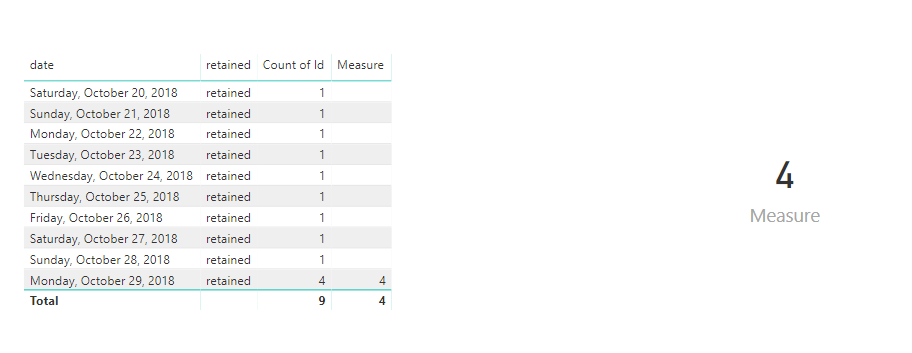
Best Regards
Maggie
- Mark as New
- Bookmark
- Subscribe
- Mute
- Subscribe to RSS Feed
- Permalink
- Report Inappropriate Content
For some reason I am getting an error message around the return part of the measure shown in the screenshot.
The total commission measure is a sum of the commission payout column from the data. While the Correct Distinct Count is a sumx of the distinct commission payout column.
- Mark as New
- Bookmark
- Subscribe
- Mute
- Subscribe to RSS Feed
- Permalink
- Report Inappropriate Content
Hi @lbrown
Your formula need to modify, please see the bold character which is different from yours
Commission Measure =
VAR maxdate =
    CALCULATE (
        MAX ( 'Retained &Winback Call Logs'[Create Timetamp] ),
        ALL ( 'Retained &Winback Call Logs' )
    )
RETURN
    CALCULATE (
        DISTINCTCOUNT ( 'Retained &Winback Call Logs'[ESG Account Number] ),
        FILTER (
            'Retained &Winback Call Logs',
            'Retained &Winback Call Logs'[Timestamp] = maxdate
        )
    )
From your formula, you use [MaxDate Measure] instead of "maxdate", please modify.
Best Regards
Maggie
- Mark as New
- Bookmark
- Subscribe
- Mute
- Subscribe to RSS Feed
- Permalink
- Report Inappropriate Content

- Mark as New
- Bookmark
- Subscribe
- Mute
- Subscribe to RSS Feed
- Permalink
- Report Inappropriate Content
Can you do something like ...
DailyCommission = calculate([Commission],FILTER('Name of your Calendar Table','Calendar Table'[Date]=Today()..
You might need to make Today()-1, assuming your data feed comes through every midnight / morning...
Make sure you label your comission card to say "Last Days Comissions" to be clear...
- Mark as New
- Bookmark
- Subscribe
- Mute
- Subscribe to RSS Feed
- Permalink
- Report Inappropriate Content
@Anonymous
This unfortunately didn't work. This gives me a blank when I add the field to the Card Visual.
- Mark as New
- Bookmark
- Subscribe
- Mute
- Subscribe to RSS Feed
- Permalink
- Report Inappropriate Content
My inclination is that today() isn't able to match up with your Create Timestamp.
I could be wrong...but I see your date logic is hooked up straight to (what looks like) your raw data file, likely with the column header of: "Create Timestamp".
If there's any chance of extra Calendar-based metric reporting that you might need to show, a lot of the tutorials suggest you use a Calendar table to power all time-based calculations (MTD, QTD, YTD, etc.)
Here's a fast one: https://www.youtube.com/watch?v=F7kc4pd6TVU
Edit:
What format is your Create Timestamp formatted to? Date/Time? etc.?
- Mark as New
- Bookmark
- Subscribe
- Mute
- Subscribe to RSS Feed
- Permalink
- Report Inappropriate Content
@Anonymous
The format of the Create Timestamp is Date. I also added a Date Table to use in the formula, but I'm still getting the complete total of the column when all the dates are considered. I think the Total Commissions has some effect on the formula. Right now the Total Commissions = sum([Commissions Payout]) which is considering the sum of the total commissions column without considering the max date measure.
- Mark as New
- Bookmark
- Subscribe
- Mute
- Subscribe to RSS Feed
- Permalink
- Report Inappropriate Content
Looks like you've already got Step 1 done.
Total Commissions $ = sum('Retained & Winback Call Logs'[Comission Payout])
Step 2 Try something like this?
Daily Commission $ = CALCULATE([Total Comissions $], DATESBETWEEN('Create Date'[Call Log Date],TODAY()-1,TODAY())
- Mark as New
- Bookmark
- Subscribe
- Mute
- Subscribe to RSS Feed
- Permalink
- Report Inappropriate Content
@Anonymous
For this measure I am still seeing the total commission amount as a sum of the column.
Helpful resources

FabCon & SQLCon – Barcelona 2026
Join us in Barcelona for FabCon and SQLCon, the Fabric, Power BI, SQL, and AI community event. Save €200 with code FABCMTY200.

Power BI DataViz World Championships - June 2026
A new Power BI DataViz World Championship is coming this June! Don't miss out on submitting your entry.

| User | Count |
|---|---|
| 24 | |
| 22 | |
| 20 | |
| 18 | |
| 14 |


| User | Count |
|---|---|
| 45 | |
| 38 | |
| 24 | |
| 22 | |
| 20 |


