cancel
Showing results for 
Search instead for 
Did you mean: 

The Power BI Data Visualization World Championships is back! Get ahead of the game and start preparing now! Learn more

Reply
ketan10
Advocate III
Advocate III

Need Help: Rolling Average (Last 2 days) | When multiple dates in a column

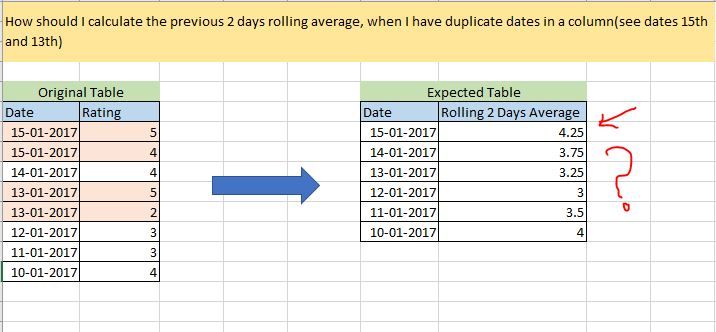
I have an original table using which I need to calculate the rolling average of rating table. However I do not get the expected output. Can somebody please help me with a DAX solution for this ? 
Please refer the image below:
1.JPG
Any help would be appreciated !

1 ACCEPTED SOLUTION

Hi @ketan10


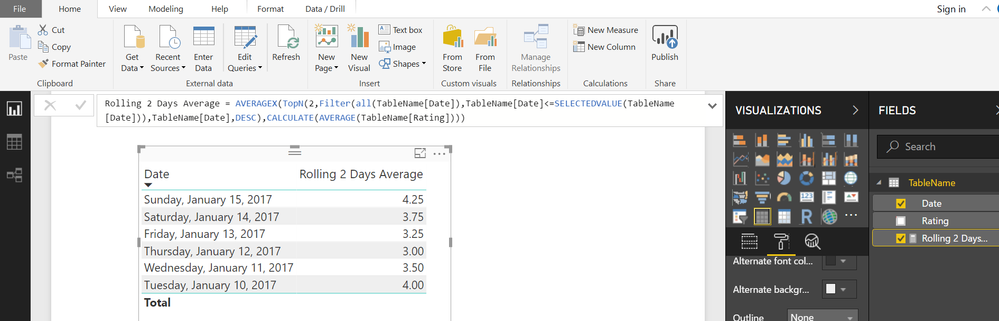
Try this MEASURE


Rolling 2 Days Average =
AVERAGEX (
    TOPN (
        2,
        FILTER (
            ALL ( TableName[Date] ),
            TableName[Date] <= SELECTEDVALUE ( TableName[Date] )
        ),
        TableName[Date], DESC
    ),
    CALCULATE ( AVERAGE ( TableName[Rating] ) )
)

View solution in original post

3 REPLIES 3
rabih
Frequent Visitor

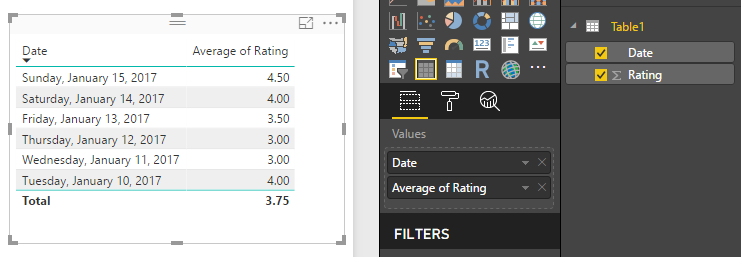
I replicated your data and chose Average of Rating instead of Sum or Don't summarize etc..Average of rating.png

Hi @ketan10


Try this MEASURE


Rolling 2 Days Average =
AVERAGEX (
    TOPN (
        2,
        FILTER (
            ALL ( TableName[Date] ),
            TableName[Date] <= SELECTEDVALUE ( TableName[Date] )
        ),
        TableName[Date], DESC
    ),
    CALCULATE ( AVERAGE ( TableName[Rating] ) )
)

Helpful resources

Announcements
Power BI DataViz World Championships

Power BI Dataviz World Championships

The Power BI Data Visualization World Championships is back! Get ahead of the game and start preparing now!

December 2025 Power BI Update Carousel

Power BI Monthly Update - December 2025

Check out the December 2025 Power BI Holiday Recap!

FabCon Atlanta 2026 carousel

FabCon Atlanta 2026

Join us at FabCon Atlanta, March 16-20, for the ultimate Fabric, Power BI, AI and SQL community-led event. Save $200 with code FABCOMM.