Join us at FabCon Atlanta from March 16 - 20, 2026, for the ultimate Fabric, Power BI, AI and SQL community-led event. Save $200 with code FABCOMM.
Register now!The Power BI Data Visualization World Championships is back! Get ahead of the game and start preparing now! Learn more
Hello All;
I am a new user for Power BI. I dont have any big information or ideas about this tool. So i would like to ask help on experts on this tool.
My Manager would like me to create a KPI tool using Power BI but the problem is i dont know how to do this.
As shown below, it is a sample of KPI repoting which my manager would like me to do but i dont know how to do it
Can please anyone help me on this or any points that might help me start this one.
Solved! Go to Solution.
Hi @Anonymous,
Based on my test, you could refer to below stesps:
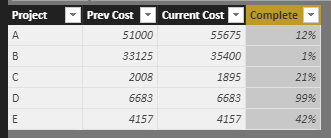
Sample data:
Create a measure to show the KPI:
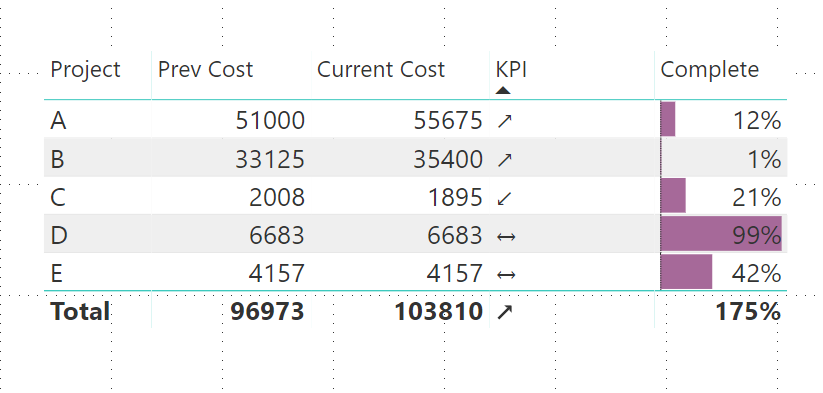
KPI = IF(MAX('Table1'[Current Cost])<MAX('Table1'[Prev Cost]),UNICHAR(8601),IF(MAX('Table1'[Current Cost])>MAX('Table1'[Prev Cost]),UNICHAR(8599),UNICHAR(8596)))Result:
Use the conditional formatting function to modify the [Complete] column:
Result:
You could also download the pbix file to have a view.
https://www.dropbox.com/s/su9xsctgtd1tqco/KPI%20Reporting.pbix?dl=0
Regards,
Daniel He
Hi @Anonymous,
Could you please tell me if your problem has been solved? If it is, could you please mark the helpful replies as Answered?
Regards,
Daniel He
Hi @Anonymous,
Could you please tell me if your problem has been solved? If it is, could you please mark the helpful replies as Answered?
Regards,
Daniel He
Hi @Anonymous,
Based on my test, you could refer to below stesps:
Sample data:
Create a measure to show the KPI:
KPI = IF(MAX('Table1'[Current Cost])<MAX('Table1'[Prev Cost]),UNICHAR(8601),IF(MAX('Table1'[Current Cost])>MAX('Table1'[Prev Cost]),UNICHAR(8599),UNICHAR(8596)))Result:
Use the conditional formatting function to modify the [Complete] column:
Result:
You could also download the pbix file to have a view.
https://www.dropbox.com/s/su9xsctgtd1tqco/KPI%20Reporting.pbix?dl=0
Regards,
Daniel He
The Power BI Data Visualization World Championships is back! Get ahead of the game and start preparing now!
| User | Count |
|---|---|
| 40 | |
| 35 | |
| 34 | |
| 31 | |
| 28 |
| User | Count |
|---|---|
| 137 | |
| 102 | |
| 71 | |
| 67 | |
| 64 |