
Don't miss your chance to take the Fabric Data Engineer (DP-600) exam for FREE! Find out how by watching the DP-600 session on-demand now through April 28th.
Learn moreJoin the FabCon + SQLCon recap series. Up next: Power BI, Real-Time Intelligence, IQ and AI, and Data Factory take center stage. All sessions are available on-demand after the live show. Register now
Prefacing this by saying this is my first post to a forum like this, so if you need more clarifications let me know. I also had to make this example because I have a rough format of this on Power BI but I cannot post the specfics here.
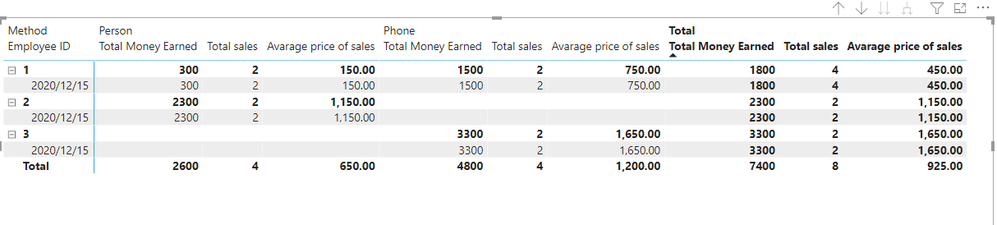
I want to make a table that shows a summary of an employee's sales, separated by In Person and By Phone sales methods.
That would look like the above picture in Power BI. The Total Sales column would count up the amount of Phone method sales and In Person sales, respective to the Employee ID. The same would be for Average Price of Sales and Total Money Earned.
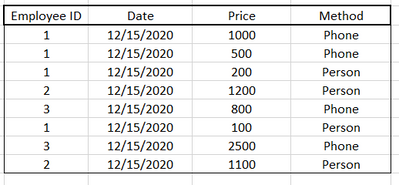
The summary would get the data from a spreadsheet, with the data formatted as below.
The one problem I've run into was having In Person and By Phone show up on the same table and be on the same line for 1 Employee ID
Thanks in advance,
AC
Solved! Go to Solution.
Hi, @AColan
1.Depend on the data you have applied, I create the table below.
2.Create a Matrix as below.
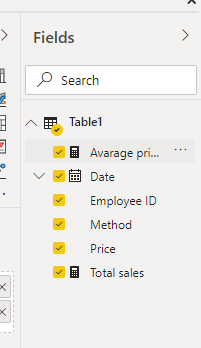
3.Create two measures as below:
Total sales =
COUNT(Table1[Method])
Avarage price of sales =
AVERAGE(Table1[Price])
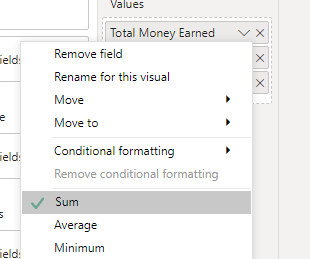
4.Calculate the sum of price and rename it to Total Money Earned.
5.Drag all columns into Matrix.
Here is the demo, please try it: Need Help Formatting Table Columns
Best Regards,
Link Chen
If this post helps then please consider Accept it as the solution to help the other members find it more quickly.
Hi, @AColan
1.Depend on the data you have applied, I create the table below.
2.Create a Matrix as below.
3.Create two measures as below:
Total sales =
COUNT(Table1[Method])
Avarage price of sales =
AVERAGE(Table1[Price])
4.Calculate the sum of price and rename it to Total Money Earned.
5.Drag all columns into Matrix.
Here is the demo, please try it: Need Help Formatting Table Columns
Best Regards,
Link Chen
If this post helps then please consider Accept it as the solution to help the other members find it more quickly.
Hi,
To your matrix visual, drag Method to the column labels & Employee ID and Date to the row labels. Write this measure
Measure = sum(data[price])
Hope this helps.
Check out the April 2026 Power BI update to learn about new features.
If you have recently started exploring Fabric, we'd love to hear how it's going. Your feedback can help with product improvements.
A new Power BI DataViz World Championship is coming this June! Don't miss out on submitting your entry.
| User | Count |
|---|---|
| 41 | |
| 37 | |
| 32 | |
| 20 | |
| 15 |
| User | Count |
|---|---|
| 66 | |
| 58 | |
| 31 | |
| 25 | |
| 24 |