Don't miss your chance to take exam DP-600 or DP-700 on us!
Request nowLearn from the best! Meet the four finalists headed to the FINALS of the Power BI Dataviz World Championships! Register now
Hi All,
So i have the following measures:
Current Month - Selects the Cost Center for the Currently Selected Month
Current Month =
var FileDate = SELECTEDVALUE(Dates[File Name])
return
IF(ISBLANK((CALCULATE(SELECTEDVALUE(Workday[Cost Center - ID]), Workday[File Name] = FileDate))), "Exit", CALCULATE(SELECTEDVALUE(Workday[Cost Center - ID]), Workday[File Name] = FileDate ))
Previous Month Cost Center - Calculated Column that gets the prior months Cost Center for each row
Previous Month Cost Center =
VAR __prevDate =
CALCULATE(
MAX( Workday[File Name] ),
FILTER(
ALLEXCEPT( 'Workday', Workday[Associate ID] ),
'Workday'[File Name] < MAX( Workday[File Name] )
)
)
RETURN
CALCULATE( MAX( Workday[Cost Center - ID]), ALLEXCEPT( 'Workday', Workday[Associate ID] ), Workday[File Name] = __prevDate )
Transfer Check - Checks if the Prior and Current Months Cost Centers have changed
TransferCheck = IF(AND([Current Month] <> [Prev], AND([Current Month] <> "", [Prev] <> "")), 1, 0)
ExitCheck - Checks to see if a record existed in previous month, but not the current month
ExitCheck = IF([Current Month] = "Exit", 1, 0)
I now want to summarize the ExitCheck flag. I have successfully done this with other measures, such as "TransferCheck" which is the following:
Transfer Count =
sumx(Values(Workday[Associate ID]),[TransferCheck])
This gives me my desired outputs, showing a count by Business for "Transfers". However, when I apply this exact same logic to "ExitCheck", i only get zeroes. Is there something different i should be doing?
Also, here is my (simple) data model
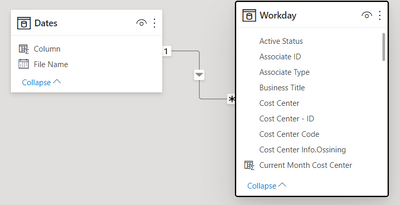
Thanks!
Solved! Go to Solution.
Hi @Anonymous ,
I created some data:
Here are the steps you can follow:
1. If you want to calculate the total of [ExitCheck], you can create measure:
all_sum = SUMX(ALL('Table'),'Table'[ExitCheck])
2. If you want to calculate [ExitCheck] in groups, you can create measure:
group_sum = SUMX(FILTER(ALL('Table'),[ExitCheck]=MAX('Table'[ExitCheck])),[ExitCheck])
3. Result:
If the result does not meet your expectations, can you share sample data and sample output in table format? Or a sample pbix after removing sensitive data.
Best Regards,
Liu Yang
If this post helps, then please consider Accept it as the solution to help the other members find it more quickly
Hi @Anonymous ,
I created some data:
Here are the steps you can follow:
1. If you want to calculate the total of [ExitCheck], you can create measure:
all_sum = SUMX(ALL('Table'),'Table'[ExitCheck])
2. If you want to calculate [ExitCheck] in groups, you can create measure:
group_sum = SUMX(FILTER(ALL('Table'),[ExitCheck]=MAX('Table'[ExitCheck])),[ExitCheck])
3. Result:
If the result does not meet your expectations, can you share sample data and sample output in table format? Or a sample pbix after removing sensitive data.
Best Regards,
Liu Yang
If this post helps, then please consider Accept it as the solution to help the other members find it more quickly
Share feedback directly with Fabric product managers, participate in targeted research studies and influence the Fabric roadmap.
Check out the February 2026 Power BI update to learn about new features.
| User | Count |
|---|---|
| 54 | |
| 47 | |
| 39 | |
| 16 | |
| 15 |
| User | Count |
|---|---|
| 83 | |
| 70 | |
| 38 | |
| 28 | |
| 26 |