Hi PBI Community
Problem -
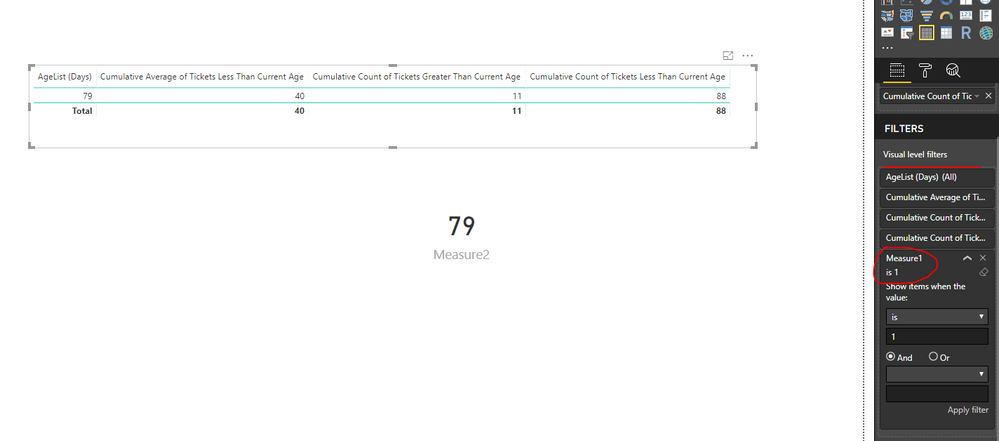
I need help creating a measure that will calculate the number of tickets that need to be closed in order bring the cumulative average age of the tickets = to target age of tickets. I've included a .pbix file with some sample data and precalculated measures.
Dataset -
Download From Google Drive
https://drive.google.com/file/d/1AR1wtoSw0iqdi0tfiYua2fD_PLEJlTnm/view?usp=sharing
Copy and Paste data is at the end of the message
Additional Details -
For example
In the sample data set the Target Average Age = 40.
As can be seen in the table:
When Cumulative Average of Tickets = 40, Cumulative Count of Tickets Greater than Current Age = 11. Therefore the 11 oldest tickets must be closed in order to bring the cumulative average to the target.
While I have been able to figure this out using a table, I haven't been able to translate the table into a single measure. in the actual dataset table 1 will include other details about tickets such as location, status etc and the measure must dynamic and affected by those other filters.
If possible I would also like a measure that would return the corresponding AgeList (Days) value, in this case 79, however I could probably figure that out if someone helps me with the first measure.
Quick Thank you to @Anonymous for help provided earlier with Cumulative Count measures.
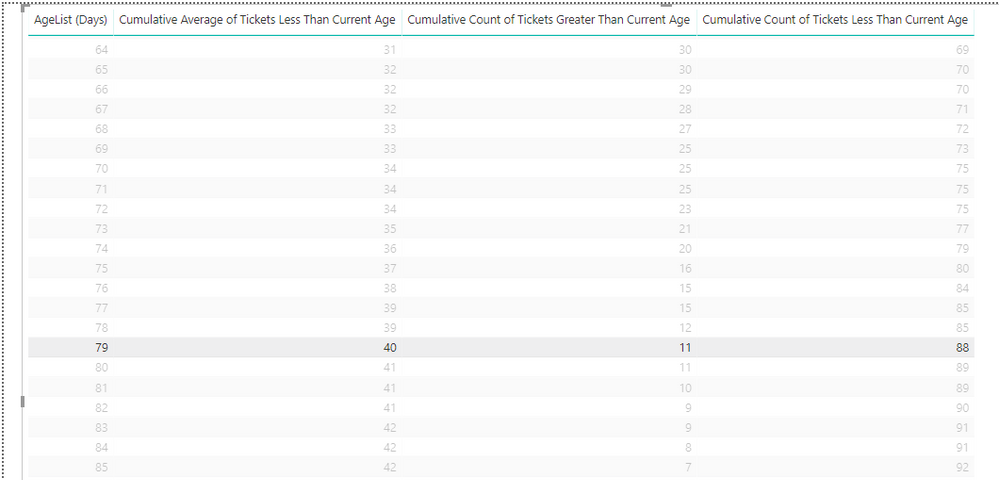
Table 1
Data
Ticket IDAge (Days)
| 103JG8MG9JQ | 54 |
| 103EE5WFU3D | 58 |
| 1030C25NFD9 | 8 |
| 103LJZEVZX5 | 17 |
| 1037HWX3A7R | 30 |
| 1032FT62VHN | 51 |
| 103NMQFBG1A | 75 |
| 1039KNPJ0B6 | 72 |
| 103VIKYILU2 | 88 |
| 103GPH7Q55O | 84 |
| 103BNDGYGOK | 69 |
| 103XVAQ71Y6 | 66 |
| 103IS7Z5MI2 | 44 |
| 1034Q48E6SY | 21 |
| 103ZY1HMRCL | 42 |
| 103KWY0UCMH | 22 |
| 1036TV9TW63 | 67 |
| 103R1II17GZ | 75 |
| 103DZFSAS0V | 74 |
| 1038WC18CAI | 40 |
| 103U49AHXTE | 33 |
| 103F26JPI40 | 78 |
| 103103TX2EW | 18 |
| 103W702WDXJ | 43 |
| 103H5XB4Y8F | 90 |
| 10333UUDJRB | 55 |
| 103OAR3B31X | 27 |
| 103A8OCKOLT | 14 |
| 10356LMS8VG | 32 |
| 103RDHV0TFC | 81 |
| 103CBE4Z4P8 | 41 |
| 103Y9BD7P9U | 10 |
| 1030NR4A3PL | 58 |
| 103MKOE9EZH | 28 |
| 1037ILNHYI4 | 55 |
| 103TQIWPJT0 | 78 |
| 103OOF5O4CM | 31 |
| 1039LCEWOMI | 73 |
| 103VT9O596E | 62 |
| 103GR56DKG1 | 69 |
| 103BO2GC4QX | 54 |
| 103XWZPKPAJ | 32 |
| 103JUWYSAKF | 32 |
| 1034ST7RU4B | 2 |
| 103QZQHZFEY | 12 |
| 103LXNQ8QYU | 20 |
| 10364KZGB8G | 15 |
| 103S2H8FVSC | 32 |
| 103D0EING28 | 59 |
| 10387BRV0LU | 42 |
| 103U58A4LWQ | 60 |
| 103F35J36FD | 20 |
| 1031ASSBHP9 | 72 |
| 103N8P1J195 | 0 |
| 103I6MAIMJR | 28 |
| 1033DJKQ73N | 30 |
| 103PBGTZRDA | 73 |
| 103A9D27CN6 | 0 |
| 1035G9B6N7S | 60 |
| 103RE6LE8HO | 78 |
| 103CC33MS1K | 63 |
| 103YK0DLDB7 | 13 |
| 103JHXMTXV3 | 46 |
| 103FFUV2I5P | 4 |
| 103TR7V374C | 24 |
| 103OP45BSEZ | 68 |
| 103AW1EKCYV | 61 |
| 103VUYNIN8R | 59 |
| 103HSUWR8SD | 18 |
| 1032ZR6ZT29 | 16 |
| 103XXOFYDMW | 34 |
| 103JVLO6YWS | 98 |
| 10342IXEIGO | 34 |
| 103Q0FGNTQA | 34 |
| 103LYCPLE06 | 10 |
| 103759ZUZKT | 23 |
| 103S3682JUP | 64 |
| 103E13H14EL | 76 |
| 103Z90Q9PO7 | 21 |
| 103U6XZH073 | 39 |
| 103GEU9QKIQ | 26 |
| 1031CQIO51M | 99 |
| 103N9NRXPBI | 35 |
| 103IHK05AV4 | 3 |
| 1034FHJDV50 | 14 |
| 103PDESCFPN | 85 |
| 103BK22KQZJ | 22 |
| 103WIYBTBJF | 2 |
| 103RGVKSWT1 | 82 |
| 103DNST0GDX | 8 |
| 103YLP381NJ | 57 |
| 103KJMCGLXF | 35 |
| 103FQJLFXH2 | 95 |
| 1030OGUOHRY | 75 |
| 103MMDDW2AU | 32 |
| 1038TAMVMLG | 79 |
| 1031P5U152B | 88 |
| 103MX239QM7 | 35 |
| 1038UZCIAWT | 75 |
| 103TSWLQV6P | 97 |
Measures
Cumulative Average of Tickets Greater Than Current Age = VAR currentAge = max(Table2[AgeList (Days)])
RETURN
CALCULATE(
    AVERAGE(Table1[Age (Days)]),
    ALLSELECTED(Table1),
    'Table1'[Age (Days)] > currentAge
)
Cumulative Average of Tickets Less Than Current Age = VAR currentAge = max(Table2[AgeList (Days)])
RETURN
CALCULATE(
average(Table1[Age (Days)]),
ALLSELECTED(Table1),
'Table1'[Age (Days)] < currentAge
)Cumulative Count of Tickets Greater Than Current Age = VAR currentAge = max(Table2[AgeList (Days)])
RETURN
CALCULATE(
COUNTROWS(Table1),
ALLSELECTED(Table1),
'Table1'[Age (Days)] > currentAge
)Cumulative Count of Tickets Less Than Current Age = VAR currentAge = max(Table2[AgeList (Days)])
RETURN
CALCULATE(
COUNTROWS(Table1),
ALLSELECTED(Table1),
'Table1'[Age (Days)] < currentAge
)Target Age = 40
Table 2
AgeList (Days)
| 0 |
| 1 |
| 2 |
| 3 |
| 4 |
| 5 |
| 6 |
| 7 |
| 8 |
| 9 |
| 10 |
| 11 |
| 12 |
| 13 |
| 14 |
| 15 |
| 16 |
| 17 |
| 18 |
| 19 |
| 20 |
| 21 |
| 22 |
| 23 |
| 24 |
| 25 |
| 26 |
| 27 |
| 28 |
| 29 |
| 30 |
| 31 |
| 32 |
| 33 |
| 34 |
| 35 |
| 36 |
| 37 |
| 38 |
| 39 |
| 40 |
| 41 |
| 42 |
| 43 |
| 44 |
| 45 |
| 46 |
| 47 |
| 48 |
| 49 |
| 50 |
| 51 |
| 52 |
| 53 |
| 54 |
| 55 |
| 56 |
| 57 |
| 58 |
| 59 |
| 60 |
| 61 |
| 62 |
| 63 |
| 64 |
| 65 |
| 66 |
| 67 |
| 68 |
| 69 |
| 70 |
| 71 |
| 72 |
| 73 |
| 74 |
| 75 |
| 76 |
| 77 |
| 78 |
| 79 |
| 80 |
| 81 |
| 82 |
| 83 |
| 84 |
| 85 |
| 86 |
| 87 |
| 88 |
| 89 |
| 90 |
| 91 |
| 92 |
| 93 |
| 94 |
| 95 |
| 96 |
| 97 |
| 98 |
| 99 |
| 100 |