Join us at FabCon Atlanta from March 16 - 20, 2026, for the ultimate Fabric, Power BI, AI and SQL community-led event. Save $200 with code FABCOMM.
Register now!The Power BI Data Visualization World Championships is back! Get ahead of the game and start preparing now! Learn more
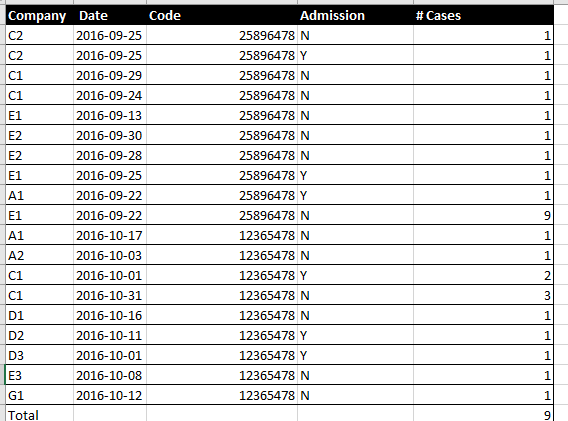
I have to write one measure which counts the number of Rows, but it should have two type of Filter.
Like the below image: We need count via Company wise. But should have 2 conditions
1. For company C1 and E1 we need check Cases number =1 and Admission = "N"
2. Rest of other company we need to check Case Number = 1
Can you please help me how I write measurer to calculate a count.
Solved! Go to Solution.
try this
Measure =
VAR C1_E1_filter = FILTER('Table','Table'[Company] in {"C1","E1"} && 'Table'[Admission] = "N" && 'Table'[# Cases] =1)
VAR C1_E1 = CALCULATE(COUNTROWS('Table'),C1_E1_filter)
VAR Else_filter = FILTER('Table','Table'[Company]<>"C1" && 'Table'[Company]<>"E1" && 'Table'[Admission] = "N")
VAR Else_value = CALCULATE(COUNTROWS('Table'),Else_filter)
RETURN
C1_E1+Else_value
try this
Measure =
VAR C1_E1_filter = FILTER('Table','Table'[Company] in {"C1","E1"} && 'Table'[Admission] = "N" && 'Table'[# Cases] =1)
VAR C1_E1 = CALCULATE(COUNTROWS('Table'),C1_E1_filter)
VAR Else_filter = FILTER('Table','Table'[Company]<>"C1" && 'Table'[Company]<>"E1" && 'Table'[Admission] = "N")
VAR Else_value = CALCULATE(COUNTROWS('Table'),Else_filter)
RETURN
C1_E1+Else_value
Thanks, it works...
The Power BI Data Visualization World Championships is back! Get ahead of the game and start preparing now!
| User | Count |
|---|---|
| 38 | |
| 38 | |
| 37 | |
| 28 | |
| 25 |
| User | Count |
|---|---|
| 124 | |
| 87 | |
| 70 | |
| 66 | |
| 65 |