Join us at FabCon Atlanta from March 16 - 20, 2026, for the ultimate Fabric, Power BI, AI and SQL community-led event. Save $200 with code FABCOMM.
Register now!Get Fabric Certified for FREE during Fabric Data Days. Don't miss your chance! Request now
Hi All,
I am a newbie to PowerBI and working on a small project case study.
I have a data set comprising of
1. Defect_ID
2. Status
3. Detected_WeekNo
4. Closed_WeekNo (populated if the status of defect is set to close).
I need to create a visual which has
1. Detected_WeekNo on X-Axis
2. Defect_ID count on the Y axis
3. One line chart on the visual, showing the count of defects per each value of Detected_WeekNo.
4. One line chart on the same visual, showing the count of defects per each value of Closed_WeekNo.
Sample Data set 'DefectDump':-
| Defect_ID | Status | Detected_WeekNo | Closed_WeekNo |
| 1 | New | 20 | |
| 2 | In Progress | 20 | |
| 3 | Closed | 20 | 20 |
| 4 | Retest | 20 | |
| 5 | Closed | 20 | 21 |
| 6 | Closed | 21 | 21 |
My queries are:-
1. Which visual in PowerBI desktop will be best suitable for representing this information?
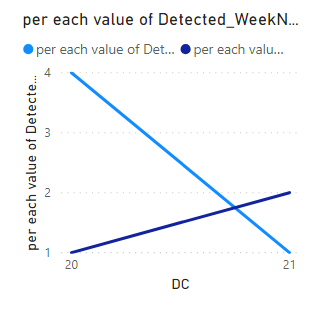
2. Based on the above described sample data set, the chart should specify the Defected_defect_count for week 20 as 4, Detected_defect_count for week 21 as 1, Closed_defect_count for week 20 as 1, Detected_defect_count for week 21 as 2. How to achieve this? Does it need a self join between the 'DefectDump' table data set?
How to implement this requirement?
Solved! Go to Solution.
Hi @Anonymous ,
You could combine your "Detected_WeekNo" and "Closed_WeekNo" into one column as your x-axis.
DC =
IF (
'Table'[Detected_WeekNo] >= 'Table'[Closed_WeekNo],
'Table'[Detected_WeekNo],
'Table'[Closed_WeekNo]
)
Then create two measures to caculate values of "Defect_ID".
per each value of Closed_WeekNo =
CALCULATE (
COUNT ( 'Table'[Defect_ID] ),
ALLEXCEPT ( 'Table', 'Table'[Closed_WeekNo] ),
FILTER ( 'Table', 'Table'[Closed_WeekNo] = 'Table'[DC] )
)per each value of Detected_WeekNo =
CALCULATE (
COUNT ( 'Table'[Defect_ID] ),
ALLEXCEPT ( 'Table', 'Table'[Detected_WeekNo] ),
FILTER ( 'Table', 'Table'[Detected_WeekNo] = 'Table'[DC] )
)
Use line chart to show the results.
Here is my test file for your reference.
Hi @Anonymous ,
You could combine your "Detected_WeekNo" and "Closed_WeekNo" into one column as your x-axis.
DC =
IF (
'Table'[Detected_WeekNo] >= 'Table'[Closed_WeekNo],
'Table'[Detected_WeekNo],
'Table'[Closed_WeekNo]
)
Then create two measures to caculate values of "Defect_ID".
per each value of Closed_WeekNo =
CALCULATE (
COUNT ( 'Table'[Defect_ID] ),
ALLEXCEPT ( 'Table', 'Table'[Closed_WeekNo] ),
FILTER ( 'Table', 'Table'[Closed_WeekNo] = 'Table'[DC] )
)per each value of Detected_WeekNo =
CALCULATE (
COUNT ( 'Table'[Defect_ID] ),
ALLEXCEPT ( 'Table', 'Table'[Detected_WeekNo] ),
FILTER ( 'Table', 'Table'[Detected_WeekNo] = 'Table'[DC] )
)
Use line chart to show the results.
Here is my test file for your reference.
Check out the November 2025 Power BI update to learn about new features.
Advance your Data & AI career with 50 days of live learning, contests, hands-on challenges, study groups & certifications and more!