Join us at FabCon Atlanta from March 16 - 20, 2026, for the ultimate Fabric, Power BI, AI and SQL community-led event. Save $200 with code FABCOMM.
Register now!Get Fabric certified for FREE! Don't miss your chance! Learn more
Hello:
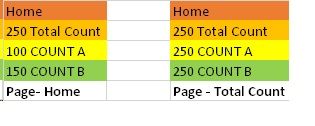
I am facing in navigation menu that the total that i am displaying is changing the moment i do “CTRL + click” to navigate on another page.
For example if you based on attached screenshot Home Page is showing correct total values for Count A & B. After i do “CTRL + click” on Total Count page the all values changes to inital Total value which is 250. this change happens in Home page & also on Total Count page. I am trying to figuring that out what might be causing?
Any help is greatly appreciated.
FYI …https://powerbi.tips/product/layouts-sunset/
Solved! Go to Solution.
I started from the scratch & was able to fix the problem. its tricky if you are not careful enough with card & bookmarks. Thanks for your reply. more importantly the selections are important with respective tabs. Thank you for your reply.
Hi @aaditya2000
Did you use bookmarks?
Which page is a bookmark?
What relationship is the Home Page and Total Count page? you refer to two pages or two visuals?
Best Regards
Maggie
I started from the scratch & was able to fix the problem. its tricky if you are not careful enough with card & bookmarks. Thanks for your reply. more importantly the selections are important with respective tabs. Thank you for your reply.
Share feedback directly with Fabric product managers, participate in targeted research studies and influence the Fabric roadmap.
Check out the February 2026 Power BI update to learn about new features.
| User | Count |
|---|---|
| 68 | |
| 59 | |
| 48 | |
| 20 | |
| 16 |
| User | Count |
|---|---|
| 107 | |
| 104 | |
| 39 | |
| 27 | |
| 27 |