
Join us at FabCon Atlanta from March 16 - 20, 2026, for the ultimate Fabric, Power BI, AI and SQL community-led event. Save $200 with code FABCOMM.
Register now!The Power BI Data Visualization World Championships is back! Get ahead of the game and start preparing now! Learn more
Greetings,
I followed the Poweer Bi tutorial to create a Drill Down page and tool.
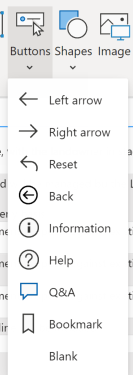
When I select the INSERT tab and select button, I don't see a Data or Drill Down button option??
I tried a Blank button, still no Data or DrillDown option??
I would appreciate any pointers to resolve this.
Regards,
Clive
Solved! Go to Solution.
Hi @Anonymous ,
Drill down is not a default button,so you cant directly find it in "buttons",try to import a similar visual online:
Then check below reference to link the button the related page:
https://docs.microsoft.com/en-us/power-bi/create-reports/desktop-buttons
Best Regards,
Kelly
Did I answer your question? Mark my post as a solution!
Hi,
Thanks for your reply, unfortuanetly that doesn't help.
I have a MS Spreadsheet in Power BI Report. The Report has 15 Categories, and each category has a number of sub-categories.
I want a button for the main category eg LAND, then another button for each sub-category that can be toggled on and off.
The image illustrates what I am trying to do when the user clicks the Category and sub-cateogry button/s, the filtered data fills a table.
Hi @Anonymous ,
Drill down is not a default button,so you cant directly find it in "buttons",try to import a similar visual online:
Then check below reference to link the button the related page:
https://docs.microsoft.com/en-us/power-bi/create-reports/desktop-buttons
Best Regards,
Kelly
Did I answer your question? Mark my post as a solution!
@Anonymous
I think you can also try to create bookmarks for each category/sub-category views, then call this on different buttons, and this will lead to that point of view.
Hope this makes sense.
Hello @Anonymous
Please see this link: https://community.powerbi.com/t5/Desktop/how-to-use-a-button-instead-of-drilldown-option/m-p/667874
Hope this solves.
The Power BI Data Visualization World Championships is back! Get ahead of the game and start preparing now!
| User | Count |
|---|---|
| 39 | |
| 37 | |
| 33 | |
| 32 | |
| 29 |
| User | Count |
|---|---|
| 133 | |
| 88 | |
| 85 | |
| 68 | |
| 64 |