Join us at FabCon Atlanta from March 16 - 20, 2026, for the ultimate Fabric, Power BI, AI and SQL community-led event. Save $200 with code FABCOMM.
Register now!The Power BI Data Visualization World Championships is back! Get ahead of the game and start preparing now! Learn more
I can't get my model language to switch to English. I opened a new PBI document today and it gave me my date table in Ukrainian. I have switched to English under "Regional Settings", closed out the document, and reopened; as well as restarted my computer. My dates are still in Ukrainian. Please help.
Hi, @bonjourposte ;
I tested it and may be we could change window's date language.
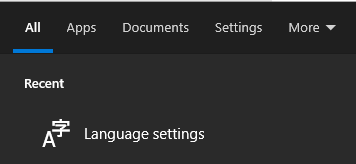
1.Search language setting.
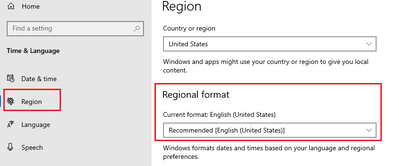
2.select region->region format.
then restart power bi desktop.
In additional, you need check the setting about here.
Supported languages and countries/regions for Power BI - Power BI | Microsoft Learn
Best Regards,
Community Support Team _ Yalan Wu
If this post helps, then please consider Accept it as the solution to help the other members find it more quickly.
Unfortunately it's still in Ukrainian.
Hi, @bonjourposte ;
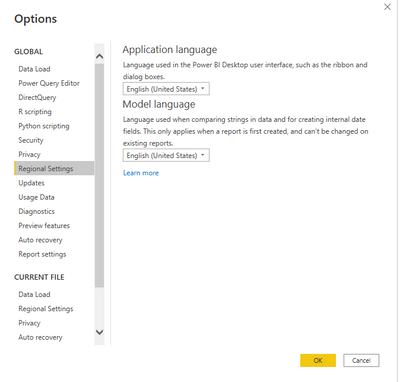
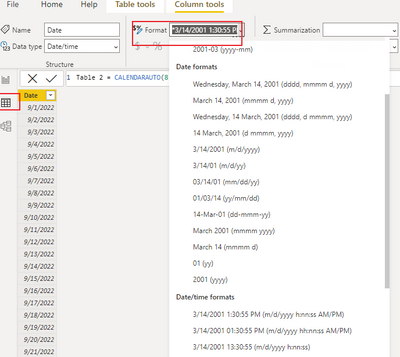
This is strange, can you send me this screenshot of you, as well as the screenshot of the PowerBI language settings? I'll take a look at what went wrong, I had the same problem as yours before, and now it's solved; There is also a screenshot similar to the one below:
Best Regards,
Community Support Team _ Yalan Wu
If this post helps, then please consider Accept it as the solution to help the other members find it more quickly.
The Power BI Data Visualization World Championships is back! Get ahead of the game and start preparing now!
| User | Count |
|---|---|
| 38 | |
| 38 | |
| 37 | |
| 28 | |
| 28 |
| User | Count |
|---|---|
| 124 | |
| 89 | |
| 73 | |
| 66 | |
| 65 |