Join us at FabCon Atlanta from March 16 - 20, 2026, for the ultimate Fabric, Power BI, AI and SQL community-led event. Save $200 with code FABCOMM.
Register now!The Power BI Data Visualization World Championships is back! Get ahead of the game and start preparing now! Learn more
Hi All
I have a PBI file it work fine for last 3 year. Due to some issue happen now my sales table not link with date table.
yesterday i make a post on how to recovery , But it does not help :-
Now i need to go to first setp to bring back all the report. :-
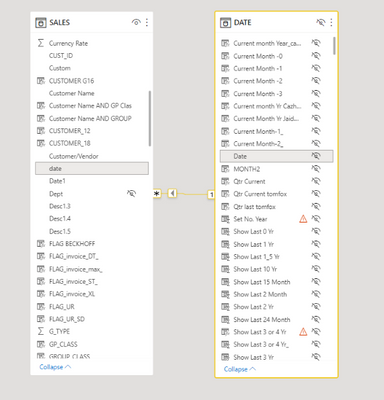
I have check model , the sales table and date table is link :-
I have check the date table can display year number :-
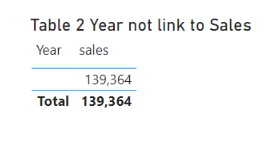
I have try to add the Year table with sales amount , year not display any number :-
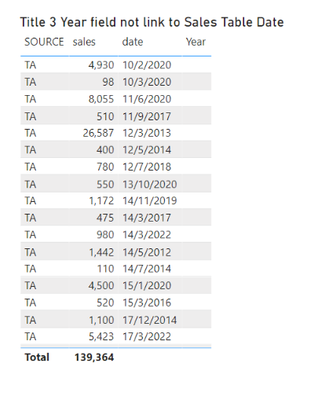
I have check sales table alone , it can display sales amount and date :-
Can some one advise me why sales table and date table not able link ?
Paul
Solved! Go to Solution.
The date column in sales date is a text column no a date colum
just change it and it should works
The date column in sales date is a text column no a date colum
just change it and it should works
@Anonymous
Thank you very much.
And declare your date table as a reference date
@Anonymous
I try to change the sales table date field from text to date format , i get error msg. Does it mean that i need to change at power quary ?
No error on my side with your Pbix
Hi All
The Power BI Data Visualization World Championships is back! Get ahead of the game and start preparing now!
Check out the November 2025 Power BI update to learn about new features.
| User | Count |
|---|---|
| 59 | |
| 46 | |
| 42 | |
| 23 | |
| 18 |
| User | Count |
|---|---|
| 190 | |
| 122 | |
| 96 | |
| 66 | |
| 47 |