Join us at FabCon Atlanta from March 16 - 20, 2026, for the ultimate Fabric, Power BI, AI and SQL community-led event. Save $200 with code FABCOMM.
Register now!The Power BI Data Visualization World Championships is back! Get ahead of the game and start preparing now! Learn more
Hi All
I have a PBI file it work fine for last 3 year. Due to some issue happen now my sales table not link with date table.
yesterday i make a post on how to recovery , But it does not help :-
Now i need to go to first setp to bring back all the report. :-
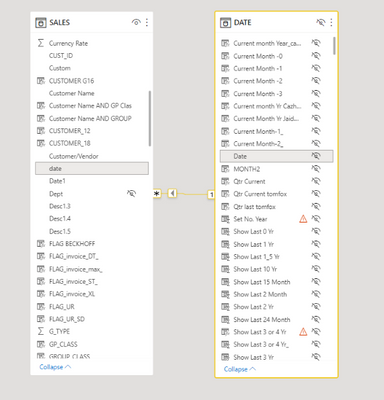
I have check model , the sales table and date table is link :-
I have check the date table can display year number :-
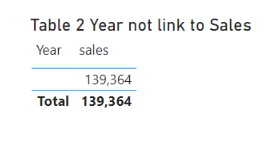
I have try to add the Year table with sales amount , year not display any number :-
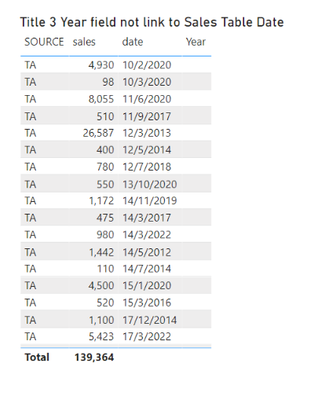
I have check sales table alone , it can display sales amount and date :-
Can some one advise me why sales table and date table not able link ?
Paul
Solved! Go to Solution.
The date column in sales date is a text column no a date colum
just change it and it should works
The date column in sales date is a text column no a date colum
just change it and it should works
@Anonymous
Thank you very much.
And declare your date table as a reference date
@Anonymous
I try to change the sales table date field from text to date format , i get error msg. Does it mean that i need to change at power quary ?
No error on my side with your Pbix
Hi All
The Power BI Data Visualization World Championships is back! Get ahead of the game and start preparing now!
| User | Count |
|---|---|
| 38 | |
| 38 | |
| 37 | |
| 28 | |
| 28 |
| User | Count |
|---|---|
| 124 | |
| 89 | |
| 73 | |
| 66 | |
| 65 |