cancel
Showing results for 
Search instead for 
Did you mean: 

The Power BI Data Visualization World Championships is back! Get ahead of the game and start preparing now! Learn more

Reply
Anonymous
Not applicable

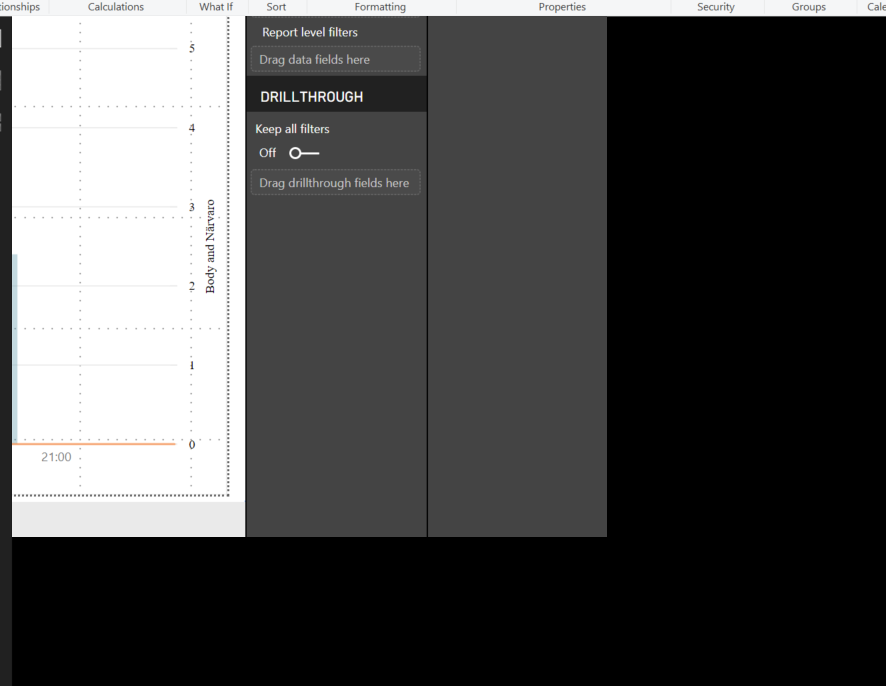
My Power BI Canvas is not placed correctly

Hello, My canvas is not placed correctly. I couldn't view my visualizations or create new reports. How do I get the canvas to show in the proper place?


Thanks in advance!


Capture.PNG

1 ACCEPTED SOLUTION
Greg_Deckler
Community Champion
Community Champion

Generally for me when something like this happens, I click on one of the other icons over on the left, like the Relationship icon and then back to the report icon or close and restart Power BI or reboot. Have you tried any of these?


Follow on LinkedIn
@ me in replies or I'll lose your thread!!!
Instead of a Kudo, please vote for this idea
Become an expert!: Enterprise DNA
External Tools: MSHGQM
YouTube Channel!: Microsoft Hates Greg
Latest book!:
DAX For Humans

DAX is easy, CALCULATE makes DAX hard...

View solution in original post

4 REPLIES 4
Greg_Deckler
Community Champion
Community Champion

Generally for me when something like this happens, I click on one of the other icons over on the left, like the Relationship icon and then back to the report icon or close and restart Power BI or reboot. Have you tried any of these?


Follow on LinkedIn
@ me in replies or I'll lose your thread!!!
Instead of a Kudo, please vote for this idea
Become an expert!: Enterprise DNA
External Tools: MSHGQM
YouTube Channel!: Microsoft Hates Greg
Latest book!:
DAX For Humans

DAX is easy, CALCULATE makes DAX hard...
Anonymous
Not applicable

@Greg_Deckler 

I restarted the computer again, and it worked!

Thanks

Anonymous
Not applicable

Hi @Greg_Deckler 

Yes, I click on one of the other icons and  I restarted my computer, but it didn't work. Is there another way to reboot  Power BI? 

You could check the Issues forum here:

https://community.powerbi.com/t5/Issues/idb-p/Issues

And if it is not there, then you could post it.

If you have Pro account you could try to open a support ticket. If you have a Pro account it is free. Go to https://support.powerbi.com. Scroll down and click "CREATE SUPPORT TICKET".


Follow on LinkedIn
@ me in replies or I'll lose your thread!!!
Instead of a Kudo, please vote for this idea
Become an expert!: Enterprise DNA
External Tools: MSHGQM
YouTube Channel!: Microsoft Hates Greg
Latest book!:
DAX For Humans

DAX is easy, CALCULATE makes DAX hard...

Helpful resources

Announcements
Power BI DataViz World Championships

Power BI Dataviz World Championships

The Power BI Data Visualization World Championships is back! Get ahead of the game and start preparing now!

December 2025 Power BI Update Carousel

Power BI Monthly Update - December 2025

Check out the December 2025 Power BI Holiday Recap!

FabCon Atlanta 2026 carousel

FabCon Atlanta 2026

Join us at FabCon Atlanta, March 16-20, for the ultimate Fabric, Power BI, AI and SQL community-led event. Save $200 with code FABCOMM.