Get certified for free when you join Fabric Data Days 2026 and dive into Fabric, Power BI, SQL, AI, and other essential data skills.
Join nowData Days is here! Join us now for 60+ days of learning, challenges, and connection. Learn more
Hello,
i'm new user of power BI, hope someone can answer my question below.
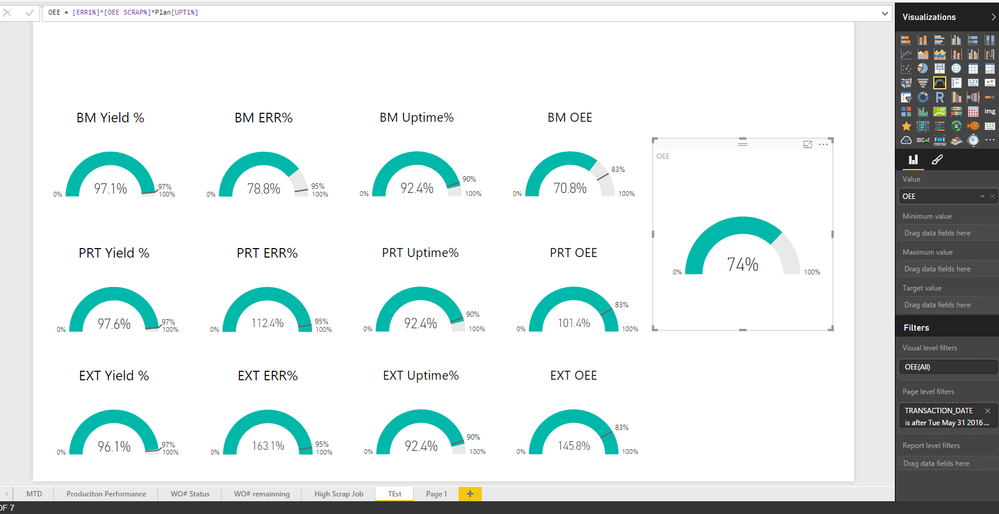
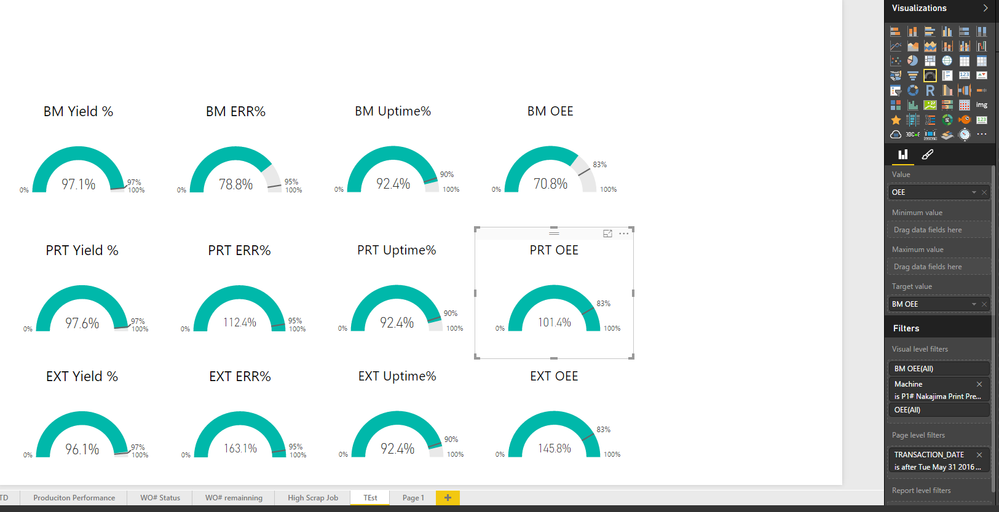
Refer to below print screen, i got OEE result from different department.
now i want to create another chart show OEE of plant performance, which i need 70.8% (BM OEE) * 101.4% (PRT OEE) * 145.8%(EXT OEE). the result should be 104.7%
appreciate if someone can anwer me, thanks.
im using filters function to filter different department result
Hi @ansona,
In your scenario, please create three measures which return OEE performance for different department like below:
measure for BM OEE= CALCULATE( sum([ERR1%])* sum([OEE SCRAP%])*sum(Plan[UPTI%]),FILTER('Plan',[Machine]="BM"))
Then create a new measure to return multiply value from those three measures.
Reference:
CALCULATE Function (DAX)
If you have any question, please feel free to ask.
Best Regards,
Qiuyun Yu
Hi Qiuyun,
measure for BM OEE= CALCULATE( sum([ERR1%])* sum([OEE SCRAP%])*sum(Plan[UPTI%]),FILTER('Plan',[Machine]="BM"))
if i want to filter more than 1 criteria, how to write that formula?
i want to filter machine BM#1, BM#2, BM#3
Thanks
Anson
Hi @ansona,
You can change filer parameter value as different BM values in FILTER() function like this:
measure for BM OEE= CALCULATE( sum([ERR1%])* sum([OEE SCRAP%])*sum(Plan[UPTI%]),FILTER('Plan',[Machine]="BM#1"))
Also you can specify the measure like below:
measure for BM OEE= CALCULATE( sum([ERR1%])* sum([OEE SCRAP%])*sum(Plan[UPTI%]))
Then add the field which contains BM#1, BM#2, BM#3 in a slicer for user to check.
Best Regards,
Qiuyun Yu
What are the sources of the three OEE percentages? Are they Calculated Measures? or are they from a data set?
those are calculated measures from data set.
Don't miss out on Data Days, June 15 through August 7. Learn Fabric, Power BI, SQL, AI and more.
Check out the May 2026 Power BI update to learn about new features.
| User | Count |
|---|---|
| 23 | |
| 21 | |
| 20 | |
| 19 | |
| 13 |
| User | Count |
|---|---|
| 58 | |
| 50 | |
| 38 | |
| 31 | |
| 27 |