Join us at FabCon Atlanta from March 16 - 20, 2026, for the ultimate Fabric, Power BI, AI and SQL community-led event. Save $200 with code FABCOMM.
Register now!The Power BI Data Visualization World Championships is back! Get ahead of the game and start preparing now! Learn more
Hi everyone,
I need help for a task if anyone has an idea, I would appreciate it and thank you.
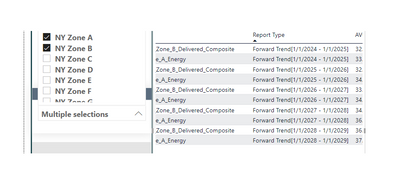
I have a slicer drop down selection where there are selections for different zones. If I select a zone from the slicer I can display an average price on the table for the selected zone.
What I am trying to do; when I select more than one zone, I want the table to aggregate the selected zones prices and display only one price.
Thank you
@umutkaya79 Sorry, having trouble following, can you post sample data as text and expected output?
Not really enough information to go on, please first check if your issue is a common issue listed here: https://community.powerbi.com/t5/Community-Blog/Before-You-Post-Read-This/ba-p/1116882
Also, please see this post regarding How to Get Your Question Answered Quickly: https://community.powerbi.com/t5/Community-Blog/How-to-Get-Your-Question-Answered-Quickly/ba-p/38490
The most important parts are:
1. Sample data as text, use the table tool in the editing bar
2. Expected output from sample data
3. Explanation in words of how to get from 1. to 2.
Hi Greg. I thought I did figure it out but I guess not. I will explain one more time here what I am trying to achieve. Thank you for your help again.
I have a slicer on the left and a table on the right. When I pick a single zone from the slicer, my table dsiplays the avg prices for every each year for the selected zone. I am trying to aggregate the result set on the table when I pick more than one zones from the slicer. For example if I pick 2 zones, taking the average of those 2 zones and displaying it as a single zone under a different zone name. (new zone name can be something like 'aggregated')
Thank you
Thanks Greg. I figured it out.
The Power BI Data Visualization World Championships is back! Get ahead of the game and start preparing now!
Check out the November 2025 Power BI update to learn about new features.
| User | Count |
|---|---|
| 59 | |
| 46 | |
| 42 | |
| 23 | |
| 17 |
| User | Count |
|---|---|
| 190 | |
| 122 | |
| 96 | |
| 66 | |
| 47 |