Get Fabric or SQL Certified for Free.
Get certified for free when you join Fabric Data Days 2026 and dive into Fabric, Power BI, SQL, AI, and other essential data skills.
Join now- Power BI forums
- Get Help with Power BI
- Desktop
- Service
- Report Server
- Power Query
- Mobile Apps
- Developer
- DAX Commands and Tips
- Custom Visuals Development Discussion
- Health and Life Sciences
- Power BI Spanish forums
- Translated Spanish Desktop
- Training and Consulting
- Instructor Led Training
- Dashboard in a Day for Women, by Women
- Galleries
- Data Stories Gallery
- Themes Gallery
- Contests Gallery
- QuickViz Gallery
- Quick Measures Gallery
- Visual Calculations Gallery
- Fabric Apps Gallery
- Notebook Gallery
- Translytical Task Flow Gallery
- TMDL Gallery
- R Script Showcase
- Webinars and Video Gallery
- Ideas
- Custom Visuals Ideas (read-only)
- Issues
- Issues
- Events
- Upcoming Events
July 28 - August 9 | Final Round of the Power BI Dataviz World Championships. This is your chance. Learn more
- Power BI forums
- Forums
- Get Help with Power BI
- Desktop
- Re: Multiple rows in different columns
- Subscribe to RSS Feed
- Mark Topic as New
- Mark Topic as Read
- Float this Topic for Current User
- Bookmark
- Subscribe
- Printer Friendly Page

- Mark as New
- Bookmark
- Subscribe
- Mute
- Subscribe to RSS Feed
- Permalink
- Report Inappropriate Content
Multiple rows in different columns
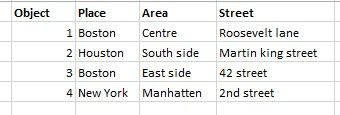
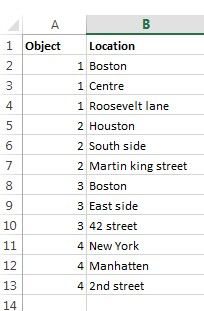
Hi all,
I Have a large dataset that contains an object number and a location (place, area, street) In the dataset this is on line level as you can see in the first table. But I want it structurend in different columns as shown in the seccond table. So that I have 4 columns.
I really would appreciate your help.
Solved! Go to Solution.


- Mark as New
- Bookmark
- Subscribe
- Mute
- Subscribe to RSS Feed
- Permalink
- Report Inappropriate Content
Please see the comments in the code for the steps to be taken:
let
// Your source data
    Source = Table.FromRows(Json.Document(Binary.Decompress(Binary.FromText("VY2xCsJADEB/JdzcxbNfoAguddBJSodAgz1aErik+vveWYg6vpe8pO/DLjThIGrCYWg2PBJbJseriNKTFliQNxuLPcvqUeWbrDaBpvG70mG2xDAnfoCWi2Sf0f7/Y8UTqtXWRRt/i7aYC73gLnl20SFPaIbsJvLo1fAG", BinaryEncoding.Base64), Compression.Deflate)), let _t = ((type text) meta [Serialized.Text = true]) in type table [Object = _t, Location = _t]),
    #"Changed Type" = Table.TransformColumnTypes(Source,{{"Object", Int64.Type}, {"Location", type text}}),
// Add Index column
    #"Added Index" = Table.AddIndexColumn(#"Changed Type", "Index", 0, 1),
// Transform index column with modulo, value 3
    #"Calculated Modulo" = Table.TransformColumns(#"Added Index", {{"Index", each Number.Mod(_, 3), type number}}),
// Pivot on that new column, taking "Location" into values. If you do this by hand, make sure to disable aggregation in the advanced options ("Don't Aggregate".
    #"Pivoted Column" = Table.Pivot(Table.TransformColumnTypes(#"Calculated Modulo", {{"Index", type text}}, "en-US"), List.Distinct(Table.TransformColumnTypes(#"Calculated Modulo", {{"Index", type text}}, "en-US")[Index]), "Index", "Location")
in
    #"Pivoted Column"
Imke Feldmann (The BIccountant)
If you liked my solution, please give it a thumbs up. And if I did answer your question, please mark this post as a solution. Thanks!
How to integrate M-code into your solution -- How to get your questions answered quickly -- How to provide sample data -- Check out more PBI- learning resources here -- Performance Tipps for M-queries
- Mark as New
- Bookmark
- Subscribe
- Mute
- Subscribe to RSS Feed
- Permalink
- Report Inappropriate Content
Sure, just pivot on that column instead of the newly created and rename the resulting columns afterwards.
Imke Feldmann (The BIccountant)
If you liked my solution, please give it a thumbs up. And if I did answer your question, please mark this post as a solution. Thanks!
How to integrate M-code into your solution -- How to get your questions answered quickly -- How to provide sample data -- Check out more PBI- learning resources here -- Performance Tipps for M-queries


- Mark as New
- Bookmark
- Subscribe
- Mute
- Subscribe to RSS Feed
- Permalink
- Report Inappropriate Content
Hi,
You may refer to my solution here.
Hope this helps.
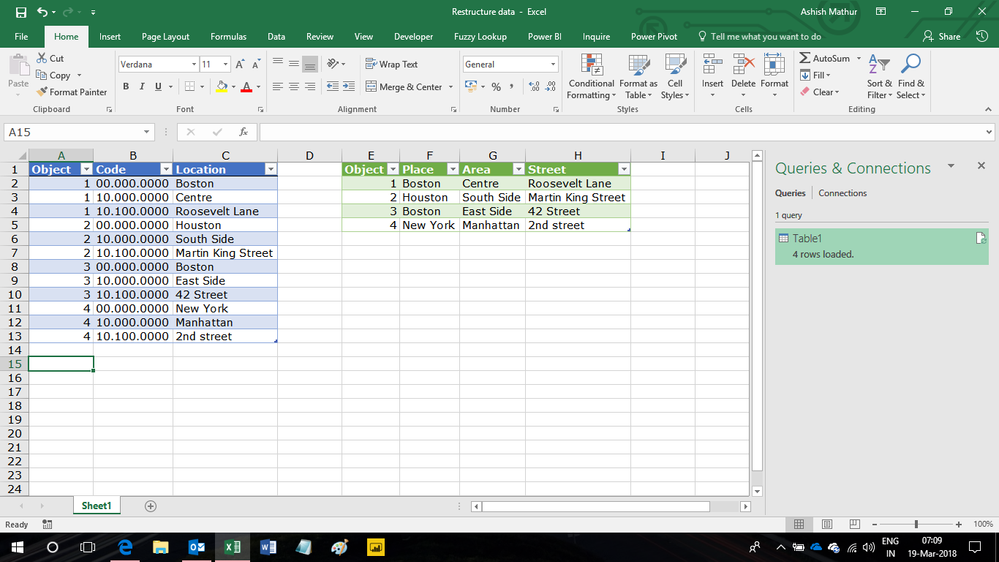
Regards,
Ashish Mathur
http://www.ashishmathur.com
https://www.linkedin.com/in/excelenthusiasts/

- Mark as New
- Bookmark
- Subscribe
- Mute
- Subscribe to RSS Feed
- Permalink
- Report Inappropriate Content
Hmm...invoking @ImkeF
Follow on LinkedIn
@ me in replies or I'll lose your thread!!!
Instead of a Kudo, please vote for this idea
Become an expert!: Enterprise DNA
External Tools: MSHGQM
YouTube Channel!: Microsoft Hates Greg
Latest book!: DAX For Humans
DAX is easy, CALCULATE makes DAX hard...
- Mark as New
- Bookmark
- Subscribe
- Mute
- Subscribe to RSS Feed
- Permalink
- Report Inappropriate Content
Please see the comments in the code for the steps to be taken:
let
// Your source data
    Source = Table.FromRows(Json.Document(Binary.Decompress(Binary.FromText("VY2xCsJADEB/JdzcxbNfoAguddBJSodAgz1aErik+vveWYg6vpe8pO/DLjThIGrCYWg2PBJbJseriNKTFliQNxuLPcvqUeWbrDaBpvG70mG2xDAnfoCWi2Sf0f7/Y8UTqtXWRRt/i7aYC73gLnl20SFPaIbsJvLo1fAG", BinaryEncoding.Base64), Compression.Deflate)), let _t = ((type text) meta [Serialized.Text = true]) in type table [Object = _t, Location = _t]),
    #"Changed Type" = Table.TransformColumnTypes(Source,{{"Object", Int64.Type}, {"Location", type text}}),
// Add Index column
    #"Added Index" = Table.AddIndexColumn(#"Changed Type", "Index", 0, 1),
// Transform index column with modulo, value 3
    #"Calculated Modulo" = Table.TransformColumns(#"Added Index", {{"Index", each Number.Mod(_, 3), type number}}),
// Pivot on that new column, taking "Location" into values. If you do this by hand, make sure to disable aggregation in the advanced options ("Don't Aggregate".
    #"Pivoted Column" = Table.Pivot(Table.TransformColumnTypes(#"Calculated Modulo", {{"Index", type text}}, "en-US"), List.Distinct(Table.TransformColumnTypes(#"Calculated Modulo", {{"Index", type text}}, "en-US")[Index]), "Index", "Location")
in
    #"Pivoted Column"
Imke Feldmann (The BIccountant)
If you liked my solution, please give it a thumbs up. And if I did answer your question, please mark this post as a solution. Thanks!
How to integrate M-code into your solution -- How to get your questions answered quickly -- How to provide sample data -- Check out more PBI- learning resources here -- Performance Tipps for M-queries
- Mark as New
- Bookmark
- Subscribe
- Mute
- Subscribe to RSS Feed
- Permalink
- Report Inappropriate Content
Hi Imke,
Thanx for your response, I am really new to power BI and don't really understnad your awnser. Where do I have to put the code?
Can you walk me through a bit. maybe I did not gave enough information.
The table I have is from a Navision database. I used an odata feed to import the table into Power BI.
No I need to transfort it to a table with 4 columns.
Thanks in advance for your awnser
- Mark as New
- Bookmark
- Subscribe
- Mute
- Subscribe to RSS Feed
- Permalink
- Report Inappropriate Content
Hi Youssef,
Please check if the instructions in this video help you: How to integrate M-code into your solution
Imke Feldmann (The BIccountant)
If you liked my solution, please give it a thumbs up. And if I did answer your question, please mark this post as a solution. Thanks!
How to integrate M-code into your solution -- How to get your questions answered quickly -- How to provide sample data -- Check out more PBI- learning resources here -- Performance Tipps for M-queries
- Mark as New
- Bookmark
- Subscribe
- Mute
- Subscribe to RSS Feed
- Permalink
- Report Inappropriate Content
Imke,
When I click the link I get: An Unexpected Error has occurred
- Mark as New
- Bookmark
- Subscribe
- Mute
- Subscribe to RSS Feed
- Permalink
- Report Inappropriate Content
Sorry, please take this link:
Imke Feldmann (The BIccountant)
If you liked my solution, please give it a thumbs up. And if I did answer your question, please mark this post as a solution. Thanks!
How to integrate M-code into your solution -- How to get your questions answered quickly -- How to provide sample data -- Check out more PBI- learning resources here -- Performance Tipps for M-queries
- Mark as New
- Bookmark
- Subscribe
- Mute
- Subscribe to RSS Feed
- Permalink
- Report Inappropriate Content
Ok thanx, I will check it out. I just checked the table in the original database and I saw that there is an extra column called code.
The code for City is always 00.000.0000, for area allways 10.000.0000 and for street allways 10.100.0000 as you can see in the picture.
Is there an easier way to do this
- Mark as New
- Bookmark
- Subscribe
- Mute
- Subscribe to RSS Feed
- Permalink
- Report Inappropriate Content
Sure, just pivot on that column instead of the newly created and rename the resulting columns afterwards.
Imke Feldmann (The BIccountant)
If you liked my solution, please give it a thumbs up. And if I did answer your question, please mark this post as a solution. Thanks!
How to integrate M-code into your solution -- How to get your questions answered quickly -- How to provide sample data -- Check out more PBI- learning resources here -- Performance Tipps for M-queries
- Mark as New
- Bookmark
- Subscribe
- Mute
- Subscribe to RSS Feed
- Permalink
- Report Inappropriate Content
If I pivot on the column code I get this result, I also tried the advanced options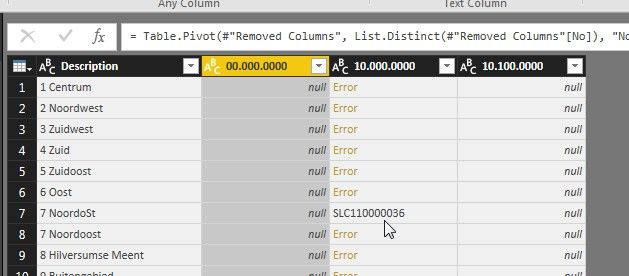

Helpful resources

FabCon & SQLCon – Barcelona 2026
Join us in Barcelona for FabCon and SQLCon, the Fabric, Power BI, SQL, and AI community event. Save €200 with code FABCMTY200.

Fabric Community Sticker Challenge - Barcelona 2026
If you love stickers, then you will definitely want to check out our community sticker challenge, Barcelona edition!

Power BI Monthly Update - July 2026
Check out the July 2026 Power BI update to learn about new features.

Power BI DataViz World Championships - June 2026
A new Power BI DataViz World Championship is coming this June! Don't miss out on submitting your entry.

| User | Count |
|---|---|
| 30 | |
| 28 | |
| 22 | |
| 21 | |
| 19 |


| User | Count |
|---|---|
| 44 | |
| 31 | |
| 18 | |
| 18 | |
| 16 |


