cancel
Showing results for 
Search instead for 
Did you mean: 

We've captured the moments from FabCon & SQLCon that everyone is talking about, and we are bringing them to the community, live and on-demand. Starts on April 14th. Register now

Reply
Saxon10
Post Prodigy
Post Prodigy

Multiple row headers in matrix table visual

Hi,


I have three columns in a table which is Order, Team and Team Code and status.

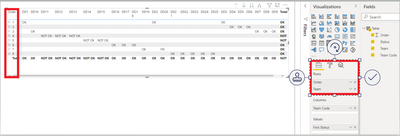
I added Order and Team columns in matrix table Row Level but both columns are showing within the same row but I would like to see separately (Order and Team) in matrix table.


OrderTeamTeam CodeStatus
1INDDD1OK
1INDDD1OK
1INDDD1OK
2ENGDD2OK
2ENGDD2OK
2ENGDD2OK
3UKDD3OK
3UKDD3OK
3UKDD3OK
3UKDD3OK
4AUSDD4NOT OK
4AUSDD4NOT OK
4AUSDD4NOT OK
5SRIDD5NOT OK
5SRIDD5NOT OK
6PAKDD6OK
6PAKDD6OK
6PAKDD6OK
7WIDD7OK
7WIDD7OK
8SADD8OK
8SADD8OK
8SADD8OK
8SADD8OK
8SADD8OK


Matrix visual:

If I want to see the team then I need to expand every single order. 


Saxon10_0-1627072782983.png


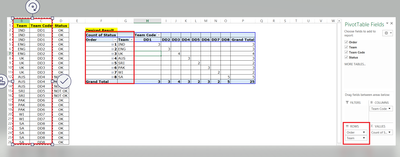
In Excel I am can add multiple columns in row level and I can ignore the sub total. I would like to get the same thing in Power BI matrix table in visual level.


Any advise please


Desired output


Saxon10_1-1627073170870.png


1 ACCEPTED SOLUTION
vanessafvg
Community Champion
Community Champion

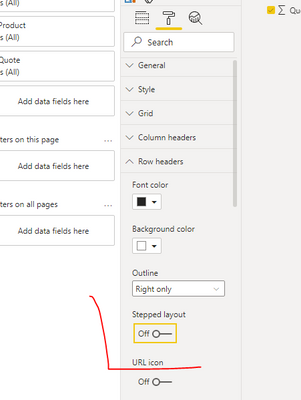
you can turn off the stepped layout in the row headers settings, you will still need to expand but its on one line


see if that helps.

vanessafvg_0-1627074141475.png


If I took the time to answer your question and I came up with a solution, please mark my post as a solution and /or give kudos freely for the effort 🙂 Thank you!

Proud to be a Super User!


View solution in original post

3 REPLIES 3
vanessafvg
Community Champion
Community Champion

you can turn off the stepped layout in the row headers settings, you will still need to expand but its on one line


see if that helps.

vanessafvg_0-1627074141475.png


If I took the time to answer your question and I came up with a solution, please mark my post as a solution and /or give kudos freely for the effort 🙂 Thank you!

Proud to be a Super User!


Anonymous
Not applicable

Agreed, its a nice trick.  But if you have many rows, sub optimal.  How would one line up both on the same row WITHOUT having to expand?  

Hi,


Thanks for your reply and help. It's nice trick.


Helpful resources

Announcements
New to Fabric survey Carousel

New to Fabric Survey

If you have recently started exploring Fabric, we'd love to hear how it's going. Your feedback can help with product improvements.

Power BI DataViz World Championships carousel

Power BI DataViz World Championships - June 2026

A new Power BI DataViz World Championship is coming this June! Don't miss out on submitting your entry.

Join our Fabric User Panel

Join our Fabric User Panel

Share feedback directly with Fabric product managers, participate in targeted research studies and influence the Fabric roadmap.

March Power BI Update Carousel

Power BI Community Update - March 2026

Check out the March 2026 Power BI update to learn about new features.