Join us at FabCon Atlanta from March 16 - 20, 2026, for the ultimate Fabric, Power BI, AI and SQL community-led event. Save $200 with code FABCOMM.
Register now!The Power BI Data Visualization World Championships is back! Get ahead of the game and start preparing now! Learn more
HI All,
I require five level of access in my report with Admin role, it should also be maintained by one single table and i should have a single role category as well.
Lets say i require Vertical, Client,Geo,jobcode and Admin role, but i will not be adding hierarchies as entries in my configuration table i will enter only the required value. for eg:
This the hierarchieal entry which user might not be able to update
User | vertical | Client | jobcode | Geo | SpecialRole |
| abc@org.com | Tech | Micosoft | 100 | India |
|
| def@org.com |
|
|
|
| Admin |
This the expected data provided from the user
User | vertical | Client | jobcode | Geo | SpecialRole |
abc@org.com | Tech |
|
|
|
|
def@org.com |
|
|
|
| Admin |
1. Above user abc when he log's in he supposed to view All Client,Jobcode and Geo Under Tech vertical
2. The challenge is to overcome blank values and achieving Admin role (overall access) in single role category.
Help me to achive this functionality
Thank in Advance.
Solved! Go to Solution.
Hi Bhavani,
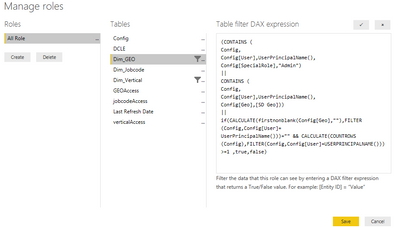
Here you go, please add the same logic for your other dimensions as well.
(CONTAINS (
Config,
Config[User],
UserPrincipalName(),
Config[SpecialRole],
"Admin"
)
||
CONTAINS (
Config,
Config[User],
UserPrincipalName(),
Config[Geo],
[SD Geo]
))
||
if(CALCULATE(firstnonblank(Config[Geo],""),FILTER(Config,Config[User]=
UserPrincipalName()))="" && CALCULATE(COUNTROWS(Config),FILTER(Config,Config[User]=USERPRINCIPALNAME()))>=1 ,true,false)
Hope it helps..
Hi Bhavani,
Here you go, please add the same logic for your other dimensions as well.
(CONTAINS (
Config,
Config[User],
UserPrincipalName(),
Config[SpecialRole],
"Admin"
)
||
CONTAINS (
Config,
Config[User],
UserPrincipalName(),
Config[Geo],
[SD Geo]
))
||
if(CALCULATE(firstnonblank(Config[Geo],""),FILTER(Config,Config[User]=
UserPrincipalName()))="" && CALCULATE(COUNTROWS(Config),FILTER(Config,Config[User]=USERPRINCIPALNAME()))>=1 ,true,false)
Hope it helps..
The Power BI Data Visualization World Championships is back! Get ahead of the game and start preparing now!
Check out the November 2025 Power BI update to learn about new features.
| User | Count |
|---|---|
| 59 | |
| 43 | |
| 42 | |
| 23 | |
| 17 |
| User | Count |
|---|---|
| 190 | |
| 122 | |
| 96 | |
| 66 | |
| 47 |