cancel
Showing results for 
Search instead for 
Did you mean: 

The Power BI Data Visualization World Championships is back! Get ahead of the game and start preparing now! Learn more

Reply
Anonymous
Not applicable

Multiple if statement

Hi,


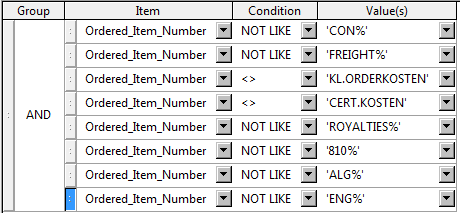
In our query tool beneeth multiple if statement is made. Can some one advice how to build this in Power BI?


I am especially interested in how to code the multiple if statement (I get the message that not more than 2 are acceptable) and how to code the validation on certain text in a certain column, so the 'not like' rows in the picture.


Conditions.png


Thanks in advance!

1 ACCEPTED SOLUTION
v-piga-msft
Resident Rockstar
Resident Rockstar

Hi @Anonymous,


For another option, you also could have a good look at this blog Multi Condition Logic In Power Query.


Best  Regards,
Cherry

Community Support Team _ Cherry Gao
If this post helps, then please consider Accept it as the solution to help the other members find it more quickly.

View solution in original post

2 REPLIES 2
v-piga-msft
Resident Rockstar
Resident Rockstar

Hi @Anonymous,


For another option, you also could have a good look at this blog Multi Condition Logic In Power Query.


Best  Regards,
Cherry

Community Support Team _ Cherry Gao
If this post helps, then please consider Accept it as the solution to help the other members find it more quickly.
Anonymous
Not applicable

@Anonymous,

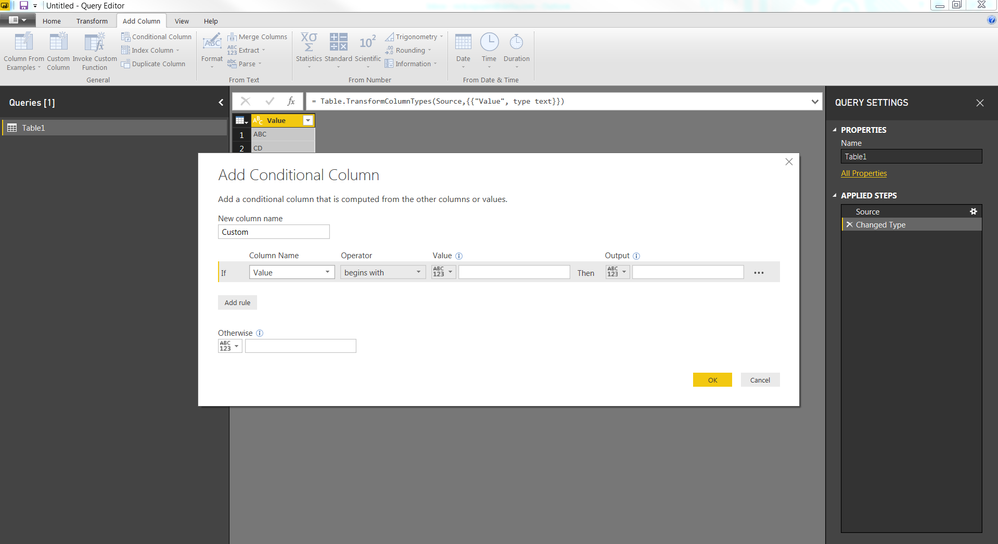
You can create a Conditional column and select begins with in Operator section in Query EditorConditionalColumn.PNG


Helpful resources

Announcements
Power BI DataViz World Championships

Power BI Dataviz World Championships

The Power BI Data Visualization World Championships is back! Get ahead of the game and start preparing now!

December 2025 Power BI Update Carousel

Power BI Monthly Update - December 2025

Check out the December 2025 Power BI Holiday Recap!

FabCon Atlanta 2026 carousel

FabCon Atlanta 2026

Join us at FabCon Atlanta, March 16-20, for the ultimate Fabric, Power BI, AI and SQL community-led event. Save $200 with code FABCOMM.