Join us at FabCon Atlanta from March 16 - 20, 2026, for the ultimate Fabric, Power BI, AI and SQL community-led event. Save $200 with code FABCOMM.
Register now!Vote for your favorite vizzies from the Power BI Dataviz World Championship submissions. Vote now!
Hi,
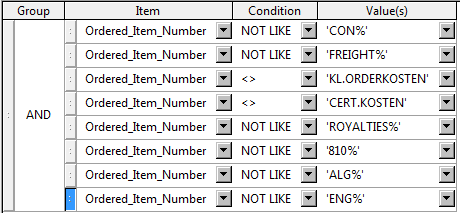
In our query tool beneeth multiple if statement is made. Can some one advice how to build this in Power BI?
I am especially interested in how to code the multiple if statement (I get the message that not more than 2 are acceptable) and how to code the validation on certain text in a certain column, so the 'not like' rows in the picture.
Thanks in advance!
Solved! Go to Solution.
Hi @Anonymous,
For another option, you also could have a good look at this blog Multi Condition Logic In Power Query.
Best Regards,
Cherry
Hi @Anonymous,
For another option, you also could have a good look at this blog Multi Condition Logic In Power Query.
Best Regards,
Cherry
@Anonymous,
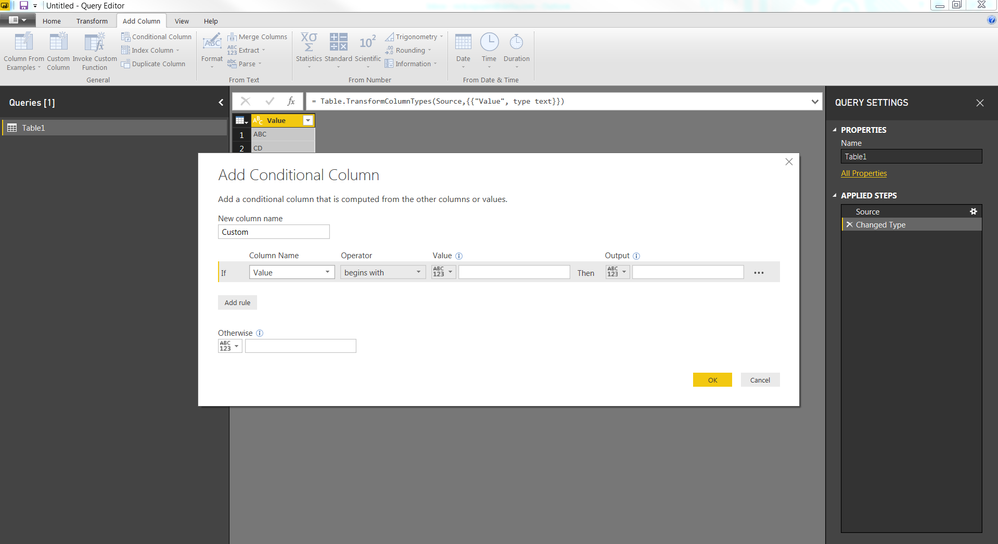
You can create a Conditional column and select begins with in Operator section in Query Editor
Vote for your favorite vizzies from the Power BI World Championship submissions!
If you love stickers, then you will definitely want to check out our Community Sticker Challenge!
Check out the January 2026 Power BI update to learn about new features.
| User | Count |
|---|---|
| 56 | |
| 52 | |
| 45 | |
| 17 | |
| 16 |
| User | Count |
|---|---|
| 108 | |
| 107 | |
| 39 | |
| 33 | |
| 25 |