cancel
Showing results for 
Search instead for 
Did you mean: 

Vote for your favorite vizzies from the Power BI Dataviz World Championship submissions. Vote now!

Reply
jtanajewski
New Member

Multiple datasets

Can you have multiple datasets in a dashboard?  I've enable Preview option - DirectQuery for PBI datasets and AS, but can't add other data sources.  Like to add multiple streaming datasets and other DB/xls sources, and be able to model and View Data.  Also, don't see Modrling - Make changes to Model option.

1 ACCEPTED SOLUTION
Anonymous
Not applicable

Hi  @jtanajewski ,

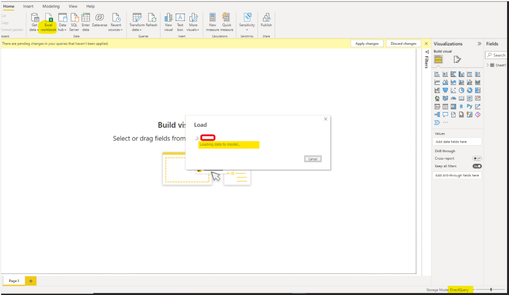
According to the test, I can add another data source here.

I first obtained data through Power bi dataset, the connection mode was Live Connection, and then I converted it to DQ mode, and finally successfully added an Excel data source.

vyangliumsft_0-1656056012498.png

If we are in DQ connection mode at the beginning, we can see the Data window, but there is no data in it.

Data window does not exist after converting from Live to DQ.

vyangliumsft_1-1656056012498.png

Refer to:

https://docs.microsoft.com/en-us/power-bi/connect-data/desktop-directquery-datasets-azure-analysis-s...


Best Regards,

Liu Yang

If this post helps, then please consider Accept it as the solution to help the other members find it more quickly.

View solution in original post

1 REPLY 1
Anonymous
Not applicable

Hi  @jtanajewski ,

According to the test, I can add another data source here.

I first obtained data through Power bi dataset, the connection mode was Live Connection, and then I converted it to DQ mode, and finally successfully added an Excel data source.

vyangliumsft_0-1656056012498.png

If we are in DQ connection mode at the beginning, we can see the Data window, but there is no data in it.

Data window does not exist after converting from Live to DQ.

vyangliumsft_1-1656056012498.png

Refer to:

https://docs.microsoft.com/en-us/power-bi/connect-data/desktop-directquery-datasets-azure-analysis-s...


Best Regards,

Liu Yang

If this post helps, then please consider Accept it as the solution to help the other members find it more quickly.

Helpful resources

Announcements
Power BI DataViz World Championships

Power BI Dataviz World Championships

Vote for your favorite vizzies from the Power BI World Championship submissions!

Sticker Challenge 2026 Carousel

Join our Community Sticker Challenge 2026

If you love stickers, then you will definitely want to check out our Community Sticker Challenge!

January Power BI Update Carousel

Power BI Monthly Update - January 2026

Check out the January 2026 Power BI update to learn about new features.

FabCon Atlanta 2026 carousel

FabCon Atlanta 2026

Join us at FabCon Atlanta, March 16-20, for the ultimate Fabric, Power BI, AI and SQL community-led event. Save $200 with code FABCOMM.