cancel
Showing results for 
Search instead for 
Did you mean: 

The Power BI Data Visualization World Championships is back! Get ahead of the game and start preparing now! Learn more

Reply
Lili123
Regular Visitor

Multiple data in same visual

Hello,


In my data base, each line corresponds to a given item. Each item has a begining date and a end date in 2 differents columns.


I would like to compare the quantity of begining and end date in a period (month by month) in the same visual. 

I tried severeal approches, but I can't do what I need. 

Item                     Begining                        end

A                         dec 2021                        jan 2022

B                          jan 2022                        fev 2022

In that exemple, I would like to have a chart with january 1 begining & 1 end // february 0 begining & 1 end

Do you have an idea on how I can do that ?

Thanks for your help.

1 ACCEPTED SOLUTION
Anonymous
Not applicable

Hi @Lili123 ,


Below is my solution.

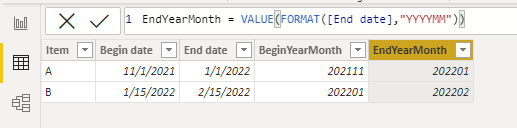
1.Create the yearmonth number column for the begin date and the end date.

BeginYearMonth = VALUE(FORMAT([Begin date],"YYYYMM"))
EndYearMonth = VALUE(FORMAT([End date],"YYYYMM"))
vstephenmsft_1-1653468629229.png


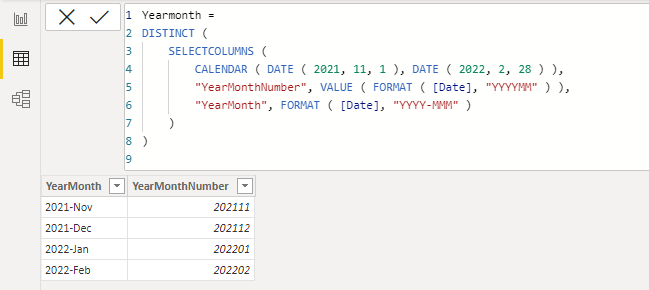
2.Create a Yearmonth table.

Yearmonth =
DISTINCT (
    SELECTCOLUMNS (
        CALENDAR ( DATE ( 2021, 11, 1 ), DATE ( 2022, 2, 28 ) ),
        "YearMonthNumber", VALUE ( FORMAT ( [Date], "YYYYMM" ) ),
        "YearMonth", FORMAT ( [Date], "YYYY-MMM" )
    )
)
vstephenmsft_0-1653468618346.png


3.Create a measure to return 1 when the YearMonthNumber in the Yearmonth table is between begin and end.

Measure =
VAR _NUM =
    MAX ( 'Yearmonth'[YearMonthNumber] )
VAR _BE =
    MAX ( 'Table'[BeginYearMonth] )
VAR _EN =
    MAX ( 'Table'[EndYearMonth] )
RETURN
    IF ( _BE <= _NUM && _NUM <= _EN, 1 )


4.Create another measure to sum up.

Measure 2 = SUMX('Table',[Measure])

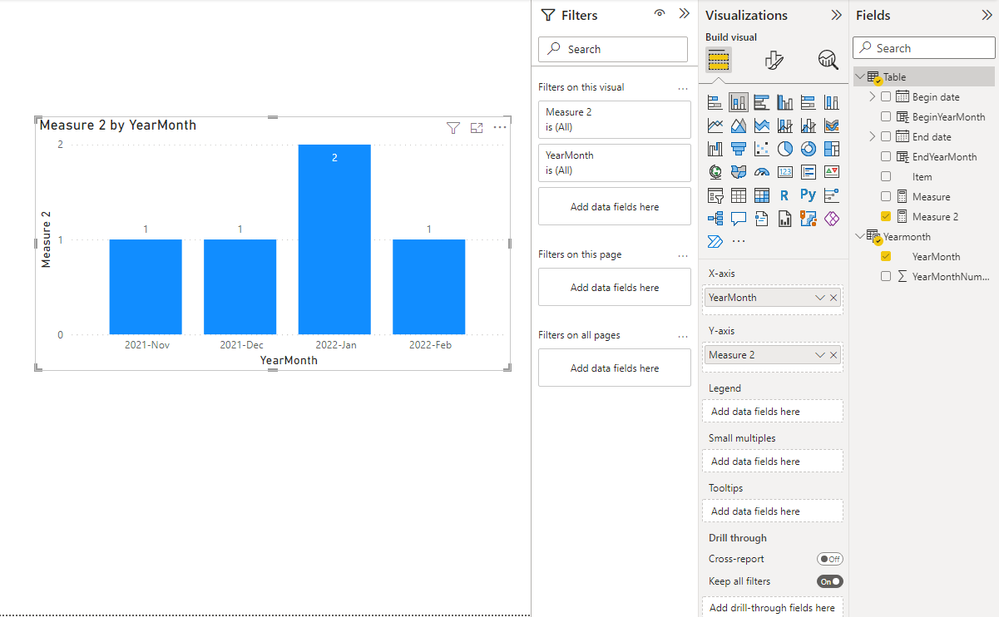
Here's the result.
vstephenmsft_2-1653468890350.png


Best Regards,

Stephen Tao


If this post helps, then please consider Accept it as the solution to help the other members find it more quickly.

View solution in original post

2 REPLIES 2
Anonymous
Not applicable

Hi @Lili123 ,


Below is my solution.

1.Create the yearmonth number column for the begin date and the end date.

BeginYearMonth = VALUE(FORMAT([Begin date],"YYYYMM"))
EndYearMonth = VALUE(FORMAT([End date],"YYYYMM"))

vstephenmsft_1-1653468629229.png


2.Create a Yearmonth table.

Yearmonth =
DISTINCT (
    SELECTCOLUMNS (
        CALENDAR ( DATE ( 2021, 11, 1 ), DATE ( 2022, 2, 28 ) ),
        "YearMonthNumber", VALUE ( FORMAT ( [Date], "YYYYMM" ) ),
        "YearMonth", FORMAT ( [Date], "YYYY-MMM" )
    )
)

vstephenmsft_0-1653468618346.png


3.Create a measure to return 1 when the YearMonthNumber in the Yearmonth table is between begin and end.

Measure =
VAR _NUM =
    MAX ( 'Yearmonth'[YearMonthNumber] )
VAR _BE =
    MAX ( 'Table'[BeginYearMonth] )
VAR _EN =
    MAX ( 'Table'[EndYearMonth] )
RETURN
    IF ( _BE <= _NUM && _NUM <= _EN, 1 )


4.Create another measure to sum up.

Measure 2 = SUMX('Table',[Measure])

Here's the result.

vstephenmsft_2-1653468890350.png


Best Regards,

Stephen Tao


If this post helps, then please consider Accept it as the solution to help the other members find it more quickly.

amitchandak
Super User
Super User

@Lili123 ,The information you have provided is not making the problem clear to me. Can you please explain with an example?

But check if these two blogs can help

https://community.powerbi.com/t5/Community-Blog/How-to-divide-distribute-values-between-start-date-o...


https://community.powerbi.com/t5/Community-Blog/HR-Analytics-Active-Employee-Hire-and-Termination-tr...


Appreciate your Kudos.

Share with Power BI Enthusiasts: Full Power BI Video (20 Hours) YouTube
Microsoft Fabric Series 60+ Videos YouTube
Microsoft Fabric Hindi End to End YouTube

Helpful resources

Announcements
Power BI DataViz World Championships

Power BI Dataviz World Championships

The Power BI Data Visualization World Championships is back! Get ahead of the game and start preparing now!

December 2025 Power BI Update Carousel

Power BI Monthly Update - December 2025

Check out the December 2025 Power BI Holiday Recap!

FabCon Atlanta 2026 carousel

FabCon Atlanta 2026

Join us at FabCon Atlanta, March 16-20, for the ultimate Fabric, Power BI, AI and SQL community-led event. Save $200 with code FABCOMM.