Learn from the best! Meet the four finalists headed to the FINALS of the Power BI Dataviz World Championships! Register now
Hello,
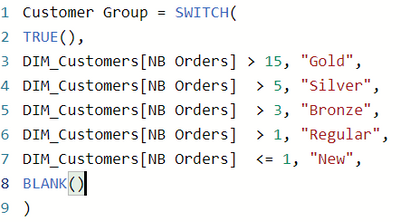
I have created the following formula to segment a table of customers according to their number of orders. I would like to add a condition to this formula which would be: "To be a Gold customer, the person must have ordered more than 15 times and spent $10,000", "To be a Silver customer, the person must have ordered more than 5 times and spent $7,000" for example. Is it possible to have 2 conditions in the SWITCH formula?
Thanks for your help!
Solved! Go to Solution.
@Louis63 , add additional condition
example
Switch(True() ,
[No] > 15 && [Spend] > 10000, "Gold" ,
// add others
)
Switch-Case statement of #PowerBI: https://www.youtube.com/watch?v=gelJWktlR80&list=PLPaNVDMhUXGaaqV92SBD5X2hk3TMNlHhb&index=56
@Louis63 , add additional condition
example
Switch(True() ,
[No] > 15 && [Spend] > 10000, "Gold" ,
// add others
)
Switch-Case statement of #PowerBI: https://www.youtube.com/watch?v=gelJWktlR80&list=PLPaNVDMhUXGaaqV92SBD5X2hk3TMNlHhb&index=56
| User | Count |
|---|---|
| 51 | |
| 35 | |
| 23 | |
| 17 | |
| 17 |
| User | Count |
|---|---|
| 70 | |
| 57 | |
| 40 | |
| 22 | |
| 22 |