cancel
Showing results for 
Search instead for 
Did you mean: 

The Power BI Data Visualization World Championships is back! It's time to submit your entry. Live now!

Reply
idlinzen
New Member

Multiple choice visualization

Hello,


I have a questionnaire with some multiple choice questions (i.e., subjects can choose more than one option). I want to create a chart (probably line chart, as there are several dates in which this survey was taken) or a table showing the percentage of subjects who chose each of the avilable options (so the percentages may add up to be above 100%).


Example:

UserBrand1Brand2Brand3Brand4Brand5Brand6Brand7Brand8
110010111
210000010
300100000
401110110
501000000
610010000
710001000
810111011
900101011


Do anyone have an idea how this can be done?


Thanks!


1 ACCEPTED SOLUTION
v-frfei-msft
Community Support
Community Support

Hi @idlinzen ,


I have created a sample for your reference, please check the following steps as below.

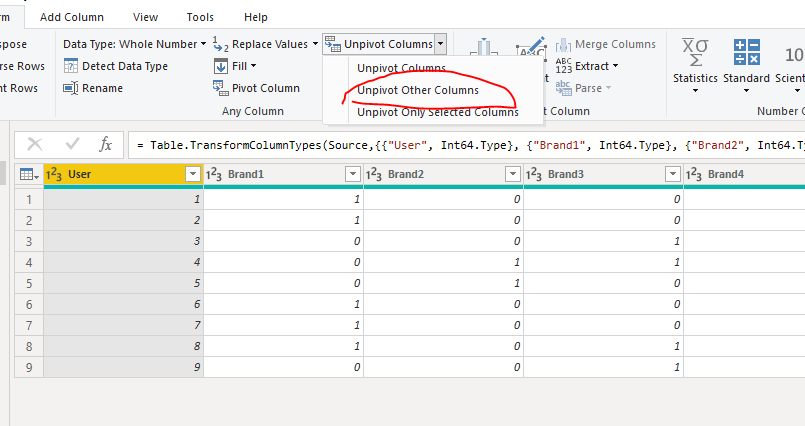
1. Unpivot the table as below in power query.

Capture.PNG


M code for your reference.

let
    Source = Table.FromRows(Json.Document(Binary.Decompress(Binary.FromText("i45WMlTSAWMDKDZEoiE4VidayQhNlQGGDpAqYyzmoGKQKhMMG1D5EFWmeM2BqTLD4XpUVeZYZAwxVFlg9T0yH6TKEkdYIamKBQA=", BinaryEncoding.Base64), Compression.Deflate)), let _t = ((type text) meta [Serialized.Text = true]) in type table [User = _t, Brand1 = _t, Brand2 = _t, Brand3 = _t, Brand4 = _t, Brand5 = _t, Brand6 = _t, Brand7 = _t, Brand8 = _t]),
    #"Changed Type" = Table.TransformColumnTypes(Source,{{"User", Int64.Type}, {"Brand1", Int64.Type}, {"Brand2", Int64.Type}, {"Brand3", Int64.Type}, {"Brand4", Int64.Type}, {"Brand5", Int64.Type}, {"Brand6", Int64.Type}, {"Brand7", Int64.Type}, {"Brand8", Int64.Type}}),
    #"Unpivoted Other Columns" = Table.UnpivotOtherColumns(#"Changed Type", {"User"}, "Attribute", "Value")
in
    #"Unpivoted Other Columns"


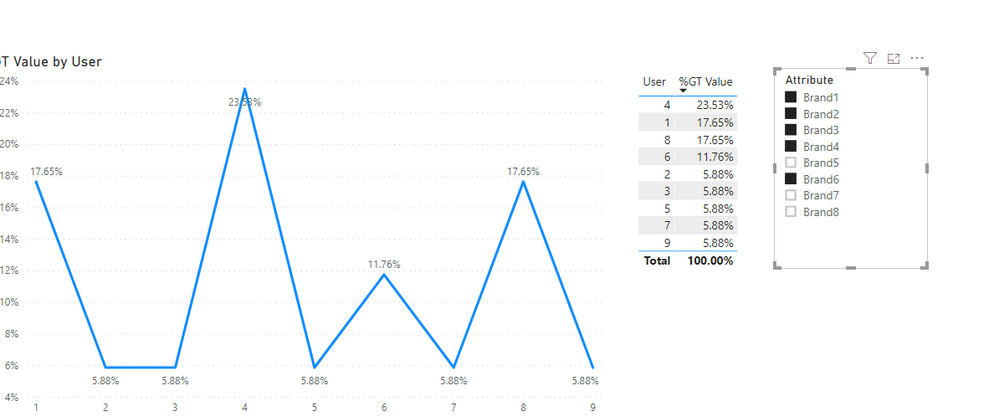
2. Then we can get excepted result we need.

2.PNG


For more details, please check the pbix as attached.


Community Support Team _ Frank
If this post helps, then please consider Accept it as the solution to help the others find it more quickly.

View solution in original post

2 REPLIES 2
v-frfei-msft
Community Support
Community Support

Hi @idlinzen ,


I have created a sample for your reference, please check the following steps as below.

1. Unpivot the table as below in power query.

Capture.PNG


M code for your reference.

let
    Source = Table.FromRows(Json.Document(Binary.Decompress(Binary.FromText("i45WMlTSAWMDKDZEoiE4VidayQhNlQGGDpAqYyzmoGKQKhMMG1D5EFWmeM2BqTLD4XpUVeZYZAwxVFlg9T0yH6TKEkdYIamKBQA=", BinaryEncoding.Base64), Compression.Deflate)), let _t = ((type text) meta [Serialized.Text = true]) in type table [User = _t, Brand1 = _t, Brand2 = _t, Brand3 = _t, Brand4 = _t, Brand5 = _t, Brand6 = _t, Brand7 = _t, Brand8 = _t]),
    #"Changed Type" = Table.TransformColumnTypes(Source,{{"User", Int64.Type}, {"Brand1", Int64.Type}, {"Brand2", Int64.Type}, {"Brand3", Int64.Type}, {"Brand4", Int64.Type}, {"Brand5", Int64.Type}, {"Brand6", Int64.Type}, {"Brand7", Int64.Type}, {"Brand8", Int64.Type}}),
    #"Unpivoted Other Columns" = Table.UnpivotOtherColumns(#"Changed Type", {"User"}, "Attribute", "Value")
in
    #"Unpivoted Other Columns"


2. Then we can get excepted result we need.

2.PNG


For more details, please check the pbix as attached.


Community Support Team _ Frank
If this post helps, then please consider Accept it as the solution to help the others find it more quickly.
amitchandak
Super User
Super User

I think, better you unpivot the data

https://radacad.com/pivot-and-unpivot-with-power-bi


Share with Power BI Enthusiasts: Full Power BI Video (20 Hours) YouTube
Microsoft Fabric Series 60+ Videos YouTube
Microsoft Fabric Hindi End to End YouTube

Helpful resources

Announcements
December 2025 Power BI Update Carousel

Power BI Monthly Update - December 2025

Check out the December 2025 Power BI Holiday Recap!

FabCon Atlanta 2026 carousel

FabCon Atlanta 2026

Join us at FabCon Atlanta, March 16-20, for the ultimate Fabric, Power BI, AI and SQL community-led event. Save $200 with code FABCOMM.