cancel
Showing results for 
Search instead for 
Did you mean: 

Learn from the best! Meet the four finalists headed to the FINALS of the Power BI Dataviz World Championships! Register now

Reply
nicv
New Member

Multiple choice column from SharePoint Lists

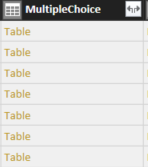
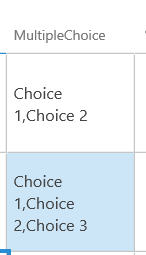
Hi. I am using a SharePoint List from Office 365 as a data source. One column I created in this list is a multiple choice one. The problem is that when I pull the data from the SharePoint List, the respective column shows as being a table in the query editor. When I search for the column name when building my report, the table can't be found.


The first photo below shows how the column looks like in the query editor. The second one shows how the column looks like in SharePoint. As you can see, I selected multiple options when filling out the respective cell, but can't extract the data in Power BI. Would you please be able to help?

MultipleChoice.PNG

MultipleChoiceinSPO.PNG


6 REPLIES 6
Greg_Deckler
Community Champion
Community Champion

See those little arrows pointing in opposite directions in your column? Click on that button and expand your Table in order to get the value.


Follow on LinkedIn
@ me in replies or I'll lose your thread!!!
Instead of a Kudo, please vote for this idea
Become an expert!: Enterprise DNA
External Tools: MSHGQM
YouTube Channel!: Microsoft Hates Greg
Latest book!:
DAX For Humans

DAX is easy, CALCULATE makes DAX hard...

I am trying to test Power BI analysis over a SharePoint list, and my fields also allow multiple responses (from a seperate sub list).


When I query the primary table, the fields return ' [list] ' in every row regardless of what is in the actual list. How do I relate this back to the sub-list tables, or expose the responses?


ID.1

RoleID

9

[List]

5

[List]

6

[List]

8

[List]

Hlello,

I'm facing the same problem with the multiple choices element, anyone got a solution for it?

edit query > field value as text > select columns 

Hi, 

dealing with the same here. anyone got a solution for it?

Hello, 

I'm facing the same problem with the multiple choices element, anyone get a solution for it?

Helpful resources

Announcements
New to Fabric survey Carousel

New to Fabric Survey

If you have recently started exploring Fabric, we'd love to hear how it's going. Your feedback can help with product improvements.

Power BI DataViz World Championships carousel

Power BI DataViz World Championships - June 2026

A new Power BI DataViz World Championship is coming this June! Don't miss out on submitting your entry.

Join our Fabric User Panel

Join our Fabric User Panel

Share feedback directly with Fabric product managers, participate in targeted research studies and influence the Fabric roadmap.

March Power BI Update Carousel

Power BI Community Update - March 2026

Check out the March 2026 Power BI update to learn about new features.