Join us at FabCon Atlanta from March 16 - 20, 2026, for the ultimate Fabric, Power BI, AI and SQL community-led event. Save $200 with code FABCOMM.
Register now!The Power BI Data Visualization World Championships is back! Get ahead of the game and start preparing now! Learn more
Hi all,
I am having trouble and was wondering if someone could please help and advise me.
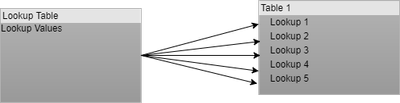
I have a SharePoint custom list which contains 5 lookup columns all of the same lookup, for example:
The issue I have is that all five lookup columns lookup to the same list, I know that in Power BI it is not possible to create relationships like so:
I am just wondering what the best way to work around this would be as I require to be able to build reports based on the lookup value.
I have already tried a few different methods to get this working but so far had no luck.
Appreciate any help and advice.
Solved! Go to Solution.
Hi @Adam13Hylo,
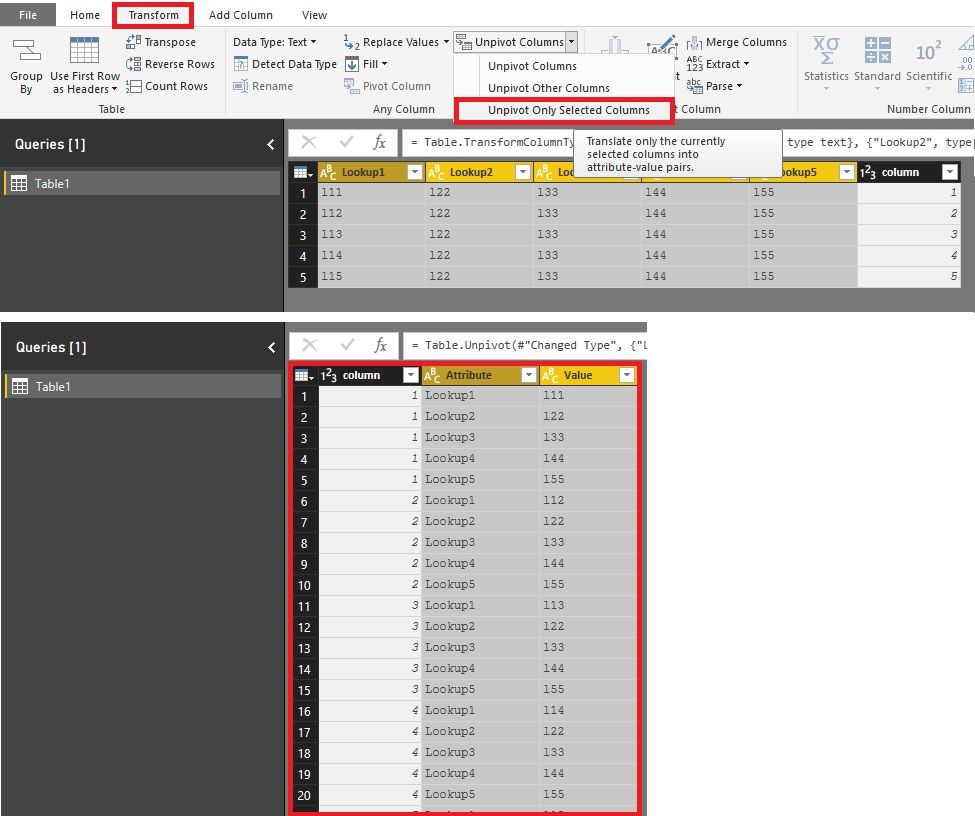
If we can combine the five columns into one, it will be easy to create relationship.
1. Open Query Editor;
2. Select the five columns with "Shift" or "Ctrl";
3. Click "Unpivot Only Selected Column".
4. Change column names if needed.
Best Regards!
Dale
Hi @Adam13Hylo,
If we can combine the five columns into one, it will be easy to create relationship.
1. Open Query Editor;
2. Select the five columns with "Shift" or "Ctrl";
3. Click "Unpivot Only Selected Column".
4. Change column names if needed.
Best Regards!
Dale
The Power BI Data Visualization World Championships is back! Get ahead of the game and start preparing now!
| User | Count |
|---|---|
| 39 | |
| 37 | |
| 33 | |
| 32 | |
| 29 |
| User | Count |
|---|---|
| 133 | |
| 88 | |
| 85 | |
| 68 | |
| 64 |