This time we’re going bigger than ever. Fabric, Power BI, SQL, AI and more. We're covering it all. You won't want to miss it.
Learn moreLevel up your Power BI skills this month - build one visual each week and tell better stories with data! Get started
Solved! Go to Solution.
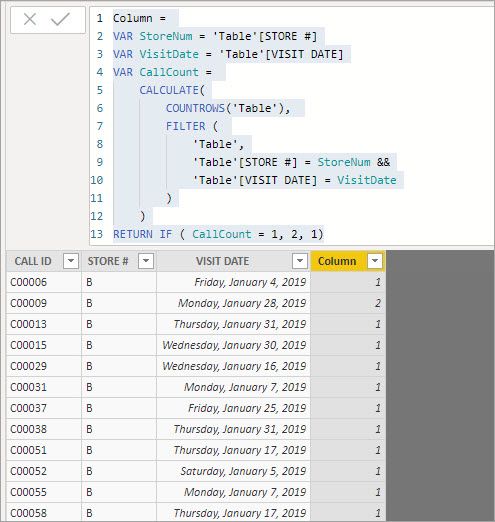
I'm not sure but I am guessing you want it as a column so you can put it in a slicer? If so, you can add a calculated column to your table that will give you the same result:
Column =
VAR StoreNum = 'Table'[STORE #]
VAR VisitDate = 'Table'[VISIT DATE]
VAR CallCount =
CALCULATE(
COUNTROWS('Table'),
FILTER (
'Table',
'Table'[STORE #] = StoreNum &&
'Table'[VISIT DATE] = VisitDate
)
)
RETURN IF ( CallCount = 1, 2, 1)Hello @Anonymous
The following measure will return the result you are looking for, you will just have to change the name of your table.
Measure =
VAR StoreNum = VALUES('Table'[STORE #] )
VAR VisitDate = VALUES('Table'[VISIT DATE] )
VAR CallCount =
CALCULATE(
COUNTROWS ( 'Table' ),
ALL ( 'Table'[CALL ID] )
,StoreNum
,VisitDate
)
RETURN
IF ( CallCount = 1, 2, 1)I also uploaded my testing .pbix so you can take a look it it: https://www.dropbox.com/s/jyoxwrae8rmz5y8/CallIDCount.pbix?dl=0
The RowCount measure just counts the rows in 'Table'. If we look at a STORE # and VISIT DATE pair we can see the ones that have more than 1 CALL ID. Further, if you click on a line in the first visual it will filter the second visual to show just the CALL ID that hit in that STORE # on that VISIT DATE.
Is there a way to do this measure in Power Query Editor?
I'm not sure but I am guessing you want it as a column so you can put it in a slicer? If so, you can add a calculated column to your table that will give you the same result:
Column =
VAR StoreNum = 'Table'[STORE #]
VAR VisitDate = 'Table'[VISIT DATE]
VAR CallCount =
CALCULATE(
COUNTROWS('Table'),
FILTER (
'Table',
'Table'[STORE #] = StoreNum &&
'Table'[VISIT DATE] = VisitDate
)
)
RETURN IF ( CallCount = 1, 2, 1)This is perfect, thank you!
Check out the April 2026 Power BI update to learn about new features.
Sign up to receive a private message when registration opens and key events begin.
If you have recently started exploring Fabric, we'd love to hear how it's going. Your feedback can help with product improvements.
| User | Count |
|---|---|
| 36 | |
| 29 | |
| 29 | |
| 21 | |
| 18 |
| User | Count |
|---|---|
| 71 | |
| 43 | |
| 33 | |
| 24 | |
| 23 |