We've captured the moments from FabCon & SQLCon that everyone is talking about, and we are bringing them to the community, live and on-demand. Starts on April 14th. Register now
Hello Team,
Can anyone help me with the scenario or example related? I'm new to power bi and learning.
We had a requirement to create filter data for multiple columns.
The Scenario is companies get their contracts renewed every 3 years. If they don't want to renew then it will be considered discontinued. Any help very much appreciated.
Columns as --Company Name,Date of issue,Status(Active,Expired,Discontinue),Category(New,End Of cycle-3years) ,ID'setc.
The issue is when the company has completed its contract for 3 years -and renewed.. they were generated with new IDs and categories as New.
For Example - Company A, Company B, Company C
| Company Name | Status | Date of Issue | ID | Category |
| Company A | Expired | 07/15/2019 | IDA | End of Cycle |
| Company B | Active | 08/08/2020 | IDB | New |
| Company C | Discontinued | 08/06/2018 | IDC | End of Cycle |
Table 2 :
| Company Name | Status | Date of Issue | ID | Category | |
| Company A | Active | 07/16/2022 | IDA1 | New | |
| Company B | Active | 08/08/2020 | IDB | New | |
| Company C | Discontinued | 08/06/2018 | IDC | End of Cycle | |
Company D | Active | 08/08/2022 | IDD | New |
Company A was created on the year 07/15/2019 -completed the 3 years cycle on 7/14/2022 -Their ID was given as ID A.Status is Expired.
Now Company A went for renewal in the year 2022. Their ID was generated New as !D A1.Status as Active and Category as New.
Similarly, other companies got discontinued in between, etc. New companies took new contracts.
How do I filter to know which company has completed 3 years of cycle and went for renewal? Which are new clients for this year etc.
Any help is Very much appreciated.Thank you in advance.
Solved! Go to Solution.
Hi @Salesforce ,
Please try:
Create two measures:
New =
var _a = CALCULATE(COUNT('Table'[Company Name]),FILTER('Table',[Company Name]=MAX('Table 2'[Company Name])))
return IF(MAX('Table 2'[Status])="Active"&&_a=BLANK(),1,0)
Renew =
var _a = CALCULATE(MAX('Table'[Status]),FILTER('Table',[Company Name]=MAX('Table 2'[Company Name])))
return IF(MAX('Table 2'[Status])="Active"&&_a="Expired",1,0)
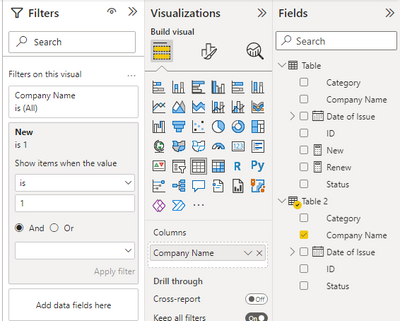
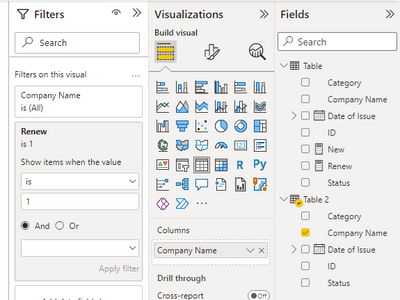
Then create two table visuals(using 'Table 2'[Company Name]) and apply these measures to the visuals(one by one):
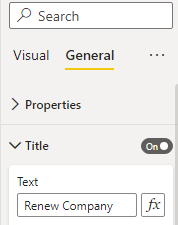
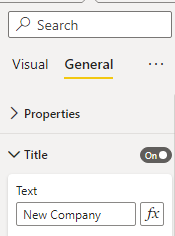
Then turn on the title of these visuals:
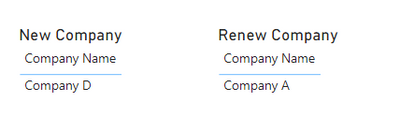
Final output:
Best Regards,
Jianbo Li
If this post helps, then please consider Accept it as the solution to help the other members find it more quickly.
Hi @Salesforce ,
Please try:
Create two measures:
New =
var _a = CALCULATE(COUNT('Table'[Company Name]),FILTER('Table',[Company Name]=MAX('Table 2'[Company Name])))
return IF(MAX('Table 2'[Status])="Active"&&_a=BLANK(),1,0)
Renew =
var _a = CALCULATE(MAX('Table'[Status]),FILTER('Table',[Company Name]=MAX('Table 2'[Company Name])))
return IF(MAX('Table 2'[Status])="Active"&&_a="Expired",1,0)
Then create two table visuals(using 'Table 2'[Company Name]) and apply these measures to the visuals(one by one):
Then turn on the title of these visuals:
Final output:
Best Regards,
Jianbo Li
If this post helps, then please consider Accept it as the solution to help the other members find it more quickly.
If you have recently started exploring Fabric, we'd love to hear how it's going. Your feedback can help with product improvements.
A new Power BI DataViz World Championship is coming this June! Don't miss out on submitting your entry.
Share feedback directly with Fabric product managers, participate in targeted research studies and influence the Fabric roadmap.
| User | Count |
|---|---|
| 53 | |
| 38 | |
| 33 | |
| 17 | |
| 17 |
| User | Count |
|---|---|
| 67 | |
| 62 | |
| 38 | |
| 34 | |
| 22 |