Join us in Barcelona for FabCon and SQLCon, September 28 - October 1, 2026.
This is best Fabric, Power BI, SQL and AI community event. How do we know? The last event sold out! Save €200 with code FABCMTY200.
Register now- Power BI forums
- Get Help with Power BI
- Desktop
- Service
- Report Server
- Power Query
- Mobile Apps
- Developer
- DAX Commands and Tips
- Custom Visuals Development Discussion
- Health and Life Sciences
- Power BI Spanish forums
- Translated Spanish Desktop
- Training and Consulting
- Instructor Led Training
- Dashboard in a Day for Women, by Women
- Galleries
- Data Stories Gallery
- Themes Gallery
- Contests Gallery
- QuickViz Gallery
- Quick Measures Gallery
- Visual Calculations Gallery
- Fabric Apps Gallery
- Notebook Gallery
- Translytical Task Flow Gallery
- TMDL Gallery
- R Script Showcase
- Webinars and Video Gallery
- Ideas
- Custom Visuals Ideas (read-only)
- Issues
- Issues
- Events
- Upcoming Events
July 28 - August 9 | Final Round of the Power BI Dataviz World Championships. This is your chance. Learn more
- Power BI forums
- Forums
- Get Help with Power BI
- Desktop
- Re: Multi conditional switch statement
- Subscribe to RSS Feed
- Mark Topic as New
- Mark Topic as Read
- Float this Topic for Current User
- Bookmark
- Subscribe
- Printer Friendly Page

- Mark as New
- Bookmark
- Subscribe
- Mute
- Subscribe to RSS Feed
- Permalink
- Report Inappropriate Content
Multi conditional switch statement
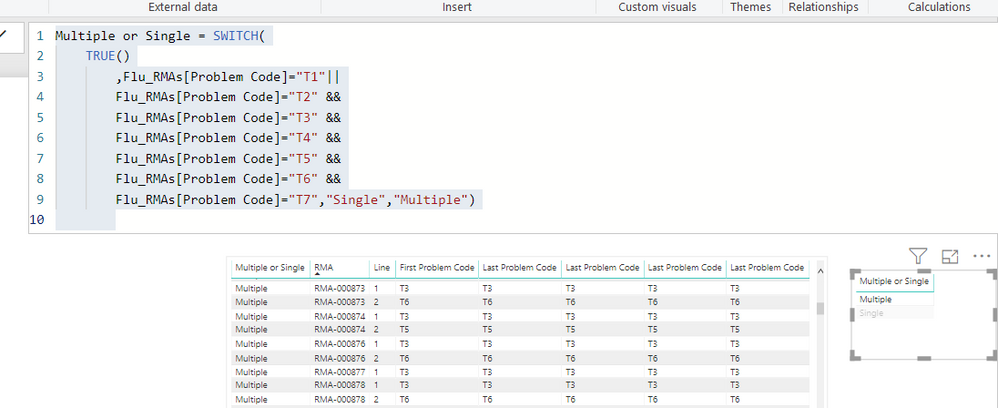
Hello - I have a situaiton where I have a Switch statment that only partially works. I am curious if there is a better way to write this (that actually works!) or perhaps use VAR.
My use case is that I have returns (we call them RMA Orders) and these orders can have multiple lines to them. Or just a single line.
Since these are returns, there is a problem code associated with them (T1 - T7). One order can sometimes have multiple problem codes, even if it is just a single line Order. Or, and Order can have multiple lines to it, and each line has a different problem code.
If an Order (regardless of the number of lines) has just one problem code associated with it, I need the newly created column to say "Single" on that row that contains the Order number. If the Order has multiple product codes associated (again...whether it is a one line order or several lines), then each row for that Order needs to say "Multiple".
Although not completely correct, you can get some idea of how this should look by looking at the first two rows below. Order RMA-000873 has two lines to it. Each line has a different product code associated with it (and could in theory, have many different product codes associated with it). The current formula does correctly say "Multiple", but there are many other rows that incorrectly say Single or Multiple so I know the formula is not working.
Ideally, I wish I could put both the && and || operators together as this would logically fit what I need. In other words, if the Order = just one product code, then Single. If it equals 2 or more, then Multiple.
Solved! Go to Solution.


- Mark as New
- Bookmark
- Subscribe
- Mute
- Subscribe to RSS Feed
- Permalink
- Report Inappropriate Content
One more ) right before your RETURN statement
Multiple or Single =
  VAR __Table =
    DISTINCT(
      SELECTCOLUMNS(
        FILTER(
          ALL('Table'),
          [RMA] = EARLIER([RMA])
        ),
        "__Problem Code",[Problem Code]
      )
    )
RETURN
  IF(COUNTROWS(__Table) > 1,"Multiple","Single")
Follow on LinkedIn
@ me in replies or I'll lose your thread!!!
Instead of a Kudo, please vote for this idea
Become an expert!: Enterprise DNA
External Tools: MSHGQM
YouTube Channel!: Microsoft Hates Greg
Latest book!: DAX For Humans
DAX is easy, CALCULATE makes DAX hard...
- Mark as New
- Bookmark
- Subscribe
- Mute
- Subscribe to RSS Feed
- Permalink
- Report Inappropriate Content
So, no sample text data provided and I don't like typing so going to wing this DAX calculation, apologies in advance for syntax errors. This is for a column.
Multiple or Single =
  VAR __Table =
    DISTINCT(
      SELECTCOLUMNS(
        FILTER(
          ALL('Table'),
          [RMA] = EARLIER([RMA])
        ),
        "__Problem Code",[Problem Code]
    )
RETURN
  IF(COUNTROWS(__Table) > 1,"Multiple","Single")
Follow on LinkedIn
@ me in replies or I'll lose your thread!!!
Instead of a Kudo, please vote for this idea
Become an expert!: Enterprise DNA
External Tools: MSHGQM
YouTube Channel!: Microsoft Hates Greg
Latest book!: DAX For Humans
DAX is easy, CALCULATE makes DAX hard...
- Mark as New
- Bookmark
- Subscribe
- Mute
- Subscribe to RSS Feed
- Permalink
- Report Inappropriate Content
Thanks Greg. I do get two errors. When I hover over the __Table it says "Parameter is not the correct type. Cannot find name __Table.
And it says the syntax for Return is incorrect.
Any idea why this is happening?

- Mark as New
- Bookmark
- Subscribe
- Mute
- Subscribe to RSS Feed
- Permalink
- Report Inappropriate Content
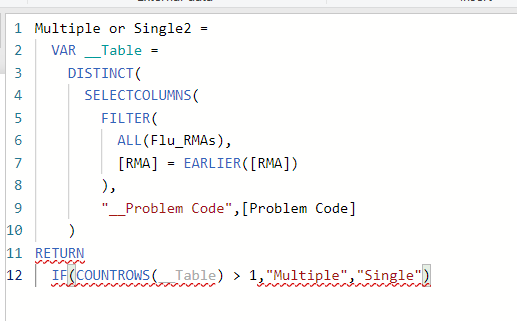
In your VAR statement, replace the comma at the end with a )
I believe that should fix it.
Follow on LinkedIn
@ me in replies or I'll lose your thread!!!
Instead of a Kudo, please vote for this idea
Become an expert!: Enterprise DNA
External Tools: MSHGQM
YouTube Channel!: Microsoft Hates Greg
Latest book!: DAX For Humans
DAX is easy, CALCULATE makes DAX hard...
- Mark as New
- Bookmark
- Subscribe
- Mute
- Subscribe to RSS Feed
- Permalink
- Report Inappropriate Content
Thanks Greg - Sorry to trouble you but I still got an error. The red lines are saying 1) a syntax error with Return, and 2) the other two red lines say these are "Unexpected Expressions".
So close....!
- Mark as New
- Bookmark
- Subscribe
- Mute
- Subscribe to RSS Feed
- Permalink
- Report Inappropriate Content
One more ) right before your RETURN statement
Multiple or Single =
  VAR __Table =
    DISTINCT(
      SELECTCOLUMNS(
        FILTER(
          ALL('Table'),
          [RMA] = EARLIER([RMA])
        ),
        "__Problem Code",[Problem Code]
      )
    )
RETURN
  IF(COUNTROWS(__Table) > 1,"Multiple","Single")
Follow on LinkedIn
@ me in replies or I'll lose your thread!!!
Instead of a Kudo, please vote for this idea
Become an expert!: Enterprise DNA
External Tools: MSHGQM
YouTube Channel!: Microsoft Hates Greg
Latest book!: DAX For Humans
DAX is easy, CALCULATE makes DAX hard...
- Mark as New
- Bookmark
- Subscribe
- Mute
- Subscribe to RSS Feed
- Permalink
- Report Inappropriate Content
One last question...just trying to understand the "why" of this part of the formula. I undersand all of the rest, but do not understand how the "__Problem Code", [Problem Code] works? What is the __Problem Code as it does not seem to be a VAR? Many thanks again for your help.
- Mark as New
- Bookmark
- Subscribe
- Mute
- Subscribe to RSS Feed
- Permalink
- Report Inappropriate Content
Sure, when you use SELECTCOLUMNS you have to specify a name for the column you are "creating" and then what column to select. So the name of the column in the calculation "__Produce Code" and the column that is selected is the "Problem Code" column in the table. SELECTCOLUMNS returns a table with the column names that you specify and those columns have the values of the column in the original table you are selecting from.
Now, the next question that you are likely to ask is why I didn't just use:
"Problem Code",[Problem Code]
And just name the column the same name as before. The reason is that this can become VERY confusing as to which "Problem Code" column you are referring to, especially with DAX's intellisense. I find it better to prefix things that I create as VAR's and such with "__". This ensures that I know what the heck I am referring to later in my DAX code. When you write complex DAX, trust me, it is very helpful to keep things straight in some manner like this.
Follow on LinkedIn
@ me in replies or I'll lose your thread!!!
Instead of a Kudo, please vote for this idea
Become an expert!: Enterprise DNA
External Tools: MSHGQM
YouTube Channel!: Microsoft Hates Greg
Latest book!: DAX For Humans
DAX is easy, CALCULATE makes DAX hard...
- Mark as New
- Bookmark
- Subscribe
- Mute
- Subscribe to RSS Feed
- Permalink
- Report Inappropriate Content
That did it Greg!! Thank you so much. The Power Bi forum is seriously amazing. Everyone is so helpful. And a great learning resource as other more experienced users help folks like me with these formulas....so that we may study and learn from them.
Good stuff!
Helpful resources

FabCon & SQLCon – Barcelona 2026
Join us in Barcelona for FabCon and SQLCon, the Fabric, Power BI, SQL, and AI community event. Save €200 with code FABCMTY200.

Fabric Community Sticker Challenge - Barcelona 2026
If you love stickers, then you will definitely want to check out our community sticker challenge, Barcelona edition!

Power BI Monthly Update - July 2026
Check out the July 2026 Power BI update to learn about new features.

Power BI DataViz World Championships - June 2026
A new Power BI DataViz World Championship is coming this June! Don't miss out on submitting your entry.

| User | Count |
|---|---|
| 25 | |
| 23 | |
| 19 | |
| 17 | |
| 14 |


| User | Count |
|---|---|
| 24 | |
| 20 | |
| 20 | |
| 19 | |
| 19 |


