cancel
Showing results for 
Search instead for 
Did you mean: 

The FabCon + SQLCon recap series starts April 14th at 8am Pacific. If you’re tracking where AI is going inside Fabric, this first session is a can't miss. Register now

Reply
Lars_Janssen
Regular Visitor

Multi-Row Card formatting Column to Row

Hello all,


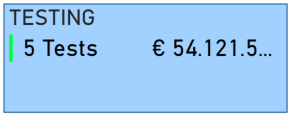
I have a bit of a visual problem using multi-row cards. The cards contain a title and 2 number values. The width and height is set as I use multiple cards. Automatically, the visual puts the numbers next to eachother as seen in the picture below:

Multi row card.png

Instead, I would like these values to be written underneath eachother, like rows. It even cuts off part of the 2nd value....

Any way to override this fromatting?


Thank you!

Lars

5 REPLIES 5
v-lionel-msft
Community Support
Community Support

Hi @Lars_Janssen ,


Has your problem been solved?


Best regards,
Lionel Chen

If this post helps, then please consider Accept it as the solution to help the other members find it more quickly.

v-lionel-msft
Community Support
Community Support

Hi @Lars_Janssen ,


This is very strange, my visual is arranged in rows by default.

dd3.PNG

What's your version of the PBI Desktop? Please try to update to the latest version(2.81.5831.821 64-bit (May 2020)).


Best regards,
Lionel Chen

If this post helps, then please consider Accept it as the solution to help the other members find it more quickly.

amitchandak
Super User
Super User

@Lars_Janssen , see if this visual can help

https://appsource.microsoft.com/en-us/product/power-bi-visuals/WA104381083?tab=Overview

Share with Power BI Enthusiasts: Full Power BI Video (20 Hours) YouTube
Microsoft Fabric Series 60+ Videos YouTube
Microsoft Fabric Hindi End to End YouTube
Pragati11
Super User
Super User

Hi @Lars_Janssen ,


Try to decrease the width of your multi-card, the values should align vertically.


If this helps and resolves the issue, appreciate a Kudos and mark it as a Solution! 🙂


Thanks,

Pragati

Best Regards,

Pragati Jain


MVP logo


LinkedIn | Twitter | Blog YouTube 

Did I answer your question? Mark my post as a solution! This will help others on the forum!

Appreciate your Kudos!!

Proud to be a Super User!!

parry2k
Super User
Super User

@Lars_Janssen I don't think there is much formatting available maybe try to use OKViz card visual from the market place.


I would  Kudos if my solution helped. 👉 If you can spend time posting the question, you can also make efforts to give Kudos whoever helped to solve your problem. It is a token of appreciation!


Subscribe to the @PowerBIHowTo YT channel for an upcoming video on List and Record functions in Power Query!!

Learn Power BI and Fabric - subscribe to our YT channel - Click here: @PowerBIHowTo

If my solution proved useful, I'd be delighted to receive Kudos. When you put effort into asking a question, it's equally thoughtful to acknowledge and give Kudos to the individual who helped you solve the problem. It's a small gesture that shows appreciation and encouragement! ❤


Did I answer your question? Mark my post as a solution. Proud to be a Super User! Appreciate your Kudos 🙂
Feel free to email me with any of your BI needs.

Helpful resources

Announcements
New to Fabric survey Carousel

New to Fabric Survey

If you have recently started exploring Fabric, we'd love to hear how it's going. Your feedback can help with product improvements.

Power BI DataViz World Championships carousel

Power BI DataViz World Championships - June 2026

A new Power BI DataViz World Championship is coming this June! Don't miss out on submitting your entry.

Join our Fabric User Panel

Join our Fabric User Panel

Share feedback directly with Fabric product managers, participate in targeted research studies and influence the Fabric roadmap.

March Power BI Update Carousel

Power BI Community Update - March 2026

Check out the March 2026 Power BI update to learn about new features.