Join us at FabCon Atlanta from March 16 - 20, 2026, for the ultimate Fabric, Power BI, AI and SQL community-led event. Save $200 with code FABCOMM.
Register now!Get Fabric Certified for FREE during Fabric Data Days. Don't miss your chance! Request now
I have created multiple slicers dependent on each other. The problem I am facing is that whenever I am changing the selection of the first slicer then its depending slicer is also changing (which is correct) but its keep the last selected value until I select the new value.
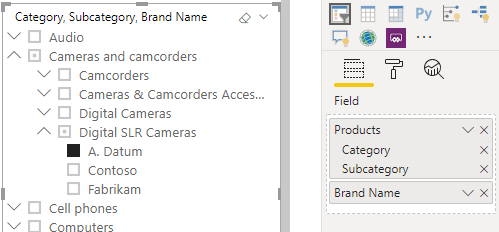
@Anonymous , Try Hierarchical Slicer from Feb 2020 release
https://powerbi.microsoft.com/en-us/blog/power-bi-desktop-february-2020-feature-summary/
@Anonymous
Use a hierarchy slicer. You can use the default slicer as a hierarchy slicer or get the custom visual from the store.
https://powerbi.microsoft.com/en-us/blog/power-bi-desktop-february-2020-feature-summary/
Also, you could disable the interaction between the multiple slicers, so that one selection will not filter out other slicers.
https://docs.microsoft.com/en-us/power-bi/service-reports-visual-interactions
Did I answer your question? Mark my post as a solution!
Appreciate with a kudos 🙂
Thanks for providing the solution. Now I have two levels slicer with region and country as levels. However when I select a country under the region level it shows Multiple Selections as selection instead of the country name. I have attached the screenshot also.
@Anonymous Since you are using the slicer as dropdown, it is expected. Please change it as a list. Or maybe you can write a new DAX measure to show selected items.
https://community.powerbi.com/t5/Desktop/display-multiple-elements-with-SELECTEDVALUE/td-p/650754
Check out the November 2025 Power BI update to learn about new features.
Advance your Data & AI career with 50 days of live learning, contests, hands-on challenges, study groups & certifications and more!