Join us at FabCon Atlanta from March 16 - 20, 2026, for the ultimate Fabric, Power BI, AI and SQL community-led event. Save $200 with code FABCOMM.
Register now!The Power BI Data Visualization World Championships is back! Get ahead of the game and start preparing now! Learn more
Hi,
We can filter multi column using visual level filter in Matrix in power bi.
I tried to filter multiple column by using IF functionin DAX and Edit Query. But getting different value.
comp vol2 = IF('Table1'[comp status]="pass",1,IF('Table1'[comp status]="fail",1,IF('Table1'[Work Cat]="uw",1,0)))
Please find attached .pbix file and let me know is possible to filter multiple column using IF function or any other function or formula.
https://drive.google.com/file/d/1YsorLAFOHqKZ_aexsP23axkchoucQ_bz/view?usp=sharing
Regards,
Salem
Solved! Go to Solution.
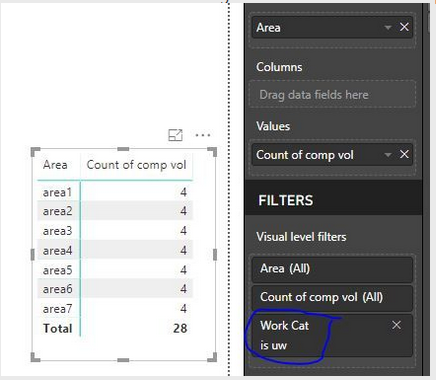
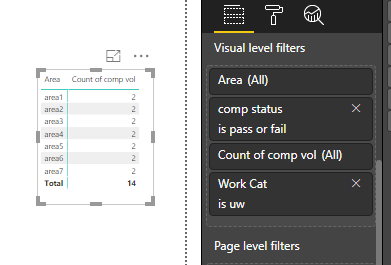
I hope you realise the reason why you are getting 28 in the first visual, is because you did not put the filter condition of comp status = "pass" AND "fail". Do you want this condition ? If no, simply delete it from the formula.
No comp status condition present in the filters section
After putting the comp status filter condition
I think you are trying to count all compvol entries in the table which have comp status as "pass" or "fail" and work cat as "uw". You can try the below.
CompVol2Measure =
CALCULATE (
COUNTROWS ( Table1 ),
FILTER (
Table1,
Table1[comp status] IN { "pass", "fail" }
&& Table1[Work Cat] = "uw"
)
)
Hi Nikhil,
Thanks for your reply.
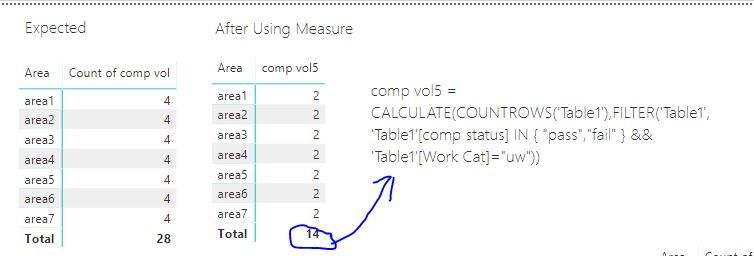
I have created the measure and found half of expected matrix.
Please have a look is it possible to make the value 28 instead of 14.
Regards,
Salem
I hope you realise the reason why you are getting 28 in the first visual, is because you did not put the filter condition of comp status = "pass" AND "fail". Do you want this condition ? If no, simply delete it from the formula.
No comp status condition present in the filters section
After putting the comp status filter condition
The Power BI Data Visualization World Championships is back! Get ahead of the game and start preparing now!
| User | Count |
|---|---|
| 42 | |
| 41 | |
| 33 | |
| 30 | |
| 27 |
| User | Count |
|---|---|
| 134 | |
| 114 | |
| 59 | |
| 57 | |
| 57 |