Join us at FabCon Atlanta from March 16 - 20, 2026, for the ultimate Fabric, Power BI, AI and SQL community-led event. Save $200 with code FABCOMM.
Register now!The Power BI Data Visualization World Championships is back! Get ahead of the game and start preparing now! Learn more
Hi
I have the following table1. This is connected live to the power BI dataset and I want to create a measure to calculate the moving range of Response
| woid | Response |
| 1 | 10 |
| 3 | 1 |
| 4 | 3 |
| 6 | 4 |
| 7 | 5 |
| 10 | 6 |
| 11 | 4 |
| 12 | 3 |
| 20 | 45 |
| 24 | 7 |
| 26 | 10 |
This is connected live to the power BI dataset and I want an outcome like the 3rd column shown below.
Note: I cannot create measure columns as this is a live connected PBI dataset
| woid | Response | Moving Range |
| 1 | 10 | 0 |
| 3 | 1 | 9 |
| 4 | 3 | 2 |
| 6 | 4 | 1 |
| 7 | 5 | 1 |
| 10 | 6 | 1 |
| 11 | 4 | 2 |
| 12 | 3 | 1 |
| 20 | 45 | 42 |
| 24 | 7 | 38 |
| 26 | 10 | 3 |
How can I achieve this?
thank you
You cannot do that with a live dataset. Convert to Direct Query with local model.
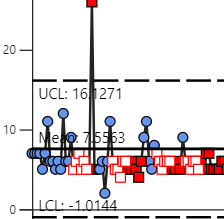
If this cannot be done I wonder how the company PQsystems that sells these MR I chart visuals are able to calculate it ?
The Power BI Data Visualization World Championships is back! Get ahead of the game and start preparing now!
| User | Count |
|---|---|
| 37 | |
| 36 | |
| 32 | |
| 31 | |
| 29 |
| User | Count |
|---|---|
| 132 | |
| 86 | |
| 85 | |
| 68 | |
| 64 |