Join us at FabCon Atlanta from March 16 - 20, 2026, for the ultimate Fabric, Power BI, AI and SQL community-led event. Save $200 with code FABCOMM.
Register now!The Power BI Data Visualization World Championships is back! Get ahead of the game and start preparing now! Learn more
potential simple question but we split the year into 13 periods (2018/19 P01, for example) and so would like a Moving Average of the last 13 periods but all DAX i have seen is based on date functionality. could somebody help with the solution to this please?
Hi @jockeywockey,
Maybe you can share a sample of your model with us.
Best Regards,
Dale
Hi, thanks for the reply. I have not had chance to fully look at this but I will come back shortly with if the original reply worked but if not I will post a sample file to explain what my request is
Hey @jockeywockey
Try creating a measure like this:
13PeriodMovingAverage =
VAR CurrentPeriod = FIRSTNONBLANK(Sales[Period],1)
RETURN
CALCULATE(
SUM(Sales[SalesAmount]),
FILTER(
FILTER(ALLSELECTED(Sales), Sales[Period] <= CurrentPeriod),
Sales[Period] > CurrentPeriod - 13
)
)
/
CALCULATE(
DISTINCTCOUNT(Sales[Period]),
FILTER(
FILTER(ALLSELECTED(Sales), Sales[Period] <= CurrentPeriod),
Sales[Period] > CurrentPeriod - 13
)
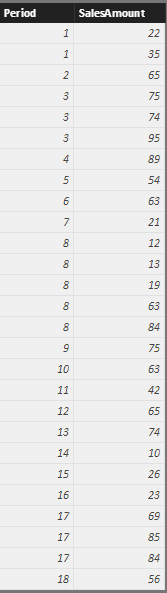
)This works if your periods are numeric so you may have to figure out how to convert your text periods to whole numbers. See below:
Hope this helps,
Parker
The Power BI Data Visualization World Championships is back! Get ahead of the game and start preparing now!
| User | Count |
|---|---|
| 40 | |
| 37 | |
| 35 | |
| 34 | |
| 28 |
| User | Count |
|---|---|
| 136 | |
| 99 | |
| 73 | |
| 66 | |
| 65 |