cancel
Showing results for 
Search instead for 
Did you mean: 

Vote for your favorite vizzies from the Power BI Dataviz World Championship submissions. Vote now!

Reply
InsureBI
Advocate II
Advocate II

Moving Average Formula ERROR

I have a table of policy coverage and effective date and I am trying to compute a daily moving average of premium.  Here is the formula I constructed, utilizing answers to similar questions on this forum.


SumCov = SUM (Policy[Coverage])

MovAvg = CALCULATE(AVERAGE(Policy[SumCov]),FILTER(ALL(Policy),Policy[EFF_DATE] <= EARLIER(Policy[EFF_DATE])))


The (simplified) Policy table with the computed measures SumCov and MovAvg should look like this:

Coverage, Eff_Date,SumCov,MovAvg

100, 6/1/2016,100,100

200,6/2/2016,900,300

600,6/2/2016,900,300

100,6/3/2016,1000,250


The formula for the new measure (MovAvg) results in the following error:

"Failed to resolve name 'SumCov'. It is not a valid table, variable, or function name."


It looks like I can't use a new measure inside a function.  If so, how should I go about computing the daily moving average.


Thank you.


5 REPLIES 5
Sean
Community Champion
Community Champion

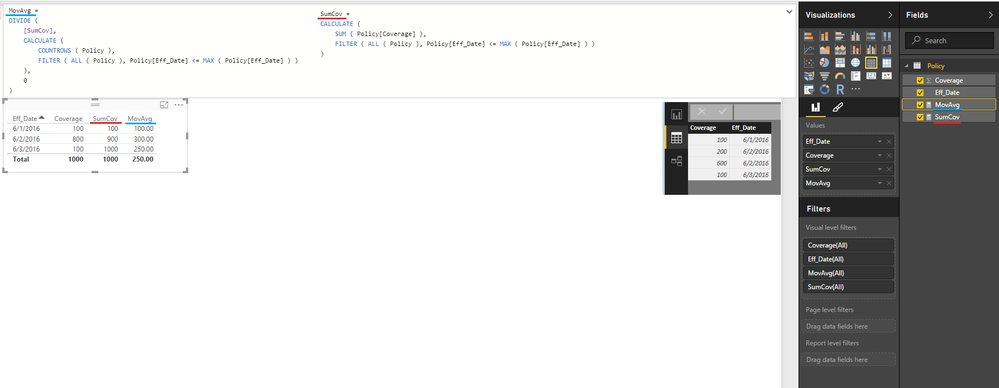
@InsureBI Try these MEASURES


SumCov MEASURE =
CALCULATE (
    SUM ( Policy[Coverage] ),
    FILTER ( ALL ( Policy ), Policy[Eff_Date] <= MAX ( Policy[Eff_Date] ) )
)

MovAvg MEASURE =
DIVIDE (
    [SumCov],
    CALCULATE (
        COUNTROWS ( Policy ),
        FILTER ( ALL ( Policy ), Policy[Eff_Date] <= MAX ( Policy[Eff_Date] ) )
    ),
    0
)

@Sean thanks, this works with one change.  Replace MAX with EARLIER.


Your help is much appreciated.

Sean
Community Champion
Community Champion

@InsureBI I read your post to mean you want a MovAvg => MEASURE Smiley Happy So that's what I provided...


DAX - Moving Average.png


Apparently you want a Calculated COLUMN so go with @Vvelarde's formula

Vvelarde
Community Champion
Community Champion


MovAvg = CALCULATE(AVERAGE(Policy[Coverage]),FILTER(ALL(Policy),Policy[EFF_DATE] <= EARLIER(Policy[EFF_DATE])))


Lima - Peru

Thanks.


So you are suggesting that I drop the table reference to the calculated measure.  I did and got the same error message. 

Helpful resources

Announcements
Power BI DataViz World Championships

Power BI Dataviz World Championships

Vote for your favorite vizzies from the Power BI World Championship submissions!

Sticker Challenge 2026 Carousel

Join our Community Sticker Challenge 2026

If you love stickers, then you will definitely want to check out our Community Sticker Challenge!

January Power BI Update Carousel

Power BI Monthly Update - January 2026

Check out the January 2026 Power BI update to learn about new features.

FabCon Atlanta 2026 carousel

FabCon Atlanta 2026

Join us at FabCon Atlanta, March 16-20, for the ultimate Fabric, Power BI, AI and SQL community-led event. Save $200 with code FABCOMM.