Join us at FabCon Atlanta from March 16 - 20, 2026, for the ultimate Fabric, Power BI, AI and SQL community-led event. Save $200 with code FABCOMM.
Register now!The Power BI Data Visualization World Championships is back! Get ahead of the game and start preparing now! Learn more
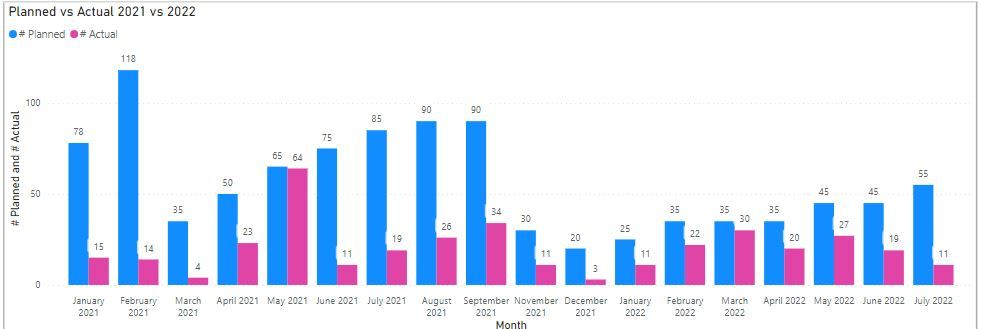
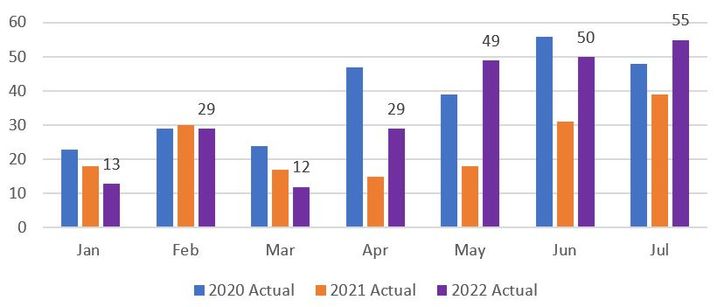
Hello, i have created a viz that displays the months in chronological order for Planned vs Actual (see first screenshot), however i want to show a month by month comparison despite the year. For example i want to show Jan 2021 and then Jan 2022 next to it. Feb 2021 and then Feb 2022 next to it and so forth rather than how it is showing now. Like in the second screenshot that i created in Excel. Hope this makes sense, any help would be appreciated.
@ameera_williams , Create this year vs last year's measure.
Year behind Sales = CALCULATE(SUM(Sales[Sales Amount]),dateadd('Date'[Date],-1,Year))
Year behind Sales = CALCULATE(SUM(Sales[Sales Amount]),SAMEPERIODLASTYEAR('Date'[Date]))
or
This year Month = CALCULATE(sum('Table'[Qty]), FILTER(ALL('Date'),'Date'[Year]=max('Date'[Year]) && 'Date'[Month] = Max('Date'[Month]) ))
Last year Month = CALCULATE(sum('Table'[Qty]), FILTER(ALL('Date'),'Date'[Year]=max('Date'[Year])-1 && 'Date'[Month] = Max('Date'[Month])))
Thanks Amit. I have created the measure, what do i do with it now?
The Power BI Data Visualization World Championships is back! Get ahead of the game and start preparing now!
| User | Count |
|---|---|
| 39 | |
| 37 | |
| 33 | |
| 32 | |
| 29 |
| User | Count |
|---|---|
| 133 | |
| 88 | |
| 85 | |
| 68 | |
| 64 |