FabCon is coming to Atlanta
Join us at FabCon Atlanta from March 16 - 20, 2026, for the ultimate Fabric, Power BI, AI and SQL community-led event. Save $200 with code FABCOMM.
Register now!- Power BI forums
- Get Help with Power BI
- Desktop
- Service
- Report Server
- Power Query
- Mobile Apps
- Developer
- DAX Commands and Tips
- Custom Visuals Development Discussion
- Health and Life Sciences
- Power BI Spanish forums
- Translated Spanish Desktop
- Training and Consulting
- Instructor Led Training
- Dashboard in a Day for Women, by Women
- Galleries
- Data Stories Gallery
- Themes Gallery
- Contests Gallery
- QuickViz Gallery
- Quick Measures Gallery
- Visual Calculations Gallery
- Notebook Gallery
- Translytical Task Flow Gallery
- TMDL Gallery
- R Script Showcase
- Webinars and Video Gallery
- Ideas
- Custom Visuals Ideas (read-only)
- Issues
- Issues
- Events
- Upcoming Events
The Power BI Data Visualization World Championships is back! Get ahead of the game and start preparing now! Learn more
- Power BI forums
- Forums
- Get Help with Power BI
- Desktop
- Re: Monthly Sum
- Subscribe to RSS Feed
- Mark Topic as New
- Mark Topic as Read
- Float this Topic for Current User
- Bookmark
- Subscribe
- Printer Friendly Page

- Mark as New
- Bookmark
- Subscribe
- Mute
- Subscribe to RSS Feed
- Permalink
- Report Inappropriate Content
Monthly Sum
Working towards building a formula, but I believe I need to do this in pieces so I'm not confusing anyone. I've asked this a few times and still haven't found my answer... So I will start simple:
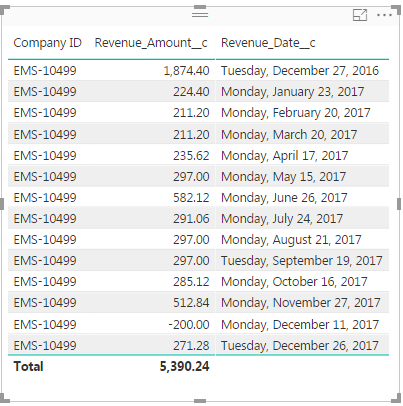
How can I get the monthly sum for the latest month in this table? (71.28) I'm trying to set it up to where as new monthly revenue comes in, it is getting the total for the latest month and multiplying that figure by 12.
Solved! Go to Solution.


- Mark as New
- Bookmark
- Subscribe
- Mute
- Subscribe to RSS Feed
- Permalink
- Report Inappropriate Content
@Anonymous
Try putting the *12 after the last parenthesis.
Regards
Victor
Lima - Peru
Lima - Peru
- Mark as New
- Bookmark
- Subscribe
- Mute
- Subscribe to RSS Feed
- Permalink
- Report Inappropriate Content
@Anonymous Hi, you can use this measure:
LastMonthRevenue =
VAR LastMonthRevenueDate =
    MONTH ( LASTDATE ( Table1[Revenue Date] ) )
VAR LastYearRevenueDate =
    YEAR ( LASTDATE ( Table1[Revenue Date] ) )
RETURN
    CALCULATE (
        SUM ( Table1[Revenue] );
        FILTER (
            Table1;
            MONTH ( Table1[Revenue Date] ) = LastMonthRevenueDate
                && YEAR ( Table1[Revenue Date] ) = LastYearRevenueDate
        )
    )
Regards
Victor
Lima - Peru
Lima - Peru
- Mark as New
- Bookmark
- Subscribe
- Mute
- Subscribe to RSS Feed
- Permalink
- Report Inappropriate Content
@Vvelarde I do have a follow up question if you don't mind. So my supervisors are trying to decide whether they want to see the latest set of records or the 2nd to last set of records. So if I wanted to set it up based on the 2nd to last set of data, how could I modify the given formula to go back an additional month from the latest month?
- Mark as New
- Bookmark
- Subscribe
- Mute
- Subscribe to RSS Feed
- Permalink
- Report Inappropriate Content
@Anonymous
Let's made a modification to the measure to be more simple
LastMonthRevenue_Reloaded =
VAR LastMonthRevenueDate =
    EOMONTH ( LASTDATE ( Table1[Revenue Date] ); 0 )
RETURN
    CALCULATE (
        SUM ( Table1[Revenue] );
        FILTER ( Table1; EOMONTH ( Table1[Revenue Date]; 0 ) = LastMonthRevenueDate )
    )
And -1 month:
LastMonthRevenue_Reloaded-1 =
VAR LastMonthRevenueDate_1 =
    EOMONTH ( LASTDATE ( Table1[Revenue Date] ); -1 )
RETURN
    CALCULATE (
        SUM ( Table1[Revenue] );
        FILTER ( Table1; EOMONTH ( Table1[Revenue Date]; 0 ) = LastMonthRevenueDate_1 )
    )
Regards
Victor
Lima - Peru
Lima - Peru
- Mark as New
- Bookmark
- Subscribe
- Mute
- Subscribe to RSS Feed
- Permalink
- Report Inappropriate Content
@Vvelarde These work perfectly. I really can't thank you enough! Thought I would never figure it out. Thanks again.
- Mark as New
- Bookmark
- Subscribe
- Mute
- Subscribe to RSS Feed
- Permalink
- Report Inappropriate Content

- Mark as New
- Bookmark
- Subscribe
- Mute
- Subscribe to RSS Feed
- Permalink
- Report Inappropriate Content
@Anonymous
Try putting the *12 after the last parenthesis.
Regards
Victor
Lima - Peru
Lima - Peru
- Mark as New
- Bookmark
- Subscribe
- Mute
- Subscribe to RSS Feed
- Permalink
- Report Inappropriate Content
@Vvelarde This is the second time you've literally saved my life. Thank you so much! Works like a charm.
Helpful resources

Power BI Dataviz World Championships
The Power BI Data Visualization World Championships is back! Get ahead of the game and start preparing now!

Power BI Monthly Update - December 2025
Check out the December 2025 Power BI Holiday Recap!

FabCon Atlanta 2026
Join us at FabCon Atlanta, March 16-20, for the ultimate Fabric, Power BI, AI and SQL community-led event. Save $200 with code FABCOMM.

| User | Count |
|---|---|
| 38 | |
| 36 | |
| 33 | |
| 32 | |
| 29 |


| User | Count |
|---|---|
| 129 | |
| 88 | |
| 79 | |
| 68 | |
| 63 |


