Hello,
I have a requirement to show active headcount and prorated salary by month based on the hire and termination dates for employees including future months from a forecasting perspective (see sample dataset below). I also need to calculate a cumulative running total for the prorated monthly salary.
| Employee ID | Employee Name | Department | Hire Date | Termination Date | Salary | SalaryMonthly |
| E101 | Emp Name 1 | Dept A | 9/15/2023 | 11/5/2023 | 120000 | 10000 |
| E102 | Emp Name 2 | Dept B | 11/25/2023 | | 120000 | 10000 |
| E103 | Emp Name 3 | Dept A | 10/1/2023 | | 120000 | 10000 |
| E104 | Emp Name 4 | Dept B | 10/20/2023 | 12/15/2023 | 120000 | 10000 |
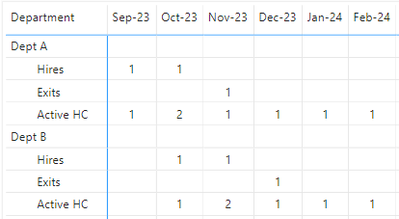
I was able to acheive the 1st part of the requirement for Active Headcount by creating the following 3 measures below:
# Hired = CALCULATE(COUNT('Employee'[Employee ID]),USERELATIONSHIP('Employee'[Hire Date],'Date'[Date]) )

# Exits = CALCULATE(COUNT('Employee'[Employee ID]),USERELATIONSHIP('Employee'[Termination Date Alt],'Date'[Date]),not(ISBLANK('Employee'[Termination Date Alt])))

# Active HC = CALCULATE(COUNTX(
    FILTER('Employee','Employee'[Hire Date]<=max('Date'[Date])
    && (ISBLANK('Employee'[Termination Date Alt]) || 'Employee'[Termination Date Alt]>max('Date'[Date]))),
    ('Employee'[Employee ID])),
    CROSSFILTER('Employee'[Hire Date],'Date'[Date],None))
Which gives me the below desired results:
The part I'm struggling w/ is how to create the measures to dynamically calculate the monthly salary amounts (prorated for the hire and termination months based on the hire and termination dates and how to show a cumulative running total for the monthly salary. I have researched this and I have found some solutions that get me close to what i'm looking for but they did not address all of the requirements specifically for my use case. I created the following table below manually to illustrate the desired results that I'm looking for and I used the below calculations to prorate the month salary:
Hire Month Proration: Monthly Salary / 30 * (Month End Date - Hire Date)
Termination Month Proration: Monthly Salary / 30 * (Term Date - Month Start Date)
| Employee ID | Department | Hire Date | Term Date | Month Start | Month End | SalaryMonthly | CumulativeSalaryMonthly |
| E101 | Dept A | 9/15/2023 | 11/5/2023 | 9/1/2023 | 9/30/2023 | 5000 | 5000 |
| E101 | Dept A | 9/15/2023 | 11/5/2023 | 10/1/2023 | 10/31/2023 | 10000 | 15000 |
| E101 | Dept A | 9/15/2023 | 11/5/2023 | 11/1/2023 | 11/30/2023 | 1333.333333 | 16333.33333 |
| E101 | Dept A | 9/15/2023 | 11/5/2023 | 12/1/2023 | 12/31/2023 | | 16333.33333 |
| E101 | Dept A | 9/15/2023 | 11/5/2023 | 1/1/2024 | 1/31/2024 | | 16333.33333 |
| E101 | Dept A | 9/15/2023 | 11/5/2023 | 2/1/2024 | 2/29/2024 | | 16333.33333 |
| E102 | Dept B | 11/25/2023 | | 9/1/2023 | 9/30/2023 | | |
| E102 | Dept B | 11/25/2023 | | 10/1/2023 | 10/31/2023 | | |
| E102 | Dept B | 11/25/2023 | | 11/1/2023 | 11/30/2023 | 1666.666667 | 1666.666667 |
| E102 | Dept B | 11/25/2023 | | 12/1/2023 | 12/31/2023 | 10000 | 11666.66667 |
| E102 | Dept B | 11/25/2023 | | 1/1/2024 | 1/31/2024 | 10000 | 21666.66667 |
| E102 | Dept B | 11/25/2023 | | 2/1/2024 | 2/29/2024 | 10000 | 31666.66667 |
| E103 | Dept A | 10/1/2023 | | 9/1/2023 | 9/30/2023 | | |
| E103 | Dept A | 10/1/2023 | | 10/1/2023 | 10/31/2023 | 10000 | 10000 |
| E103 | Dept A | 10/1/2023 | | 11/1/2023 | 11/30/2023 | 10000 | 20000 |
| E103 | Dept A | 10/1/2023 | | 12/1/2023 | 12/31/2023 | 10000 | 30000 |
| E103 | Dept A | 10/1/2023 | | 1/1/2024 | 1/31/2024 | 10000 | 40000 |
| E103 | Dept A | 10/1/2023 | | 2/1/2024 | 2/29/2024 | 10000 | 50000 |
| E104 | Dept B | 10/20/2023 | 12/15/2023 | 9/1/2023 | 9/30/2023 | | |
| E104 | Dept B | 10/20/2023 | 12/15/2023 | 10/1/2023 | 10/31/2023 | 3666.666667 | 3666.666667 |
| E104 | Dept B | 10/20/2023 | 12/15/2023 | 11/1/2023 | 11/30/2023 | 10000 | 13666.66667 |
| E104 | Dept B | 10/20/2023 | 12/15/2023 | 12/1/2023 | 12/31/2023 | 4666.666667 | 18333.33333 |
| E104 | Dept B | 10/20/2023 | 12/15/2023 | 1/1/2024 | 1/31/2024 | | 18333.33333 |
| E104 | Dept B | 10/20/2023 | 12/15/2023 | 2/1/2024 | 2/29/2024 | | 18333.33333 |
Below is the the summary view of the above table that I'm trying to incorporate into my pbix model.
| | 9/1/2023 | 10/1/2023 | 11/1/2023 | 12/1/2023 | 1/1/2024 | 2/1/2024 | Total |
| Dept A | | | | | | | |
| Monthly Salary | $5,000 | $20,000 | $11,333 | $10,000 | $10,000 | $10,000 | $66,333 |
| **bleep** Monthly Salary | $5,000 | $25,000 | $36,333 | $46,333 | $56,333 | $66,333 | |
| Dept B | | | | | | | |
| Monthly Salary | | $3,667 | $11,667 | $14,667 | $10,000 | $10,000 | $50,000 |
| **bleep** Monthly Salary | | $3,667 | $15,333 | $30,000 | $40,000 | $50,000 | |
Any guidance here would be much appreciated. 😁 P.S. I'm also attaching a link to the pbix file.