Don't miss your chance to take the Fabric Data Engineer (DP-700) exam on us!
Learn moreWe've captured the moments from FabCon & SQLCon that everyone is talking about, and we are bringing them to the community, live and on-demand. Starts on April 14th. Register now
Hi team,
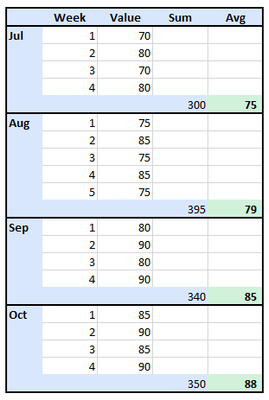
I have a 4-5-4 financial calendar where I have a different number of weeks each month. I am trying to compare monthly performance, and I cannot use the sum as each month has a different number of months, therefore I have calculated the weekly average of a month by dividing the monthly total by the number of weeks.
However, I am having a bit of trouble calculating Month on Month of that average value as I cannot use DATEADD. Looking for advice, many thanks in advance.
Hi @newyorker ,
The following DAX might work for you:
MonthlySum =
CALCULATE(SUM('Table'[Value]), ALLEXCEPT('Table', 'Table'[Month]))AveragePerWeek =
[MonthlySum] / DISTINCTCOUNT('Table'[Week])
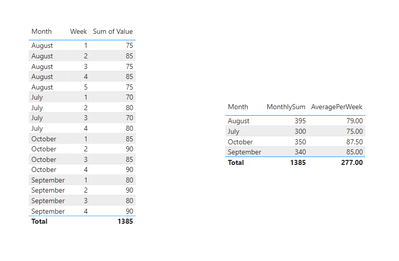
And the final output is shown in the following figure:
Best Regards,
Dino Tao
If this post helps, then please consider Accept it as the solution to help the other members find it more quickly.
Hello! I suggest adding in a date table (below I have a link to my blog post about a date reference table which has a link to the SQLBI one I love using - it accomodates regular calendar, fiscal, and fiscal weekly so perfectly handles 4-5-4/4-4-5 and makes doing time intelligence a breeze). If you do not have a full date field in your date you can join on that, if you do not you can create a date utilizing the fields you already have. Then....
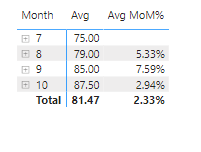
To handle the average you want, use the AVERAGEX function like below:
Proud to be a Super User! | |
Hi @audreygerred this is exactly what I need, would you mind terribly sharing the PBIX? Many thanks in advance.
Hi! I didn't save the example I created, with your data from your screenshot, but if you're taking about the pbix that has the date table I love using, you can download that from here. https://www.sqlbi.com/tools/dax-date-template/
If you need any help setting it up or doing the join to your fact table let me know. Once you have it in place and joined you can create the two measures I provided.
Proud to be a Super User! | |
Hi @newyorker
Can you please share the raw data??
If you have recently started exploring Fabric, we'd love to hear how it's going. Your feedback can help with product improvements.
A new Power BI DataViz World Championship is coming this June! Don't miss out on submitting your entry.
Share feedback directly with Fabric product managers, participate in targeted research studies and influence the Fabric roadmap.
| User | Count |
|---|---|
| 55 | |
| 34 | |
| 31 | |
| 19 | |
| 17 |
| User | Count |
|---|---|
| 74 | |
| 71 | |
| 38 | |
| 35 | |
| 25 |