cancel
Showing results for 
Search instead for 
Did you mean: 

The Power BI Data Visualization World Championships is back! Get ahead of the game and start preparing now! Learn more

Reply
Sbudd
Helper II
Helper II

Month Over Month and Year over Year with Multiple Metrics

Hi


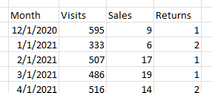
Wonder if anyone can help, im trying to create a table with last month and the previous month and compare the values of multiple metrics, I have mocked up an example of the data and what is needed. 


excel here 

1 ACCEPTED SOLUTION
Ashish_Mathur
Super User
Super User

Hi,

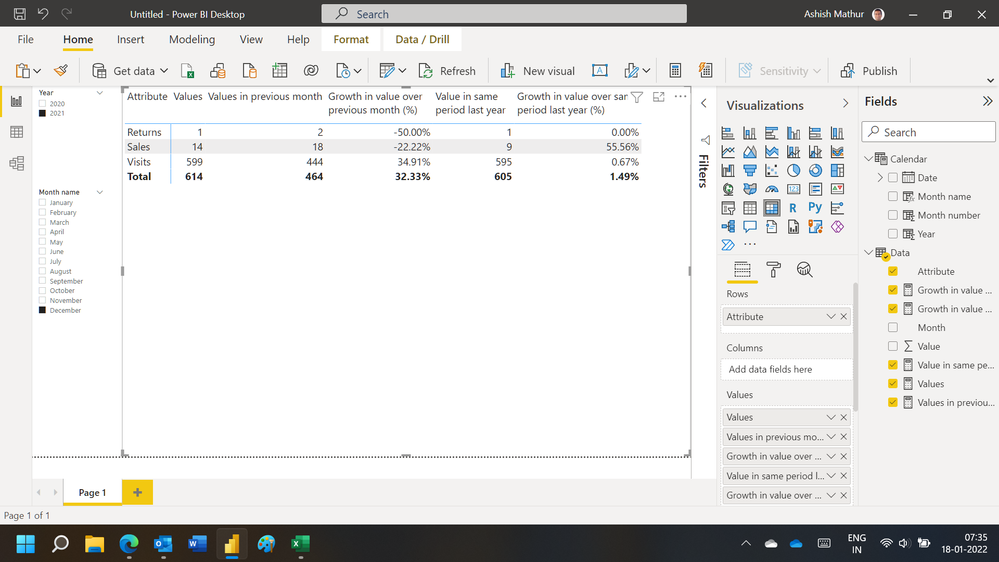
You may download my PBI file from here.

Hope this helps.

Untitled.png


Regards,
Ashish Mathur
http://www.ashishmathur.com
https://www.linkedin.com/in/excelenthusiasts/

View solution in original post

5 REPLIES 5
v-angzheng-msft
Community Support
Community Support

Hi, @Sbudd 


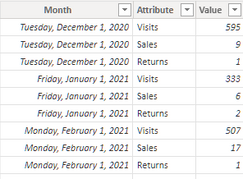
In order to display the row fields you want in the matrix, you need to Unpivot three fields in the Power Query.
You can then create 5 measures to display the 5 metrics you want.


Since there is only one date in a month in the data above, it would be better to rename the month column to date when there are more dates in a month. And you can create a calculated column to display the year and month correctly as well as to filter the data.

YYYY-mm = FORMAT('Table (2)'[Month],"YYYY-mm")

Here are 5 measures that can work for you.

LastMonth = 
var _lastMonth=CALCULATE(MAX('Table (2)'[Month]),ALLSELECTED('Table (2)'))
return 
CALCULATE(
    SUM('Table (2)'[Value]),
    FILTER(ALLEXCEPT('Table (2)','Table (2)'[Attribute]),EOMONTH('Table (2)'[Month],0)=EOMONTH(_lastMonth,0)))
Previous Month = 
var _lastMonth=CALCULATE(MAX('Table (2)'[Month]),ALLSELECTED('Table (2)'))
return 
CALCULATE(
    SUM('Table (2)'[Value]),
    FILTER(ALLEXCEPT('Table (2)','Table (2)'[Attribute]),EOMONTH('Table (2)'[Month],0)=EOMONTH(_lastMonth,-1)))
MOM% = 
DIVIDE(
[LastMonth]-[Previous Month],[Previous Month])
LastYear = 
var _lastMonth=CALCULATE(MAX('Table (2)'[Month]),ALLSELECTED('Table (2)'))
return 
CALCULATE(
    SUM('Table (2)'[Value]),
    FILTER(ALLEXCEPT('Table (2)','Table (2)'[Attribute]),EOMONTH('Table (2)'[Month],0)=EOMONTH(_lastMonth,-12)))
YOY% = 
DIVIDE(
[LastMonth]-[LastYear],[LastYear])

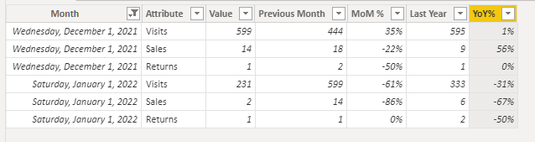
Result:
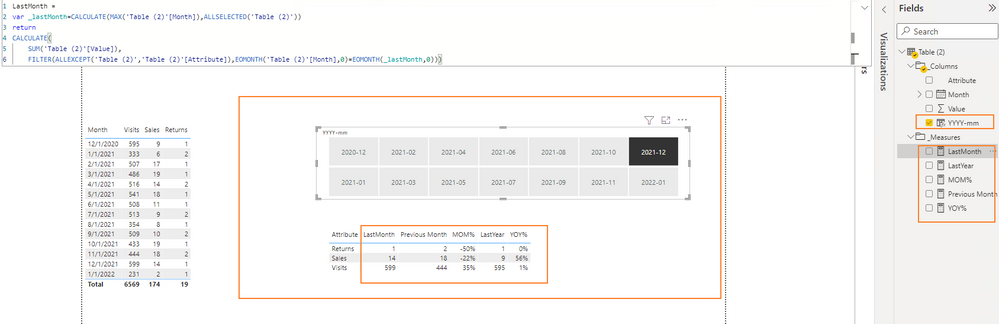
vangzhengmsft_0-1642646582592.png


Please refer to the attachment below for details.

Hope this helps.


Best Regards,
Community Support Team _ Zeon Zheng

If this post helps, then please consider Accept it as the solution to help the other members find it more quickly.

Ashish_Mathur
Super User
Super User

Hi,

You may download my PBI file from here.

Hope this helps.

Untitled.png


Regards,
Ashish Mathur
http://www.ashishmathur.com
https://www.linkedin.com/in/excelenthusiasts/
faisalazh
Advocate II
Advocate II

i think you should unpivot your table from

faisalazh_0-1642429912803.png

into this table:

faisalazh_1-1642429963685.png

you can unpivot your table using the Power Query Editor (Edit Query)

then you can add calculated column to get previous month value:


Previous Month = 
var fldAttr = 'Table'[Attribute] // This is the metrics
var fldPrevMonth = calculate( max('Table'[Month]), filter('Table', 'Table'[Month] < EARLIER('Table'[Month]) ) )
var fldValue = sumx( filter('Table', 'Table'[Month] = fldPrevMonth && 'Table'[Attribute] = fldAttr), 'Table'[Value] )
return fldValue


then you can have like this table as a result

faisalazh_0-1642431482976.png


Thanks for the speedy help! 

Im getting errors, so I feel we're 99% there.

FIrst one was "A Single value for column Attribute in Tablecannot be determined. SO i wrapped in in a MIN which removed that error.

Second error im getting is "EARLIER refers to an earlier row context which doesnt exist"


Any ideas?


i guess you create a new measure rather than a new column (calculated column).

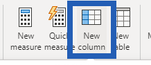
just create a new column like this picture.

faisalazh_0-1642462186053.png

you can go to this link https://drive.google.com/file/d/1XGIOPK9jC6SdA-QlOrOqhmCYAtH_WdIw/view?usp=sharing for sample pbix

Helpful resources

Announcements
Power BI DataViz World Championships

Power BI Dataviz World Championships

The Power BI Data Visualization World Championships is back! Get ahead of the game and start preparing now!

December 2025 Power BI Update Carousel

Power BI Monthly Update - December 2025

Check out the December 2025 Power BI Holiday Recap!

FabCon Atlanta 2026 carousel

FabCon Atlanta 2026

Join us at FabCon Atlanta, March 16-20, for the ultimate Fabric, Power BI, AI and SQL community-led event. Save $200 with code FABCOMM.