
cancel
Showing results for 
Search instead for 
Did you mean: 

The Power BI Data Visualization World Championships is back! Get ahead of the game and start preparing now! Learn more

Reply
Anonymous
Not applicable

Modifying report

Hi , i have a requirement to complete in Power Query.


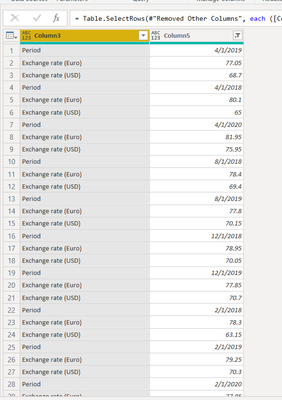
Given scenario is this ,

 bi6.PNG


Output Required is this : 


Period      |  Exchange rate(euro)   |  Exchange rate(usd)  |

4/1/2019            77.05                             68.7


and the other values are continued below.              Period , exchange rates should be the column headers.


Is this possible in Power Query? I can't use DAX as i still need to model the data further , any help would be appreciated.

2 ACCEPTED SOLUTIONS
v-yuta-msft
Community Support
Community Support

@Anonymous ,


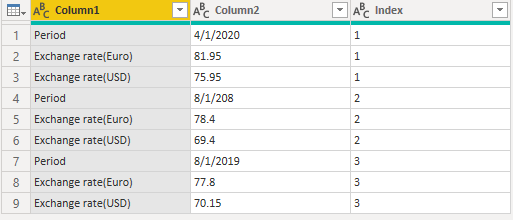
If you can add an index column like below, then you can use python script to meet your requirement.

1.PNG 


# 'dataset' holds the input data for this script

import pandas as pd

dataset = dataset.pivot(index = 'Index', columns = 'Column1', values = 'Column2')

 2.PNG 


Community Support Team _ Jimmy Tao

If this post helps, then please consider Accept it as the solution to help the other members find it more quickly.


View solution in original post

Hi @Anonymous 


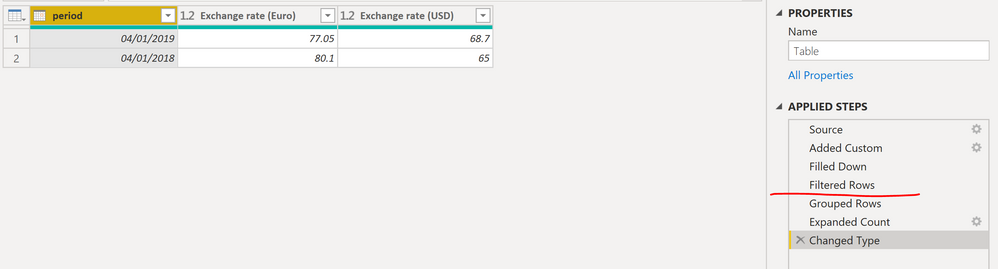
On the attached, you will find a solution using Power Query, if you have an extra ID column that could be used to group these 3 records together then skip prior steps and jump straight to Grouped Rows step.

image.png


Best Regards,
Mariusz

If this post helps, then please consider Accepting it as the solution.

Please feel free to connect with me.
LinkedIn


View solution in original post

2 REPLIES 2
v-yuta-msft
Community Support
Community Support

@Anonymous ,


If you can add an index column like below, then you can use python script to meet your requirement.

1.PNG 


# 'dataset' holds the input data for this script

import pandas as pd

dataset = dataset.pivot(index = 'Index', columns = 'Column1', values = 'Column2')

 2.PNG 


Community Support Team _ Jimmy Tao

If this post helps, then please consider Accept it as the solution to help the other members find it more quickly.


Hi @Anonymous 


On the attached, you will find a solution using Power Query, if you have an extra ID column that could be used to group these 3 records together then skip prior steps and jump straight to Grouped Rows step.

image.png


Best Regards,
Mariusz

If this post helps, then please consider Accepting it as the solution.

Please feel free to connect with me.
LinkedIn


Helpful resources

Announcements
Power BI DataViz World Championships

Power BI Dataviz World Championships

The Power BI Data Visualization World Championships is back! Get ahead of the game and start preparing now!

December 2025 Power BI Update Carousel

Power BI Monthly Update - December 2025

Check out the December 2025 Power BI Holiday Recap!

FabCon Atlanta 2026 carousel

FabCon Atlanta 2026

Join us at FabCon Atlanta, March 16-20, for the ultimate Fabric, Power BI, AI and SQL community-led event. Save $200 with code FABCOMM.

Top Solution Authors