cancel
Showing results for 
Search instead for 
Did you mean: 

Learn from the best! Meet the four finalists headed to the FINALS of the Power BI Dataviz World Championships! Register now

Reply
Anonymous
Not applicable

Modify Filter Based on Date

Hi, community,


I develop reports on projects' progress by cycle.


The data is a combination of different sources and looks like this:

Cycle TitleStartFinishCycle Currency Id
2020-017/01/2020  17/02/20201
2020-0218/02/2020  30/03/20202
2020-0331/03/2020  11/05/20203
2020-0412/05/2020  22/06/20204
2020-0523/06/2020  3/08/20205
2020-0611/08/2020    21/09/20206
2020-0722/09/2020  2/11/20207
2020-083/11/202014/12/20208


There is a week break after cycle 2020-05 and there is a Christmas break with no cycles.

I use currency ids to filter content based on the cycle. I use a page filter to do this.

When it comes to the break weeks I need to display the content from the previous cycle.


More details:

1. Every cycle is 6 weeks long

2. The first cycle of the year starts on the first Tuesday of the year

3. Mid-year break week occurs after the 04th or 05th cycle of the year. There is a break until the first Tuesday of the New Year from the end of the last cycle.

4. Cycle Currency Id is generated based on the current date. If today falls between the cycle dates then it gives cycle Id 1, and so on. So the ids change based on within which cycle we are now.

5. I can't add week breaks' information directly into the data source. 


Thanks

Evan

1 ACCEPTED SOLUTION
Anonymous
Not applicable

Hi  @Anonymous ,

Here are the steps you can follow:

1. Create calculated column.

Datediff =
var _lastfinish=CALCULATE(MAX('Table'[Finish]),FILTER(ALL('Table'),[Cycle Currency Id]=EARLIER([Cycle Currency Id])-1))
return
IF([Cycle Currency Id]=1,1,DATEDIFF(_lastfinish,[Start],DAY))

2. Create measure.

Measure =
var _select=SELECTEDVALUE('Table'[Cycle Currency Id])
var _gap=CALCULATE(MAX('Table'[Cycle Currency Id]),FILTER(ALL('Table'),[Datediff]>1))-1
return
IF(
    ISFILTERED('Table'[Cycle Currency Id]),
    MAX('Table'[Start])&"-"&MAX('Table'[Finish]),
    MAXX(FILTER(ALL('Table'),[Cycle Currency Id]=_gap),[Start])&"-"&MAXX(FILTER(ALL('Table'),[Cycle Currency Id]=_gap),[Finish]))

3. Put [cycle currency ID] into slicer and [measure] into card.

4. Result:

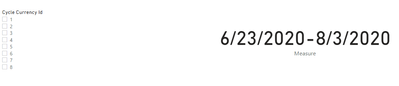
If it is not selected, it will be displayed as the previous cycle of the rest week.

v-yangliu-msft_0-1623828015455.png


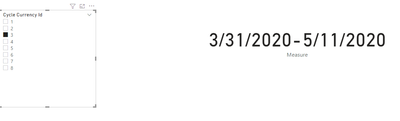
When selecting, display the current cycle.

v-yangliu-msft_1-1623828015459.png


Best Regards,

Liu Yang

If this post helps, then please consider Accept it as the solution to help the other members find it more quickly.

View solution in original post

3 REPLIES 3
Anonymous
Not applicable

Hi  @Anonymous ,

Here are the steps you can follow:

1. Create calculated column.

Datediff =
var _lastfinish=CALCULATE(MAX('Table'[Finish]),FILTER(ALL('Table'),[Cycle Currency Id]=EARLIER([Cycle Currency Id])-1))
return
IF([Cycle Currency Id]=1,1,DATEDIFF(_lastfinish,[Start],DAY))

2. Create measure.

Measure =
var _select=SELECTEDVALUE('Table'[Cycle Currency Id])
var _gap=CALCULATE(MAX('Table'[Cycle Currency Id]),FILTER(ALL('Table'),[Datediff]>1))-1
return
IF(
    ISFILTERED('Table'[Cycle Currency Id]),
    MAX('Table'[Start])&"-"&MAX('Table'[Finish]),
    MAXX(FILTER(ALL('Table'),[Cycle Currency Id]=_gap),[Start])&"-"&MAXX(FILTER(ALL('Table'),[Cycle Currency Id]=_gap),[Finish]))

3. Put [cycle currency ID] into slicer and [measure] into card.

4. Result:

If it is not selected, it will be displayed as the previous cycle of the rest week.

v-yangliu-msft_0-1623828015455.png


When selecting, display the current cycle.

v-yangliu-msft_1-1623828015459.png


Best Regards,

Liu Yang

If this post helps, then please consider Accept it as the solution to help the other members find it more quickly.

Anonymous
Not applicable

Hi, @Anonymous ,


This works.


I managed to achieve the same in Power Query by adding the column StartNextCycle which is lagged Start column.

Instead of generating Cycle Currency Id if it is between Start and Finish, I changed it to the condition if today is between Start and StartNextCycle.

The solution appeared simpler than I thought.


Thanks

Evan

amitchandak
Super User
Super User

@Anonymous , From where you are selecting date, based on we can suggest the formula


example

measure =
var _max = maxx(allselected('Date'), 'Date'[Date])
var _1 = calculate(countrows(Table), filter(Table, Table[Start date] <=_max && Table[Finish date] >=_max))
return
if(isblank(_1), calculate(countrows(Table), filter(Table, Table[Start date] <=_max-7 && Table[Finish date] >=_max-7)) , _1)


or


measure =
var _max = maxx(allselected('Date'), 'Date'[Date])
var _1 = calculate(countrows(Table), filter(Table, Table[Start date] <=_max && Table[Finish date] >=_max))
return
if(isblank(_1), calculate(countrows(Table), filter(all(Table), Table[Start date] <=_max-7 && Table[Finish date] >=_max-7)) , _1)

Share with Power BI Enthusiasts: Full Power BI Video (20 Hours) YouTube
Microsoft Fabric Series 60+ Videos YouTube
Microsoft Fabric Hindi End to End YouTube

Helpful resources

Announcements
Join our Fabric User Panel

Join our Fabric User Panel

Share feedback directly with Fabric product managers, participate in targeted research studies and influence the Fabric roadmap.

February Power BI Update Carousel

Power BI Monthly Update - February 2026

Check out the February 2026 Power BI update to learn about new features.

FabCon Atlanta 2026 carousel

FabCon Atlanta 2026

Join us at FabCon Atlanta, March 16-20, for the ultimate Fabric, Power BI, AI and SQL community-led event. Save $200 with code FABCOMM.