

Join us at FabCon Atlanta from March 16 - 20, 2026, for the ultimate Fabric, Power BI, AI and SQL community-led event. Save $200 with code FABCOMM.
Register now!The Power BI Data Visualization World Championships is back! Get ahead of the game and start preparing now! Learn more
Hello,
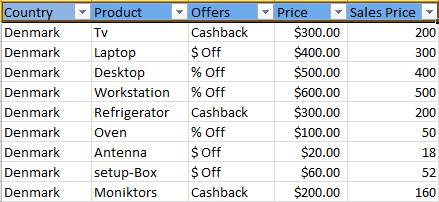
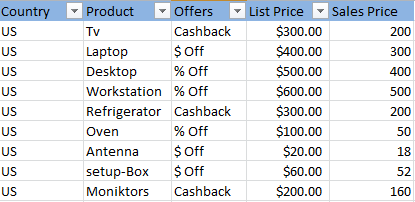
I have 3 excel workbook with data for different countries.so i wanted to use those excel file to create single dashboard so how should i do that?.i have attached sample data snapshots also for deeper understanding....
thanks in advance.
Solved! Go to Solution.
@Anonymous
In this scenario, since all you three tables have similar columns and structure, you just need to import those 3 workbooks into 3 datasets, then use "append query" in Query Editor to UNION the 3 datasets into 1 dataset.
Regards,
@Anonymous
In this scenario, since all you three tables have similar columns and structure, you just need to import those 3 workbooks into 3 datasets, then use "append query" in Query Editor to UNION the 3 datasets into 1 dataset.
Regards,
Hi dude ,
I think the excel format is same structure , am i right ?
if yes, Put all the excel in single path under separate folder .
and follow these steps in order .
1. Click the Query Editor
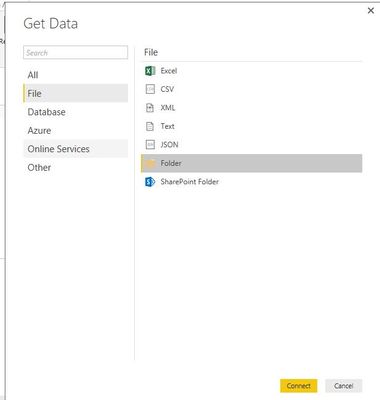
2.There Get Data
1. Get Data from Folder
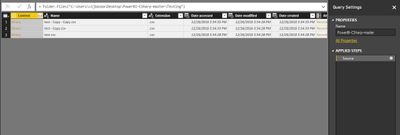
Once loaded into Query Editor
Remove other columns
Extract the table
let me know if any help
The Power BI Data Visualization World Championships is back! Get ahead of the game and start preparing now!
| User | Count |
|---|---|
| 39 | |
| 37 | |
| 33 | |
| 33 | |
| 29 |
| User | Count |
|---|---|
| 132 | |
| 90 | |
| 78 | |
| 66 | |
| 65 |