This time we’re going bigger than ever. Fabric, Power BI, SQL, AI and more. We're covering it all. You won't want to miss it.
Learn moreLevel up your Power BI skills this month - build one visual each week and tell better stories with data! Get started
I am trying to model 2 fact tables that are related to a couple of common dimensions.
I have the following tables:
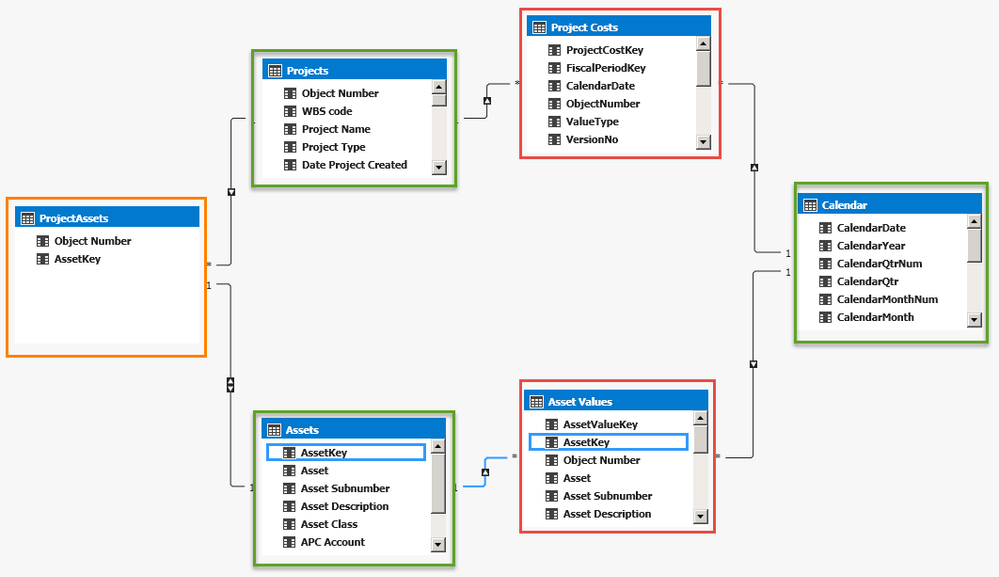
Projects
This is a dimension table that lists various construction projects. Key is ObjectNumber
Project Costs
This is a fact table and contains a list of all costs associated with various construction projects over time.
Assets
Dimension table that contains various Assets. Each Project has one or more Assets associated with it
Asset Values
Fact table that contains asset valuations over the years
ProjectAssets
This is a bridging table that links the Projects and Assets tables
Calendar
Standard Calendar hierarchy
This is how I have currently modelled the relationships (red border = fact table, green = dimension, orange = bridging)
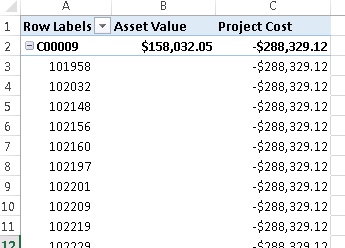
I have tried to model this many different ways, but each time the project costs are not being returned correctly for the assets. In the following scrren shot, "C0009" is the Project code and the numbers under it are Asset codes. In reality, C0009 only has 1 asset, but it is listing all of them, with the whole project cost repeated.
Any help is greatly appreciated.
Hi @cmncp,
According to your screenshot, it seems like the filter function based on related ship not works.
I'd like to suggest you modify your cross filter direction to "both".(single mode only available on one side e.g: A can filter B, B can't filter A)
If above not help, can you please share the sample file to test?
Regards,
Xiaoxin Sheng
Tough to say but I suspect that you need to edit your cross filter directions on your relationships.
I've tried different settings, but haven't found anything that works.
Check out the April 2026 Power BI update to learn about new features.
Sign up to receive a private message when registration opens and key events begin.
If you have recently started exploring Fabric, we'd love to hear how it's going. Your feedback can help with product improvements.
| User | Count |
|---|---|
| 28 | |
| 23 | |
| 22 | |
| 16 | |
| 16 |
| User | Count |
|---|---|
| 60 | |
| 35 | |
| 28 | |
| 22 | |
| 21 |