Join us at FabCon Atlanta from March 16 - 20, 2026, for the ultimate Fabric, Power BI, AI and SQL community-led event. Save $200 with code FABCOMM.
Register now!The Power BI Data Visualization World Championships is back! Get ahead of the game and start preparing now! Learn more
I have a table that has Software A with a purchase cost and then an associated annual cost. There is also software B which can only be rented so it only has a annual cost.
I created a new table with years 1-10:
For software A in year 1 the cost is the purchase cost plus the annual and then years 2-10 are the annual cost only.
So my goal is the cost column that reflects the above, and then a column of the cummulative cost.
I want to show a chart of the cummulative cost over 10 years and then use slicers to focus in on each software package.
I can calculate the sums for costs for all records in my software table, but i don't know which function will tie into the "slicers" so both the cost column and cum_cost column are only summing what is filtered.
Any ideas on this is Helpful! Thanks!
hi @Anonymous,
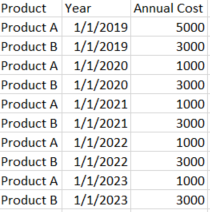
If you structure your data like this:
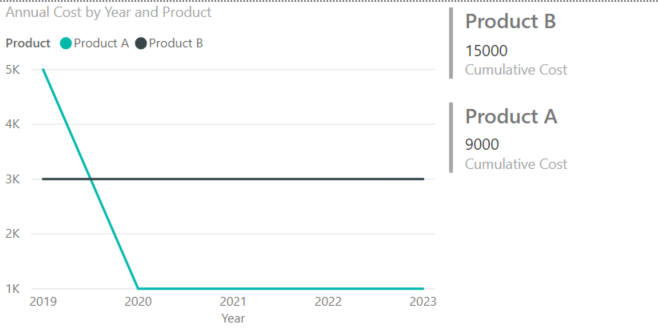
Then you should be able to create something like this:
Hope this helps!
Caleb Foster
Caleb, Thank you for this and I've tried to do it this way but it really creates a cumbersome spreadsheet. I was hoping i could accomplish this using a combination of DAX, slicers, and Filters.
The Power BI Data Visualization World Championships is back! Get ahead of the game and start preparing now!
| User | Count |
|---|---|
| 39 | |
| 37 | |
| 33 | |
| 33 | |
| 29 |
| User | Count |
|---|---|
| 132 | |
| 90 | |
| 78 | |
| 66 | |
| 65 |